142
Nom type de fichier de données d’image
Image fixe
101-0001: Ce nom de fichier s’affiche à
l’écran de votre caméscope.
DSC00001.JPG : Ce nom de fichier s’affiche à
l’écran de votre ordinateur.
Image animée
MOV00001 : Ce nom de fichier s’affiche à
l’écran de votre caméscope.
MOV00001.MPG : Ce nom de fichier s’affiche à
l’écran de votre ordinateur.
Pour prévenir l’effacement
accidentel des images
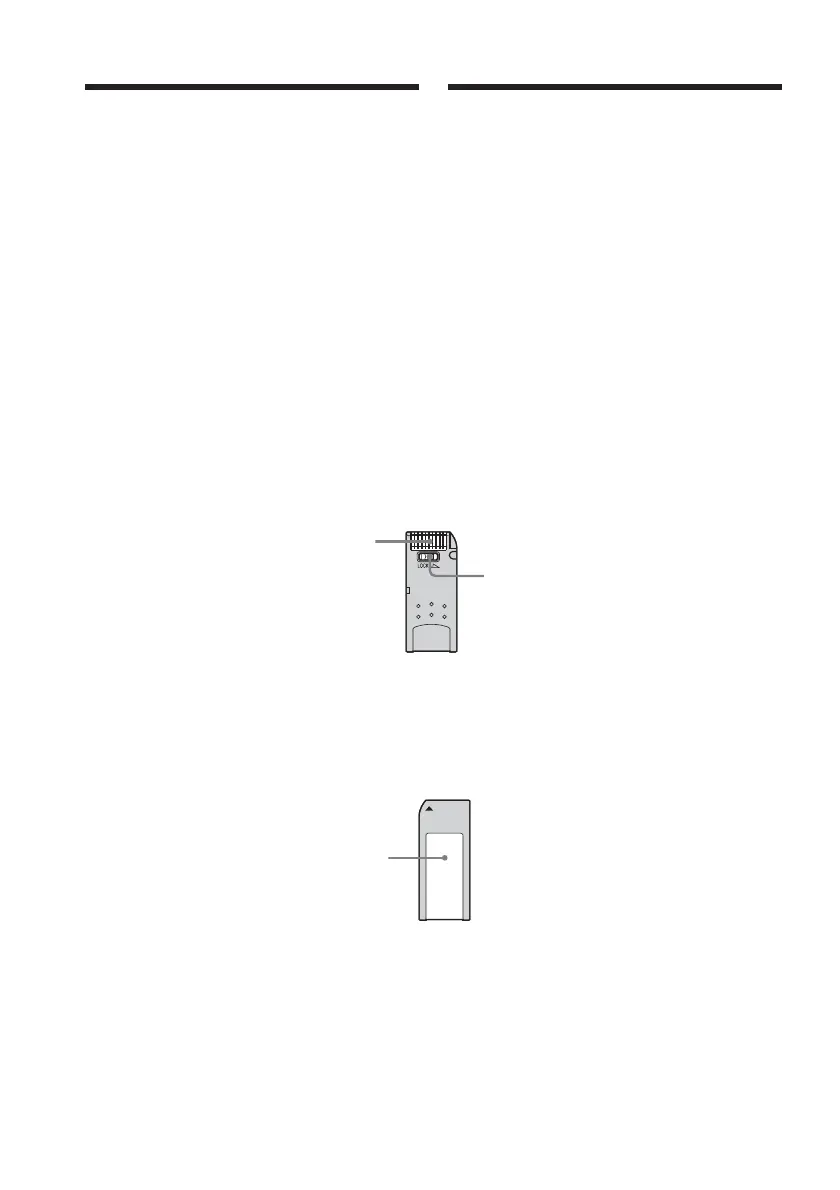
Partie arrière du « Memory Stick »
Faites coulisser l’onglet de protection en
écriture du « Memory Stick » sur LOCK.
La position et la forme de l’onglet de
protection en écriture peuvent différer en
fonction des modèles.
Remarques sur le « Memory
Stick »
Emplacement de l’étiquette
Collez l’étiquette du « Memory Stick » sur
l’emplacement réservé à l’étiquette.
Typical image data file name
Still image
101-0001: This file name appears on the
screen of your camcorder.
DSC00001.JPG: This file name appears on the
display of a computer.
Moving picture
MOV00001: This file name appears on
the screen of your
camcorder.
MOV00001.MPG: This file name appears on
the display of a computer.
To prevent from erasing images
accidentally
Rear part of the “Memory Stick”
Slide the write-protect tab on the “Memory
Stick” to LOCK.
The position and shape of the write-protect tab
may be different depending on the model.
Notes on the “Memory Stick”
Labelling position
Stick its label on the labelling position.
Using “Memory Stick”
Write-protect tab/
Onglet de protection en
écriture
Terminal/
Borne
Labelling position/
Emplacement de
l’étiquette
Utilisation du « Memory Stick »














 To Next Page