201
Viewing images with your computer Visualisation d’images à l’aide de votre ordinateur
Lors du raccordement à un
ordinateur à l’aide du port DV
Votre ordinateur doit être équipé d’un port DV
et d’un logiciel de montage capable de lire les
signaux vidéo.
Visionnage d’images enregistrées
sur un « Memory Stick » (DCR-
TRV22E/TRV33E uniquement)
Lors du raccordement à un
ordinateur via le port USB
Si vous utilisez Windows, reportez-vous à la
page 203 et à la page 233 si vous utilisez un
Macintosh.
Vous pouvez également utiliser un lecteur/
enregistreur de « Memory Stick » (en option).
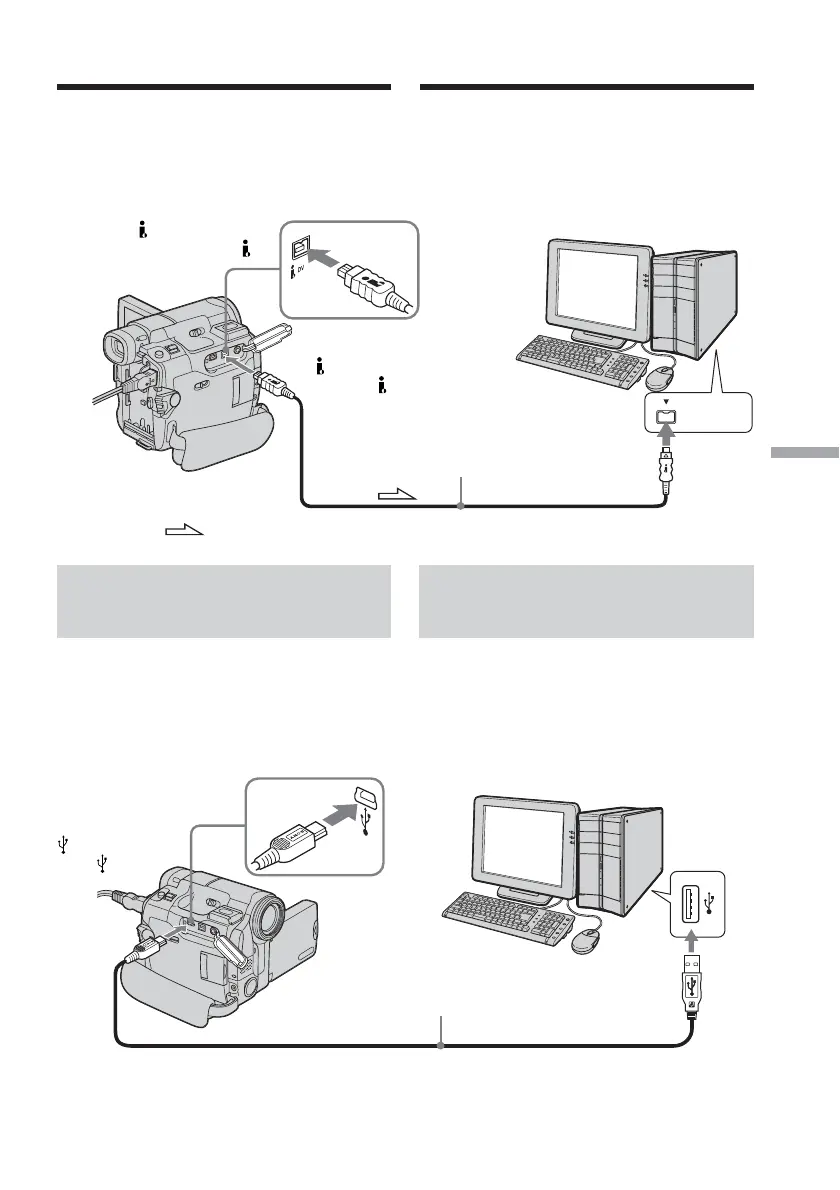
: Signal flow/Sens du signal
DV Interface/
Interface DV
Plug with mark facing up./
Branchez avec la marque
tournée vers le haut.
i.LINK cable (optional)/
Câble i.LINK (en option)
i.LINK
USB port/
Port USB
(USB) jack/
Prise (USB)
USB cable (supplied)/
Câble USB (fourni)
Push into the end./
Insérez jusqu’au bout.
Computer/Ordinateur
Computer/Ordinateur
Viewing images with a
computer – Introduction
Visualisation d’images à l’aide
d’un ordinateur – Introduction
When connecting to a computer
with the DV port
The computer must have a DV port and
editing software installed that can read video
signals.
Viewing images recorded on
the “Memory Stick” (DCR-
TRV22E/TRV33E only)
When connecting to a computer
with the USB port
See page 203 when using Windows and page
233 when using Macintosh.
You can also use a “Memory Stick” Reader/
Writer (optional).














 To Next Page