312
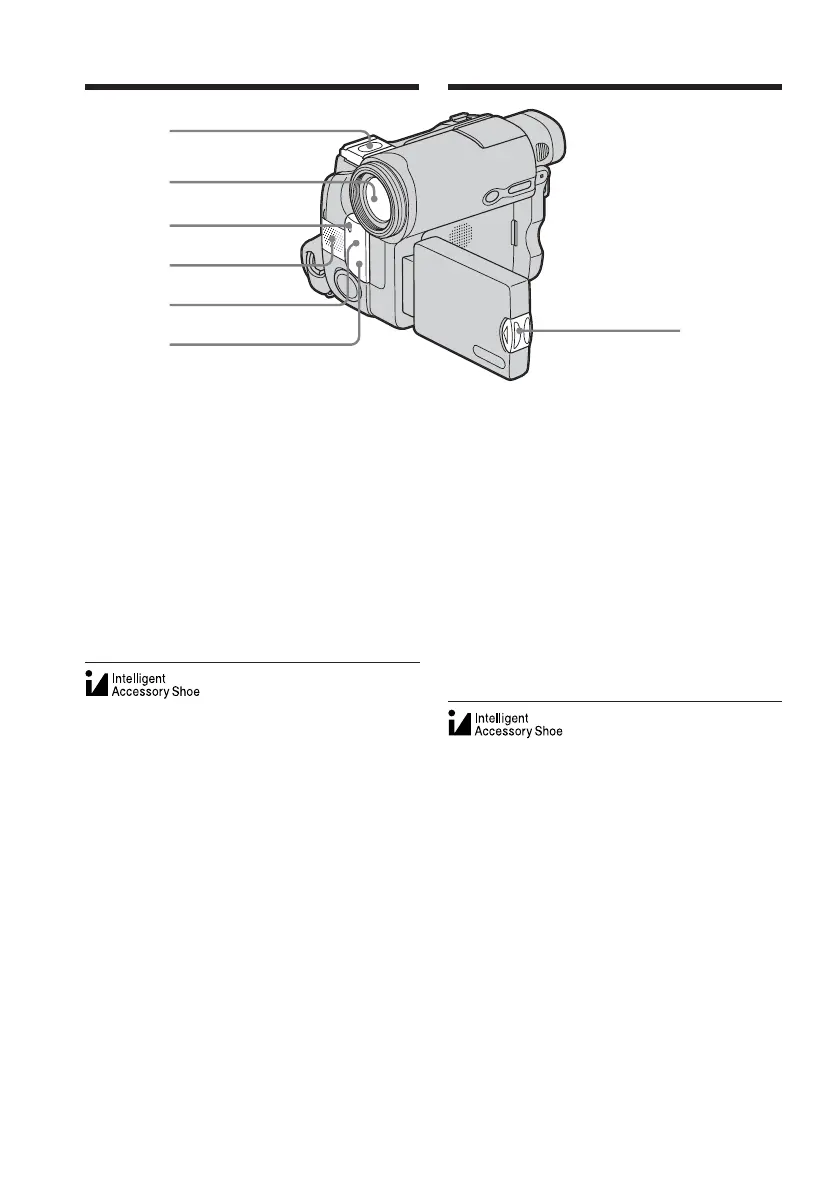
wd Intelligent accessory shoe/shoe cover
(p. 128)
wf Lens
wg Camera recording lamp (p. 36)
wh Microphone (p. 36)
wj Remote sensor (except for DCR-
TRV12E)
wk Infrared rays emitter (p. 47, 112)
wl OPEN button (p. 33)
wd
wf
wg
wh
wj
wk
wl
Notes on the intelligent accessory shoe
•The intelligent accessory shoe supplies
power to optional accessories such as a video
light or microphone.
•The intelligent accessory shoe is linked to the
POWER switch, allowing you to turn the
power supplied by the shoe on and off. Refer
to the operating instructions of the accessory
for details.
•The intelligent accessory shoe has a safety
device for fixing the installed accessory
securely. To connect an accessory, press
down and push it to the end, and then
tighten the screw.
•To remove an accessory, loosen the screw,
and then press down and pull out the
accessory.
Identifying parts and controls
Identification des composants
et des commandes
wd Griffe porte-accessoires intelligente/
Protège-griffe (p. 128)
wf Objectif
wg Voyant de tournage du caméscope
(p. 36)
wh Micro (p. 36)
wj Capteur de télécommande (sauf pour
le DCR-TRV12E)
wk Emetteur de rayons infrarouges
(pp. 47 et 112)
wl Touche OPEN (ouvrir) (p. 33)
Remarques sur la griffe porte-accessoires
intelligente
•La griffe porte-accessoires intelligente
alimente les accessoires en option, tels que la
lampe vidéo ou le micro.
•La griffe porte-accessoires intelligente est
reliée au commutateur POWER, ce qui vous
permet d’activer ou de désactiver
l’alimentation fournie par la griffe porte-
accessoires intelligente. Reportez-vous au
mode d’emploi de l’accessoire utilisé pour de
plus amples informations.
•La griffe porte-accessoires intelligente est
équipée d’un dispositif de sécurité
permettant de bien fixer les accessoires. Pour
raccorder un accessoire, insérez-le, appuyez
dessus et poussez-le jusqu’au bout, puis
serrez la vis.
•Pour retirer un accessoire, desserrez la vis,
puis appuyez sur l’accessoire et retirez-le.














 To Next Page