11-GB
Basic operations of the network function
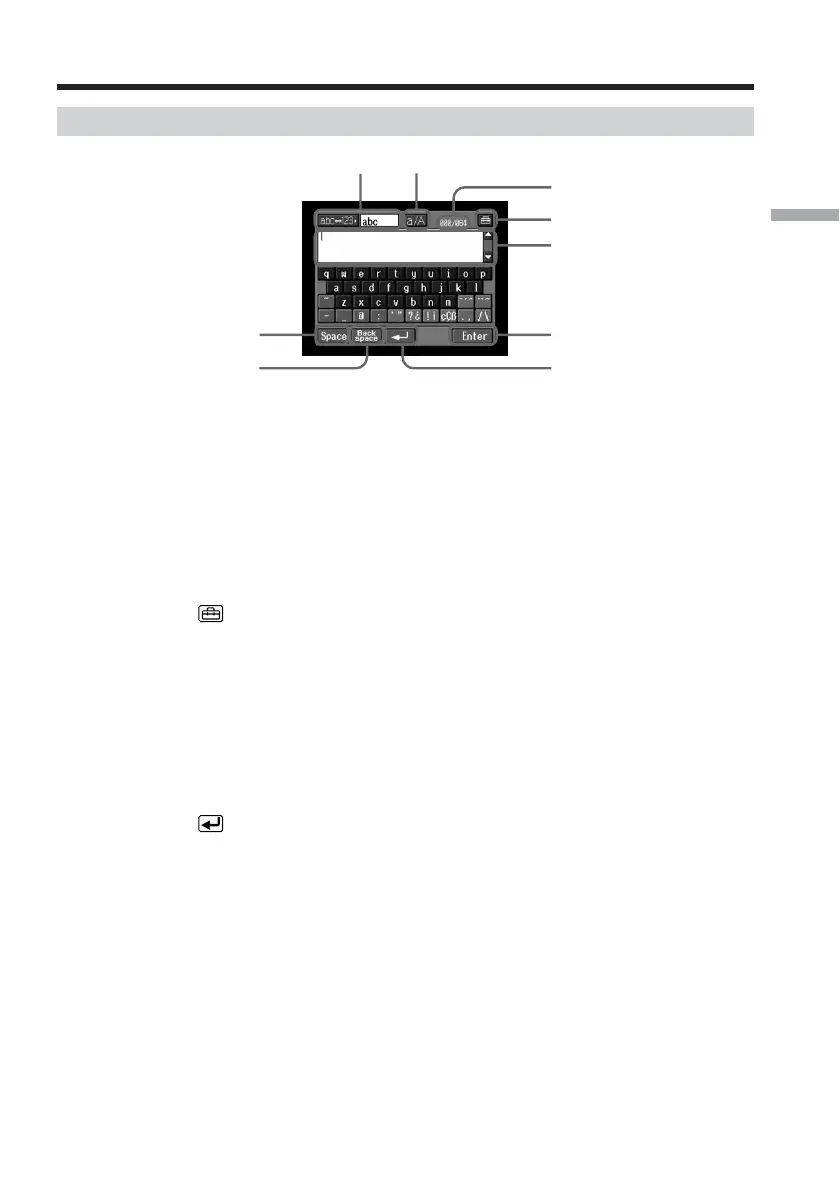
Inputting characters
1 [abcy123] button
A list box appears when you tap the [abcy123] button. Tap the desired
type of character (alphabets or numbers) from the list box.
2 [a/A] button
[a/A] button appears when you input alphabets.
You can switch between upper case and lower case.
3 Input byte number/maximum byte number
4
Preferences
You can change the keyboard arrangement for alphabets.
5 Text area
If the text is long, you can scroll up or down by tapping v or V (scroll
buttons) to display the hidden text.
6 [Enter] button
Tap this button to decide or close the character input screen.
7
button
Tap this button once to move the cursor to the next line.
8 [Back Space] button
Tap this button, and the letter just before the cursor is deleted. If you tap
the button for about three seconds, all the characters before the cursor are
deleted.
9 [Space] button
Tap this button to insert a space.
12
9
87
6
5
4
3
The character input screen














 To Next Page