66-GB
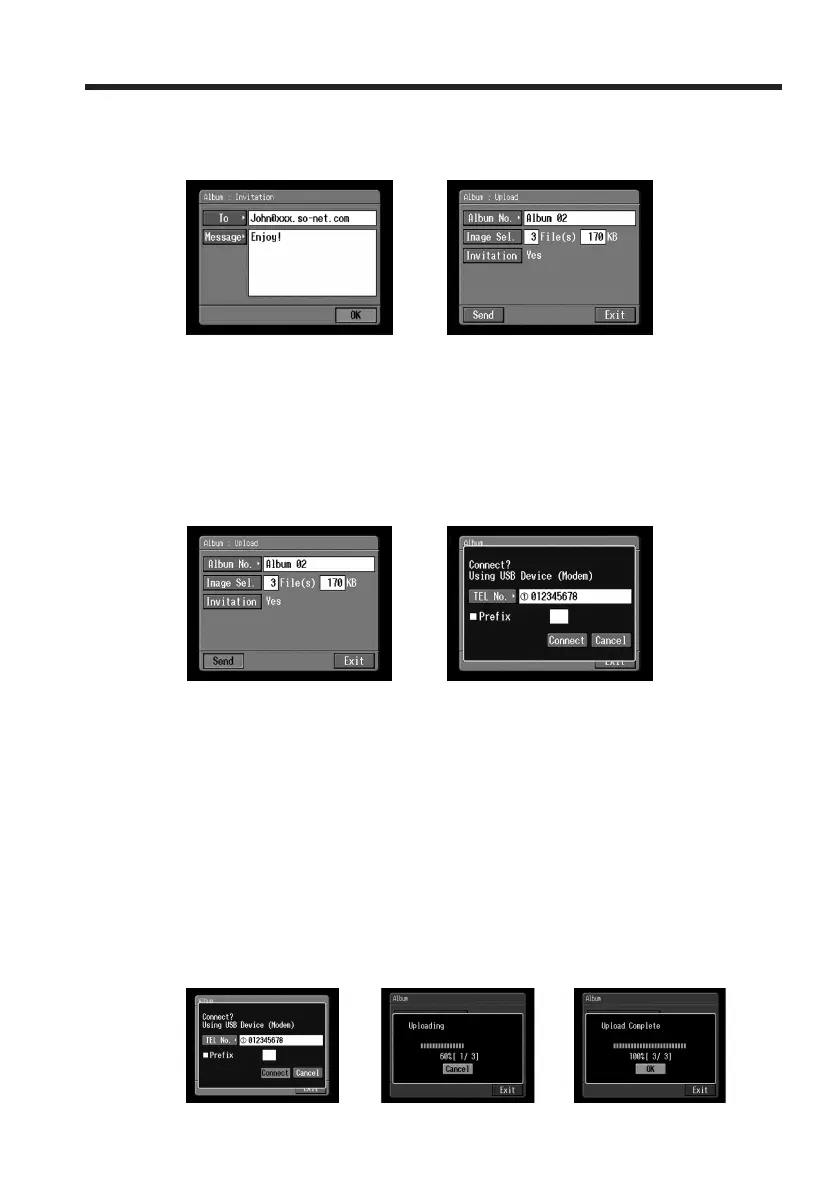
(5) Tap [OK].
The Album : Upload screen appears again.
“Yes” is indicated next to [Invitation].
,
5 Uploading still images and/or moving pictures
Before following the steps below, set a communication device to connection standby
with your camcorder. For details, refer to the operating instructions supplied with the
communication device.
(1) Tap [Send].
The screen for verifying the connection appears.
,
If you use a dial-up connection, dial the telephone number displayed on the
screen for verifying the connection. If you want to dial other telephone
numbers, tap [TEL No.] to display the list of the registered telephone numbers.
Tap the desired telephone number to select it.
To connect to an outside line, for example in a hotel, check the item “Prefix
No.” and enter the prefix number.
When you use a LAN connection, the screen for verifying the connection may
not appear.
(2) Tap [Connect].
If you use a dial-up connection, your camcorder starts dialing the selected
telephone number. When uploading is complete, the message “Upload
Complete” appears.
,,
Making your Album on the Web














 To Next Page