EasyManua.ls Logo

Sony Digital8 M2000 - HCL Arm Assembly, Loading Motor Assembly

Sony Digital8 M2000
46 pages
Print Icon
To Next Page IconTo Next Page
To Previous Page IconTo Previous Page
Loading...
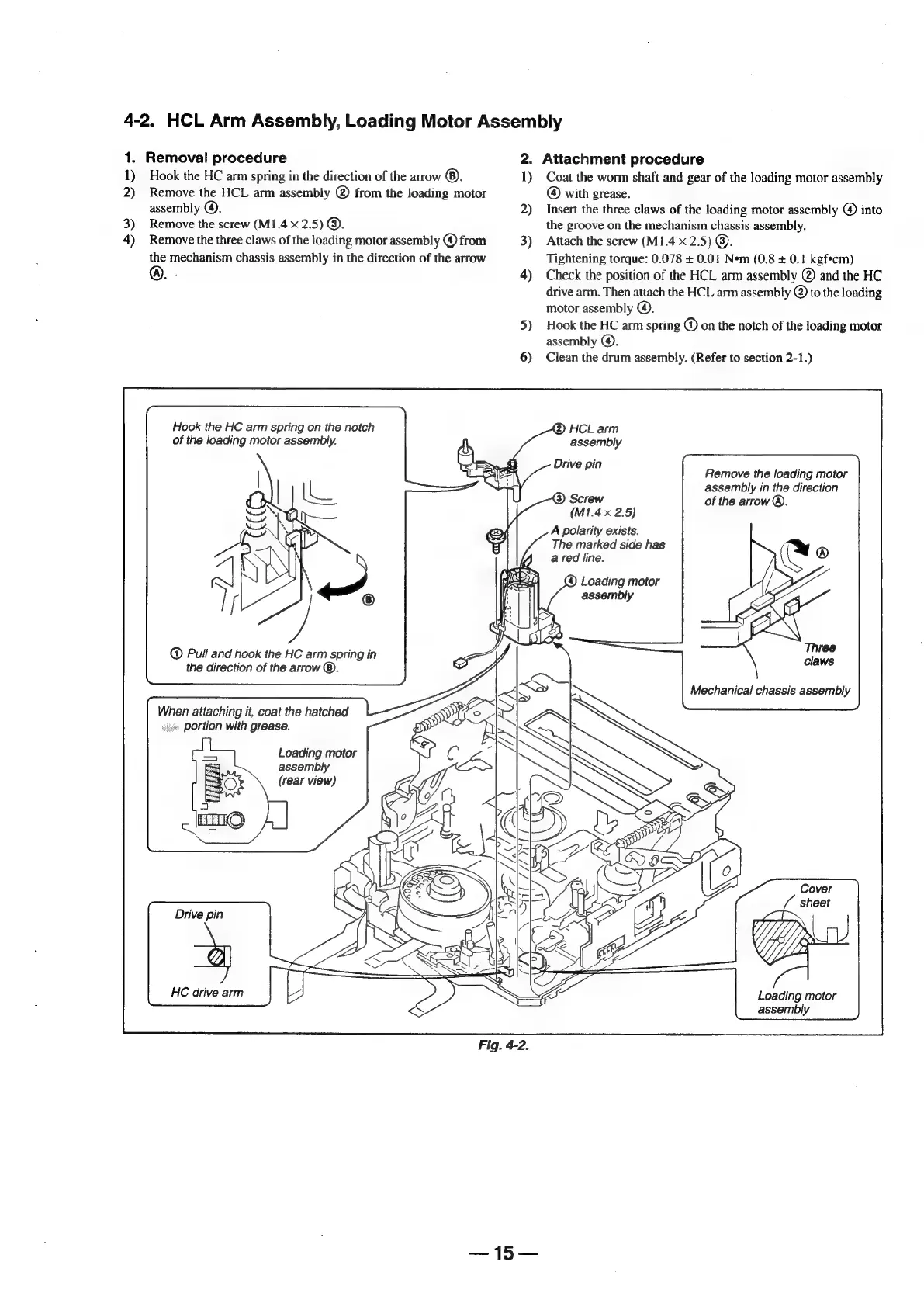
4-2.
HCL
Arm
Assembly,
Loading
Motor
Assembly
1.
1)
2)
3)
4)
Removal
procedure
Hook
the
HC
arm
spring
in
the
direction
of
the
arrow
©.
Remove
the
HCL
arm
assembly
@
from
the
loading
motor
assembly
@).
Remove
the
screw
(M1.4
x
2.5)
@.
Remove
the
three
claws
of
the
loading
motor
assembly
©
from
the
mechanism
chassis
assembly
in
the
direction
of
the
arrow
©.
.
Hook
the
HC
arm
spring
on
the
notch
of
the
loading
motor
assembly.
Pull
and
hook
the
HC
arm
spring
in
the
direction
of
the
arrow
®.
When
attaching
it,
coat
the
hatched
sg
portion
with
grease.
Loading
motor
assembly
(rear
view)
Drive
pin
HC
drive
arm
15s
2.
1)
2)
3)
4)
5)
6)
Attachment
procedure
Coat
the
worm
shaft
and
gear
of
the
loading
motor
assembly
@
with
grease.
Insert
the
three
claws
of
the
loading
motor assembly
@)
into
the
groove
on
the
mechanism
chassis
assembly.
Attach
the
screw
(M1.4
x
2.5)
@.
Tightening
torque:
0.078
+
0.01
Nem
(0.8
+
0.1
kgfecm)
Check
the
position
of
the
HCL
arm
assembly
@
and
the
HC
drive
arm.
Then
attach
the
HCL
arm
assembly
@
to
the
loading
motor
assembly
©).
Hook
the
HC
arm
spring
@
on
the
notch
of
the
loading
motor
assembly
@).
Clean
the
drum
assembly.
(Refer
to
section
2-1.)
assembly
Drive
pin
Remove
the
loading
motor
assembly
in
the
direction
of
the
arrow
®.
A
®
Three
claws
(M1.4
x
2.5)
A
polarity
exists.
The
marked
side
has
a
red
line.
(4)
Loading
motor
assembly
Loading
motor
assembly

Table of Contents

Related product manuals