EasyManua.ls Logo

Sony Digital8 M2000 - LS Chassis Block Assembly Dca Dvadecvessecvedaccavededsedeedtedssusecs

Sony Digital8 M2000
46 pages
Print Icon
To Next Page IconTo Next Page
To Previous Page IconTo Previous Page
Loading...
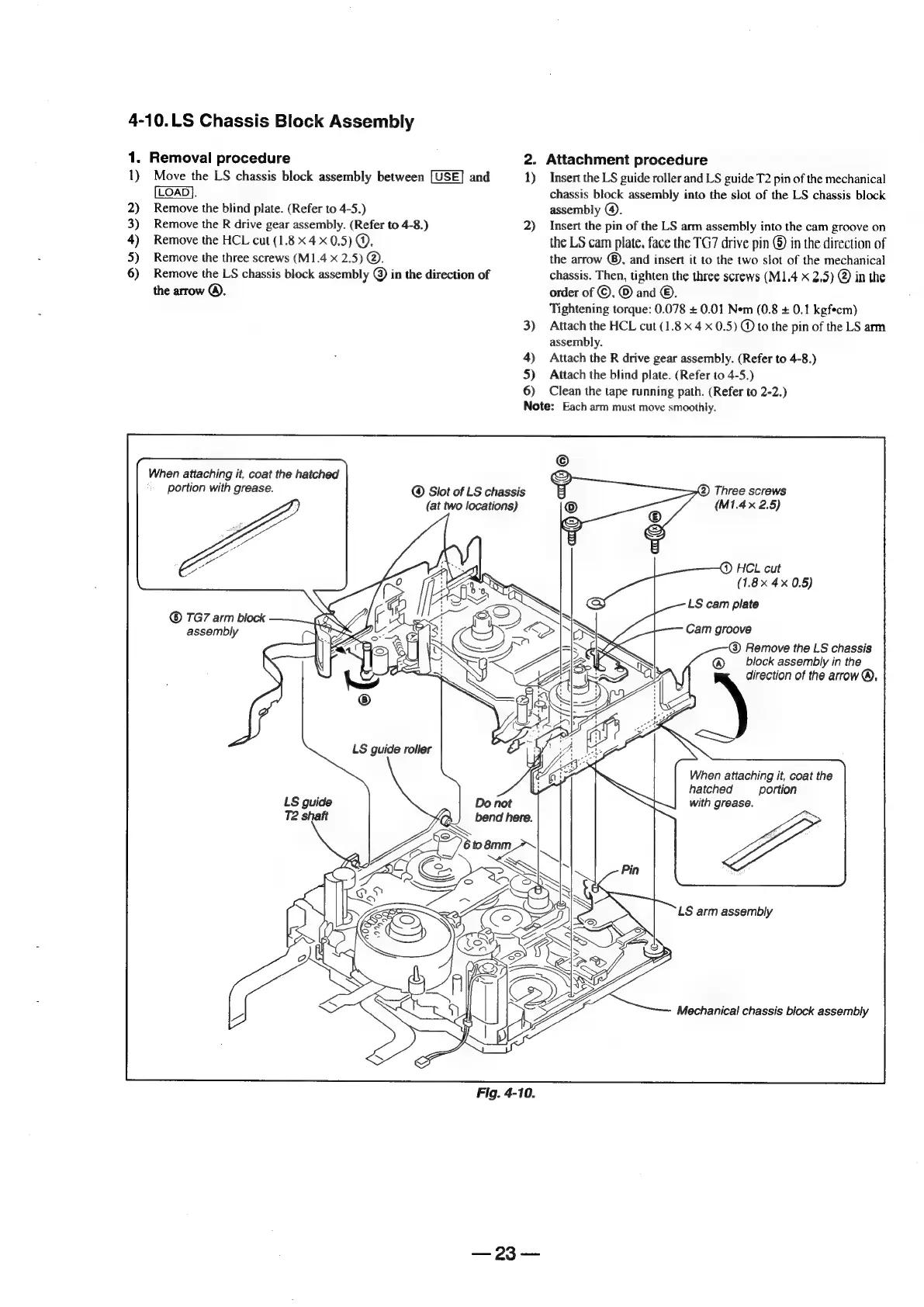
4-10.LS
Chassis
Block
Assembly
1.
1)
2)
3)
4)
5)
6)
Removal
procedure
Move
the
LS
chassis
block
assembly
between
and
[LOAD}.
Remove
the
blind
plate.
(Refer
to
4-5.)
Remove
the
R
drive
gear
assembly.
(Refer
to
4-8.)
Remove
the
HCL
cut
(1.8
x
4
x
0,5)
@,
Remove
the
three
screws
(M1.4
x
2.5)
@.
Remove
the
LS
chassis
block
assembly
©
in
the
direction
of
the
arrow
®.
When
attaching
it,
coat
the
hatched
portion
with
grease.
©
TG7
arm
block
assembly
LS
guide
roller
LS
guide
Fig.
4-10.
2.
1)
2)
3)
4)
5)
6)
Attachment
procedure
Insert
the
LS
guide
roller
and
LS
guide
T2
pin
of
the
mechanical
chassis
block
assembly
into
the
slot
of
the
LS
chassis
block
assembly
@).
Insert
the
pin
of
the
LS
arm
assembly
into
the
cam
groove
on
the
LS
cam
plate.
face
the
TG7
drive
pin
@
in
the
direction
of
the
arrow
@),
and
insert
it
to
the
two
slot
of
the
mechanical
chassis.
Then,
tighten
the
three
screws
(M1.4
x
2.5)
@
in
the
order
of
©,
©
and
©.
Tightening
torque:
0.078
+
0.01
Nem
(0.8
+
0.1
kgfecm)
Attach
the
HCL
cut
(1.8
x
4
x
0.5)
@
to
the
pin
of
the
LS
arm
assembly.
Attach
the
R
drive
gear
assembly.
(Refer
to
4-8.)
Attach
the
blind
plate.
(Refer
to
4-5.)
Clean
the
tape
running
path.
(Refer
to
2-2.)
Note:
Each
arm
must
move
smoothly.
@
Slot
of
LS
chassis
(at
two
locations)
bend
here.
oo
SS
(2)
Three
screws
(M1.4x
2.5)
HCL
cut
(1.8x
4x
0.5)
LS
cam
plate
Cam
groove
Remove
the
LS
chassis
block
assembly
in
the
direction
of
the
arrow
®,
When
attaching
it,
coat
the
hatched
portion
with
grease.
LS
arm
assembly
S
Za
Mechanical
chassis
block
assembly

Table of Contents

Related product manuals