EasyManua.ls Logo

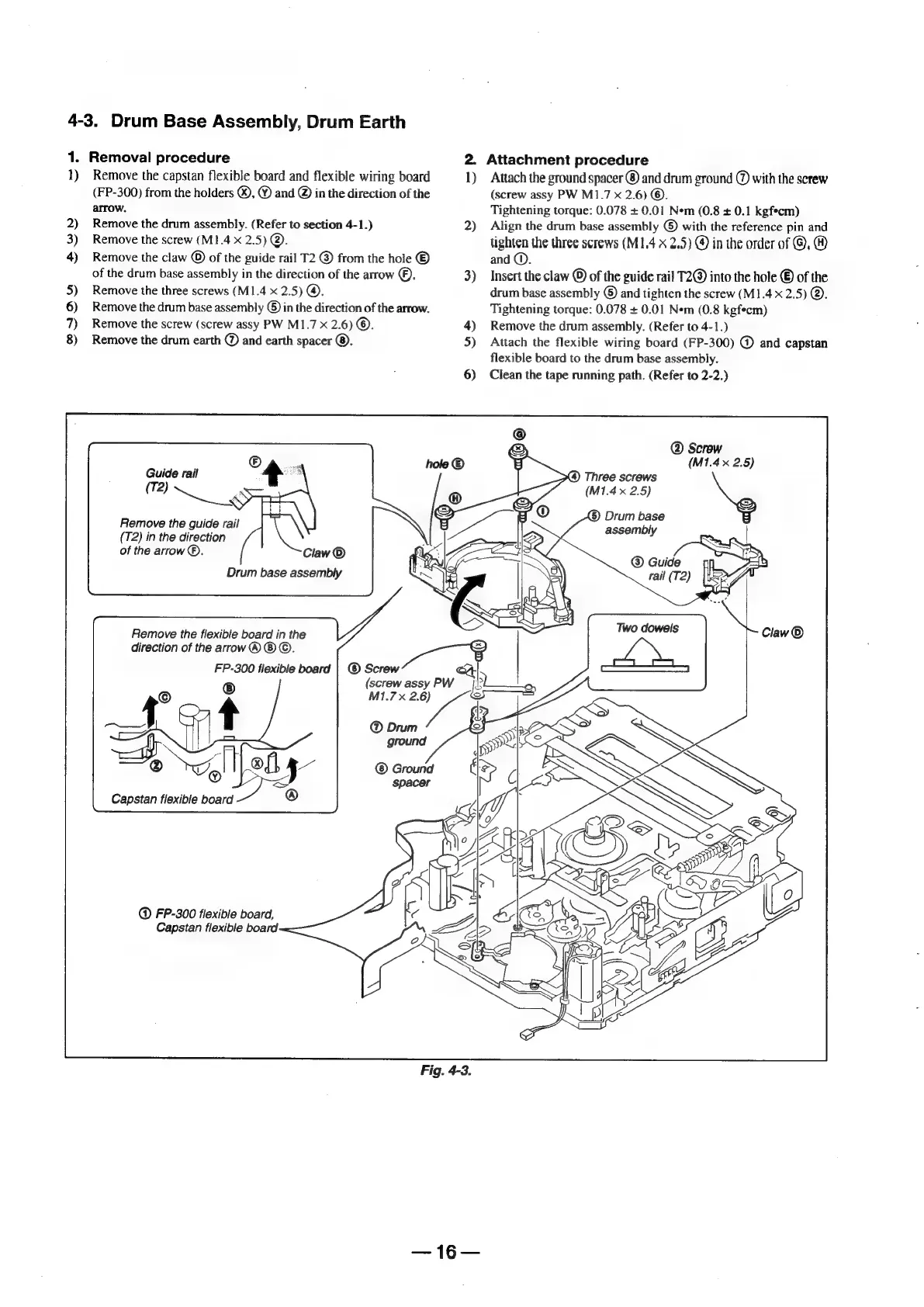
Sony Digital8 M2000 - Drum Base Assembly, Drum Earth

Sony Digital8 M2000
46 pages
Print Icon
To Next Page IconTo Next Page
To Previous Page IconTo Previous Page
Loading...
4-3.
Drum
Base
Assembly,
Drum
Earth
1.
Removal
procedure
1)
Remove
the
capstan
flexible
board
and
flexible
wiring
board
(FP-300)
from
the
holders
®,
©
and
@
in
the
direction
of
the
arrow.
2)
Remove
the
drum
assembly.
(Refer
to
section
4-1.)
3)
Remove
the
screw
(M1.4
x
2.5)
@.
4)
Remove
the
claw
©
of
the
guide
rail
T2
from
the
hole
®
of
the
drum
base
assembly
in
the
direction
of
the
arrow
©),
5)
Remove
the
three
screws
(M1.4
x
2.5)
@.
6)
Remove
the
drum
base
assembly
©
in
the
direction
of
the
arrow.
7)
Remove
the
screw
(screw
assy
PW
M1.7
x
2.6)
©.
8)
Remove
the
drum
earth
@
and
earth
spacer
©.
Guide
rail
(Te)
ee
Remove
the
guide
rail
(T2)
in
the
direction
of
the
arrow
®.
Drum
base
assembly
Remove
the
flexible
board
in
the
direction
of
the
arrow
®
®
©.
FP-300
flexible
board
|
©
Screw
eee
(screw
assy
P'
M1.7x
wee
Ground
spacer
Capstan
flexible
board
FP-300
flexible
board,
Capstan
flexible
board
2.
Attachment
procedure
2)
3)
Fig.
4-3.
16
Attach
the
ground
spacer
®
and
drum
ground
@
with
the
screw
(screw
assy
PW
M1.7
x
2.6)
©.
Tightening
torque:
0.078
+
0.01
Nem
(0.8
+
0.1
kgf*cm)
Align
the
drum
base
assembly
©
with
the
reference
pin
and
tighten
the
three
screws
(M14
x
2.5)
@
in
the
order
of
@,
@
and
©.
Insert
the
claw
©
of
the
guide
rail
T2@
into
the
hole
©
of
the
drum
base
assembly
©
and
tighten
the
screw
(M1.4
x
2.5)
@.
Tightening
torque:
0.078
+
0.01
Nem
(0.8
kgfecm)
Remove
the
drum
assembly.
(Refer
to
4-1.)
Attach
the
flexible
wiring
board
(FP-300)
@
and
capstan
flexible
board
to
the
drum
base
assembly.
Clean
the
tape
running
path.
(Refer
to
2-2.)
@
Screw
(M1.4x
2.5)
(4)
Three
screws
(M1.4x
2.5)
Drum
base
assembly
Two
dowels

Table of Contents

Related product manuals