EasyManua.ls Logo

Sony Digital8 M2000 - R Drive Gear Assembly. LS Cam Plate

Sony Digital8 M2000
46 pages
Print Icon
To Next Page IconTo Next Page
To Previous Page IconTo Previous Page
Loading...
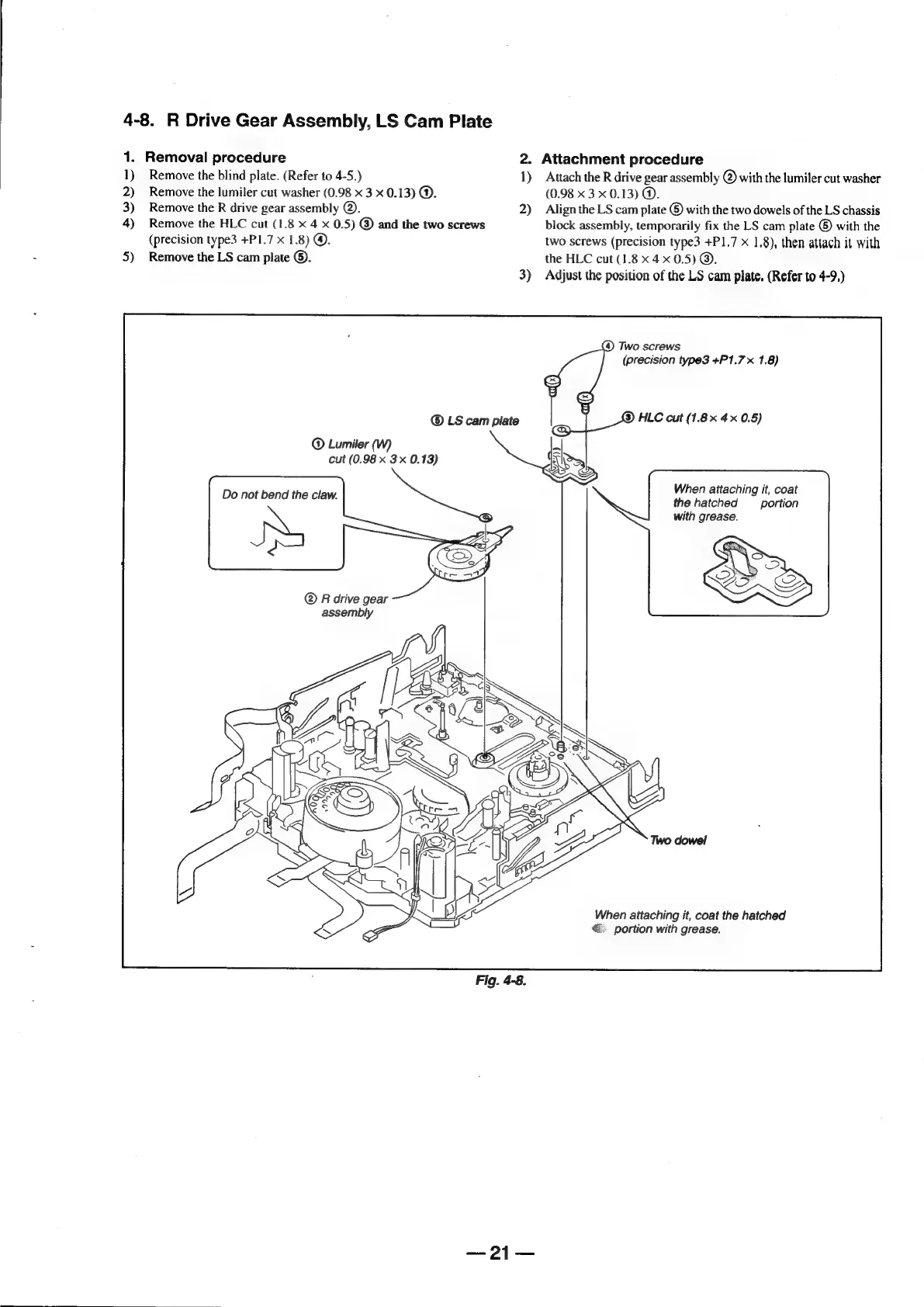
4-8.
R
Drive
Gear
Assembly,
LS
Cam
Plate
1.
1)
2)
3)
4)
5)
Removal
procedure
Remove
the
blind
plate.
(Refer
to
4-5.)
Remove
the
lumiler
cut
washer
(0.98
x
3
x
0.13)
@.
Remove
the
R
drive
gear
assembly
@.
Remove
the
HLC
cut
(1.8
x
4
x
0.5)
@
and
the
two
screws
(precision
type3
+P1.7
x
1.8)
@.
Remove
the
LS
cam
plate
®.
2.
1)
2)
©
LS
cam
plate
Lumiler
(W)
cut
(0.98
x
3x
0.13)
Do
not
bend
the
claw.
®
R
drive
gear
assembly
Fig.
4-8.
Attachment
procedure
Attach
the
R
drive
gear
assembly
@)
with
the
lumiler
cut
washer
(0.98
x
3
x
0.13)
@.
Align
the
LS
cam
plate
©
with
the
two
dowels
of
the
LS
chassis
block
assembly,
temporarily
fix
the
LS
cam
plate
®
with
the
two
screws
(precision
type3
+P1,7
x
1,8),
then
attach
it
with
the
HLC
cut
(1.8x
4x
0.5)
©.
Adjust
the
position
of
the
LS
cam
plate.
(Refer
to
4-9.)
(4)
Two
screws
(precision
type3
+P1.7
x
1.8)
(
HLC
cut
(1.8x
4x
0.5)
When
attaching
it,
coat
the
hatched
portion
with
grease.
When
attaching
it,
coat
the
hatched
portion
with
grease.
an
04

Table of Contents

Related product manuals