EasyManua.ls Logo

Sony Digital8 M2000 - Page 20

Sony Digital8 M2000
46 pages
Print Icon
To Next Page IconTo Next Page
To Previous Page IconTo Previous Page
Loading...
4-7.
S
Ratchet
RE
Plate,
Cassette
Guide
S
Removal
procedure
Remove
the
blind
plate.
(Refer
to
4-5.)
Remove
the
RE
retum
plate
spring
@.
Remove
the
S
ratchet
spring
@).
Remove
the
S
ratchet
arm
©
in
the
direction
of
the
arrow
®.
Note:
Do
not
reuse
the
S
ratchet
arm.
Remove
the
S
ratchet
RE
plate.
Remove
the
screw
(camera
tapping
M1.4
x
2)®,
Remove
the
cassette
guide
S
©
in
the
direction
of
the
arrow
©.
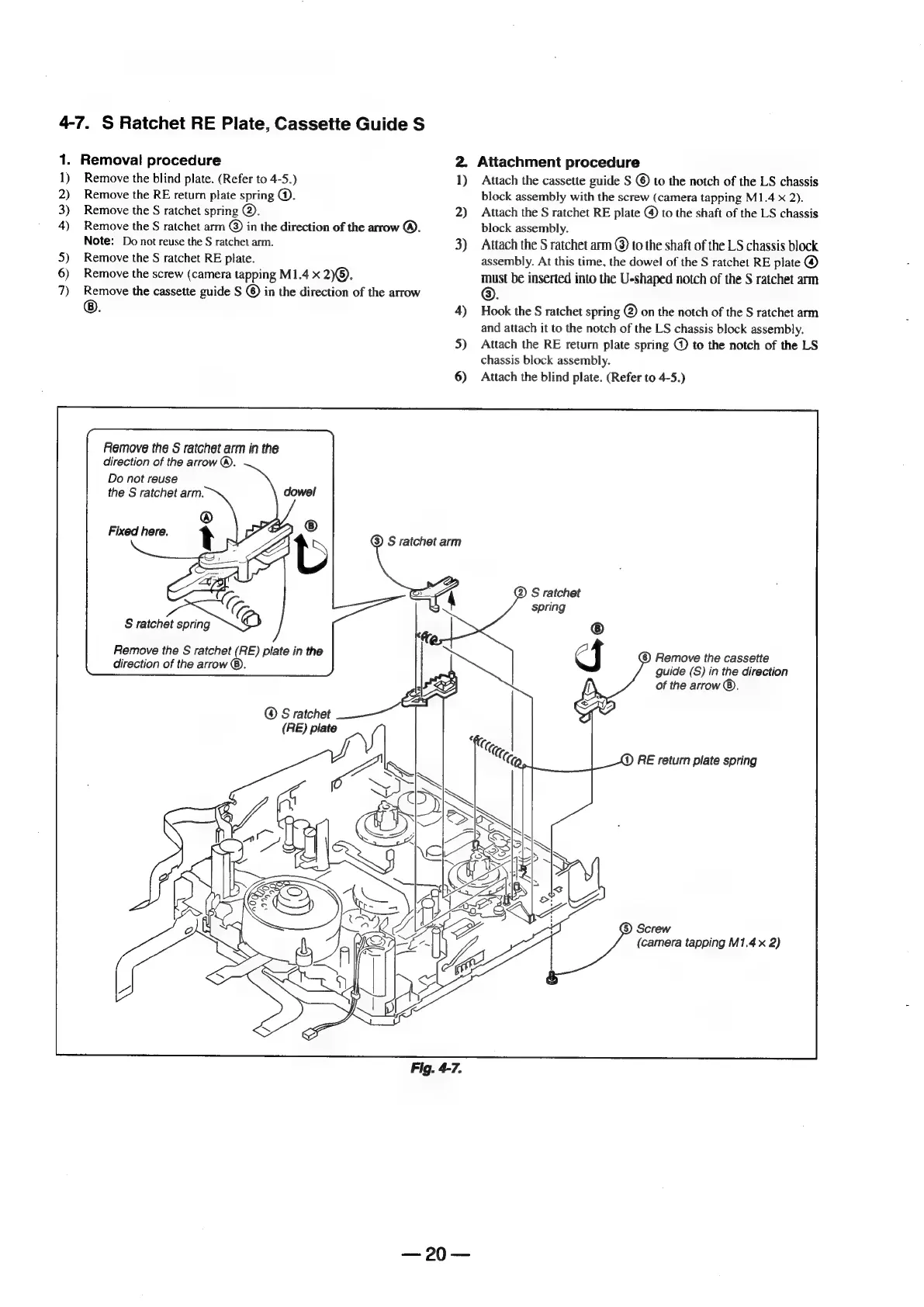
Remove
the
S
ratchet
arm
in
the
direction
of
the
arrow
®.
Do
not
reuse
the
S
ratchet
arm.
®
Fixed
here.
t
7<C
S
ratchet
spring
Remove
the
S
ratchet
(RE)
plate
in
the
direction
of
the
arrow
®.
@
S
ratchet
ee
(RE)
plate
2)
3)
4)
5)
6)
Fig.
4-7.
<=
09
=
Attachment
procedure
Attach
the
cassette
guide
S
©
to
the
notch
of
the
LS
chassis
block
assembly
with
the
screw
(camera
tapping
M1.4
x
2).
Attach
the
S
ratchet
RE
plate
@
to
the
shaft
of
the
LS
chassis
block
assembly.
Attach
the
S
ratchet
arm
@
to
the
shaft
of
the
LS
chassis
block
assembly.
At
this
time,
the
dowel
of
the
S
ratchet
RE
plate
@
ae
be
inserted
into
the
U-shaped
notch
of
the
S
ratchet
arm
Hook
the
S
ratchet
spring
@
on
the
notch
of
the
S
ratchet
arm
and
attach
it
to
the
notch
of
the
LS
chassis
block
assembly.
Attach
the
RE
return
plate
spring
@
to
the
notch
of
the
LS
chassis
block
assembly.
Attach
the
blind
plate.
(Refer
to
4-5.)
S
ratchet
(6)
Remove
the
cassette
guide
(S)
in
the
direction
of
the
arrow
®.
()
RE
return
plate
spring
Screw
(camera
tapping
M1.4
x
2)

Table of Contents

Related product manuals