EasyManua.ls Logo

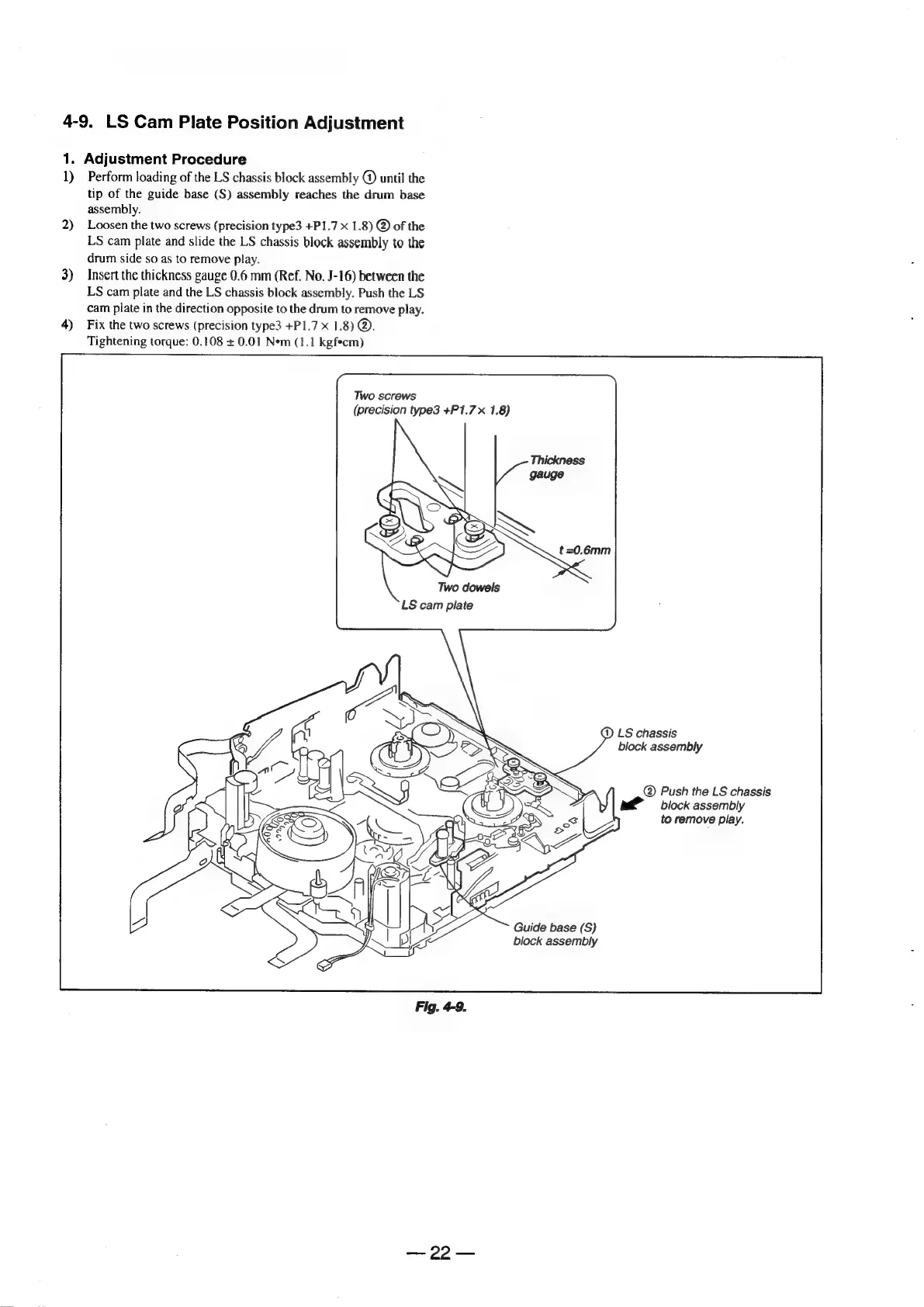
Sony Digital8 M2000 - LS Cam Plate Position Adjustment

Sony Digital8 M2000
46 pages
Print Icon
To Next Page IconTo Next Page
To Previous Page IconTo Previous Page
Loading...
4-9.
LS
Cam
Plate
Position
Adjustment
1.
Adjustment
Procedure
1)
Perform
loading
of
the
LS
chassis
block
assembly
@
until
the
tip
of
the
guide
base
(S)
assembly
reaches
the
drum
base
assembly.
2)
Loosen
the
two
screws
(precision
type3
+P1.7
x
1.8)
@
of
the
LS
cam
plate
and
slide
the
LS
chassis
block
assembly
to
the
drum
side
so
as
to
remove
play.
3)
Insert
the
thickness
gauge
0.6
mm
(Ref.
No.
J-16)
between
the
LS
cam
plate
and
the
LS
chassis
block
assembly.
Push
the
LS
cam
plate
in
the
direction
opposite
to
the
drum
to
remove
play.
4)
Fix
the
two
screws
(precision
type3
+P1.7
x
1.8)
@.
Tightening
torque:
0.108
+
0.01
Nem
(1.1
kgf*cm)
Two
screws
(precision
type3
+P1.7x
1.8)
Two
dowels
LS
cam
plate
(1)
LS
chassis
block
assembly
@
Push
the
LS
chassis
:
)
|
ai
block
assembly
xs
LZ
to
remove
play.
a
:
a
Guide
base
(S)
block
assembly
Fig.
4-9.

Table of Contents

Related product manuals