EasyManua.ls Logo

Sony Digital8 M2000 - Reel Table (T) Assembly, T Soft Assembly

Sony Digital8 M2000
46 pages
Print Icon
To Next Page IconTo Next Page
To Previous Page IconTo Previous Page
Loading...
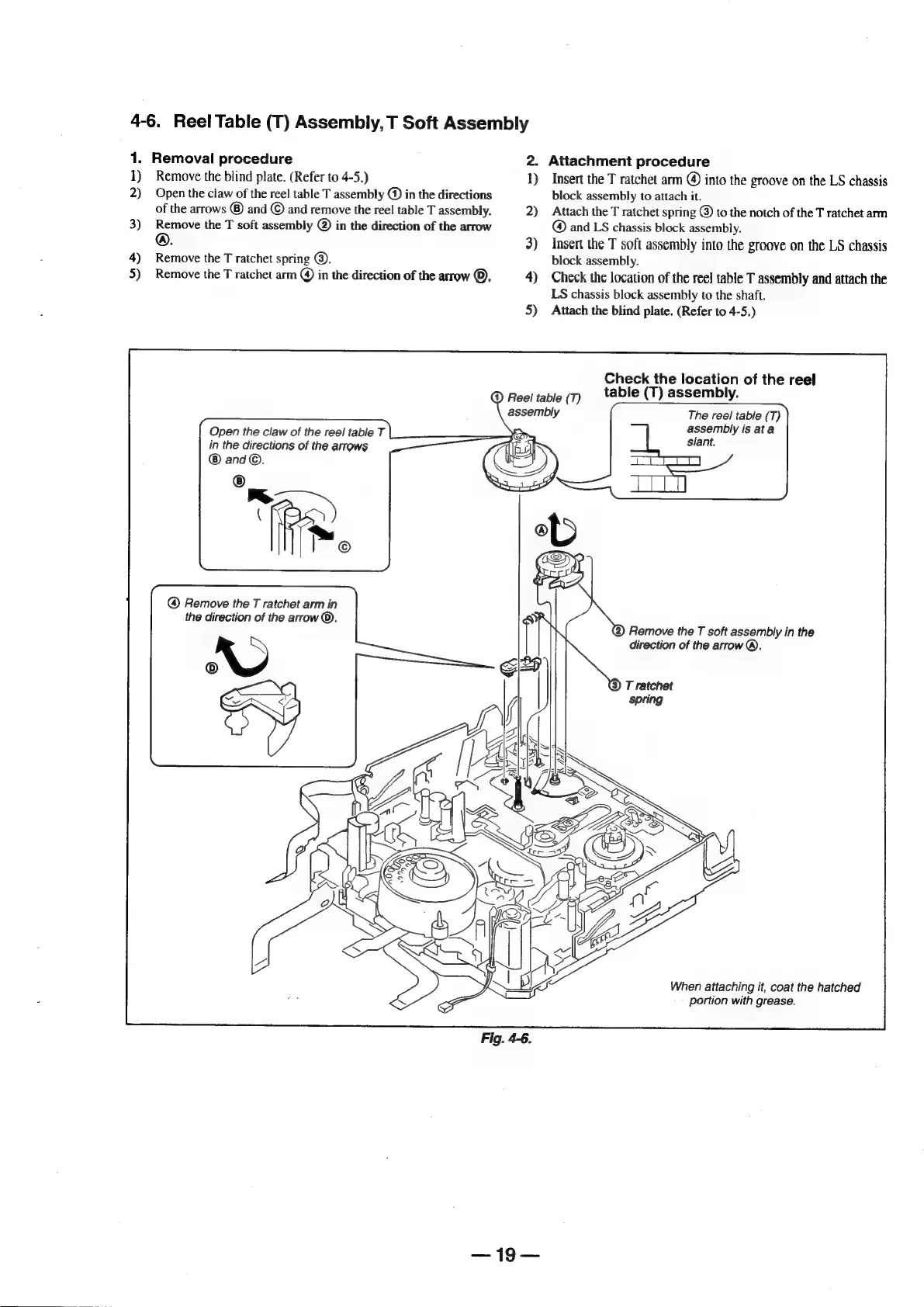
4-6.
Reel
Table
(T)
Assembly,
T
Soft
Assembly
1.
1)
2)
3)
4)
5)
Removal
procedure
Remove
the
blind
plate.
(Refer
to
4-5.)
Open
the
claw
of
the
reel
table
T
assembly
@)
in
the
directions
of
the
arrows
®
and
©
and
remove
the
reel
table
T
assembly.
Remove
the
T
soft
assembly
@)
in
the
direction
of
the
arrow
Remove
the
T
ratchet
spring
©.
Remove
the
T
ratchet
arm
@)
in
the
direction
of
the
arrow
©.
Open
the
claw
of
the
reel
table
T
in
the
directions
of
the
arrows
and
©.
@
Remove
the
T
ratchet
arm
in
the
direction
of
the
arrow
©.
—{9—
2.
Attachment
procedure
))
2)
3)
4)
5)
@)
Reel!
table
(T)
assembly
Insert
the
T
ratchet
arm
@)
into
the
groove
on
the
LS
chassis
block
assembly
to
attach
it.
Attach
the
T
ratchet
spring
@
to
the
notch
of
the
T
ratchet
arm
@
and
LS
chassis
block
assembly.
Insert
the
T
soft
assembly
into
the
groove
on
the
LS
chassis
block
assembly.
Check
the
location
of
the
reel
table
T
assembly
and
attach
the
LS
chassis
block
assembly
to
the
shaft.
Attach
the
blind
plate.
(Refer
to
4-5.)
Check
the
location
of
the
reel
table
(T)
assembly.
The
reel
table
(T)
assembly
is
ata
slant.
Remove
the
T
soft
assembly
in
the
direction
of
the
arrow®.
T
ratchet
spring
When
attaching
it,
coat
the
hatched
portion
with
grease.

Table of Contents

Related product manuals