EasyManua.ls Logo

Sony Digital8 M2000 - Mode Selector II Opeating Procedure

Sony Digital8 M2000
46 pages
Print Icon
To Next Page IconTo Next Page
To Previous Page IconTo Previous Page
Loading...
1-2.
Mode
Selector
II
Operating
Procedure
1-2-1.
Introduction
The
Mode
Selector
II
is
a
mechanism
drive
tool
that
assists
maintenance
work
of
the
various
mechanism
decks.
It
has
the
following
functions.
1.
Manual
Test
In
this
mode,
the
motor
of
the
mechanism
deck
is
powered
only
during
the
period
while
the
switch
is
turned
on
manually.
Using
the
Manual
Test,
the
operator
can
freely
control
the
motor
of
the
mechanism
deck.
2.
Step
Test
In
this
mode,
the
motor
of
the
mechanism
deck
is
kept
turned
on
until
the
mechanical
status
is
changed
from
the
present
mechanical
Status
that
is
obtained
from
the
sensor
information.
The
Step
Test
is
used
to
confirm
a
series
of
movements
of
the
mechanism
deck.
3.
Auto
Test
The
Mode
Selector
IT
stores
the
status
transition
table
in
its
memory
as
data
indicating
the
respective
modes
of
the
mechanism
deck.
The
status
transition
table
can
be
used
to
confirm
whether
a
mechanism
deck
is
operating
normally
or
has
abnormality
from
a
series
of
movements
of
a
mechanism
deck.
!f
an
abnormal
status
transition
is
detected
during
operation,
the
“NG”
indication
appears
and
the
mechanism
stops
moving.
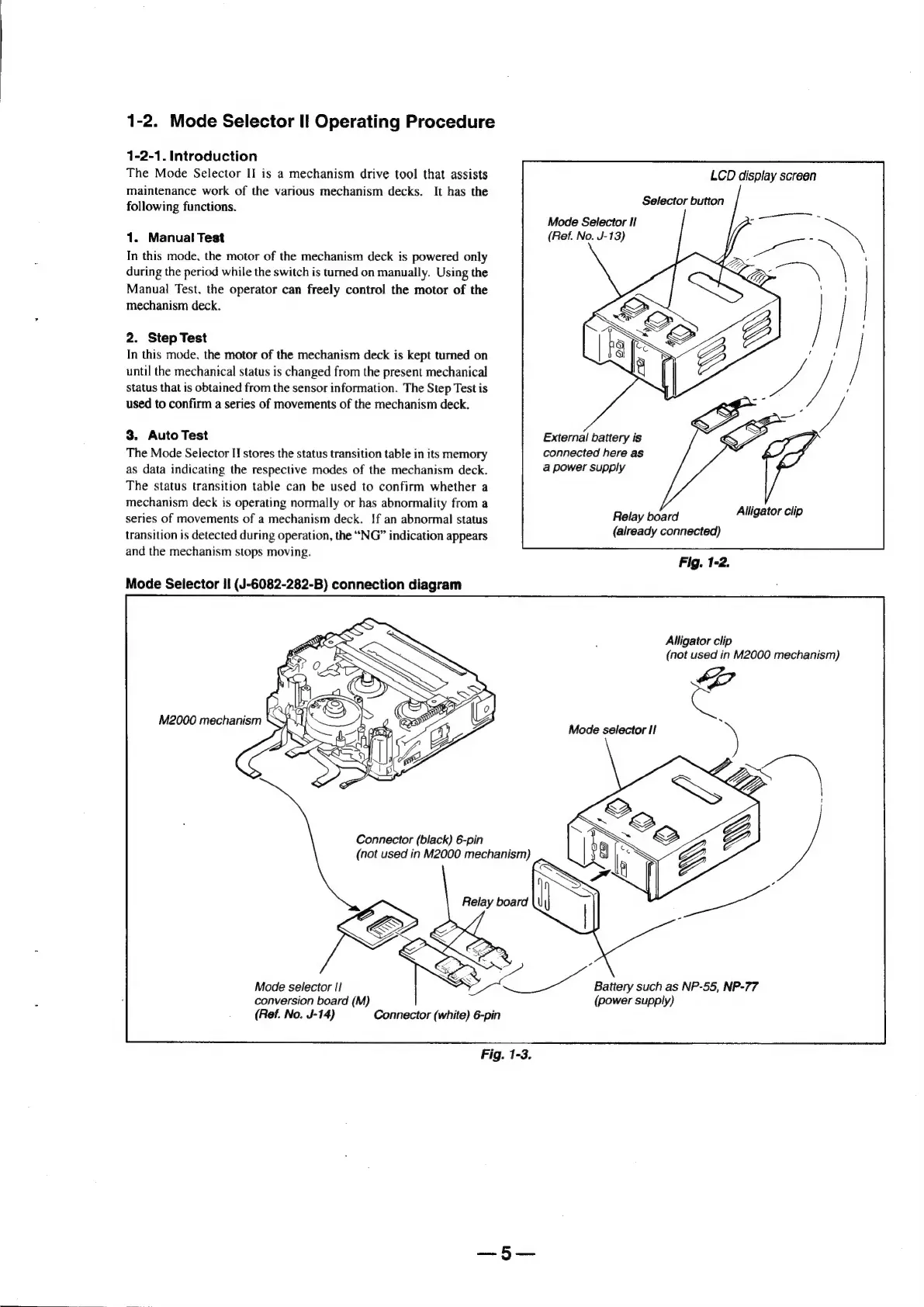
Mode
Selector
II
(J-6082-282-B)
connection
diagram
M2000
mechanism
Connector
(black)
6-pin
(not
used
in
M2000
mechanism)
Mode
selector
I!
conversion
board
(M)
LCD
display
screen
Selector
button
Mode
Selector
If
(Ref.
No.
J-13)
External
battery
is
connected
here
as
a
power
supply
Relay
board
Alligator
clip
(already
connected)
Fig.
1-2.
Alligator
clip
(not
used
in
M2000
mechanism)
Mode
selector
I/
SEX
|
A
ee:
Battery
such
as
NP-55,
NP-77
(
(power
supply)
(Ref.
No.
J-14)
Connector
(white)
6-pin
Fig.
1-3.

Table of Contents

Related product manuals