EasyManua.ls Logo

Sony Digital8 M2000 - Check, Adjustment and Replacement; Drum Assembly Dvesalsiga Sad Soeicues Venedeeeseebevevsesasuee Veeseubeccenesdoceses

Sony Digital8 M2000
46 pages
Print Icon
To Next Page IconTo Next Page
To Previous Page IconTo Previous Page
Loading...
4.
Check,
Adjustment
and
Replacement
Note:
For
removal
procedure
of
the
cabinets,
printed
wiring
boards
and
other
parts,
refer
to
“DISASSEMBLY”
of
the
Service
Manual
of
the
respective
models.
4-1.
Drum
Assembly
1.
Removal
procedure
2.
Attachment
procedure
1)
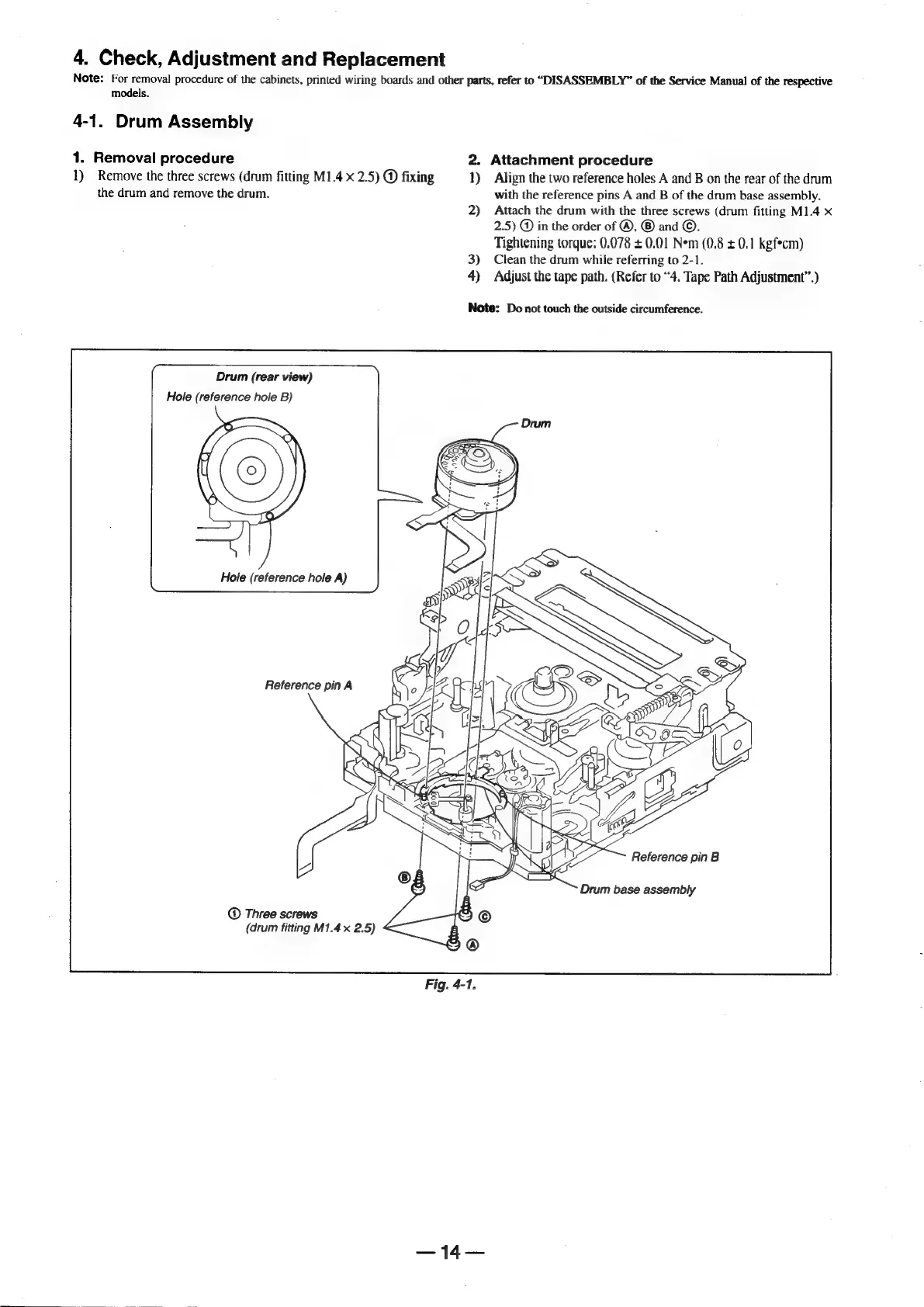
Remove
the
three
screws
(drum
fitting
M1.4
x
2.5)
@
fixing
1)
Align
the
two
reference
holes
A
and
B
on
the
rear
of
the
drum
the
drum
and
remove
the
drum.
with
the
reference
pins
A
and
B
of
the
drum
base
assembly.
2)
Attach
the
drum
with
the
three
screws
(drum
fitting
M1.4
x
2.5)
@
in
the
order
of
®,
®
and
©.
Tightening
torque:
0,078
+
0.01
Nem
(0.8
+
0.1
kgf*cm)
3)
Clean
the
drum
while
referring
to
2-1.
4)
Adjust
the
tape
path.
(Refer
to
“4.
Tape
Path
Adjustment”.)
Note:
Do
not
touch
the
outside
circumference.
Drum
(rear
view)
Hole
(reference
hole
B)
Reference
pin
B
Drum
base
assembly
Three
screws
(drum
fitting
M1.4
x
2.5)
ais
PA

Table of Contents

Related product manuals