Appendixes A-15
Appendixes
To create new text data
Use Setup Menu items 005 and 017
(page 6-3).
1 Set Setup menu item 005 to
CHARCTER.
For more information about menu
operations, see Chapter 6 “Setup
Menu”.
2 Set Setup menu item 017 to ON.
3 Press the SET button.
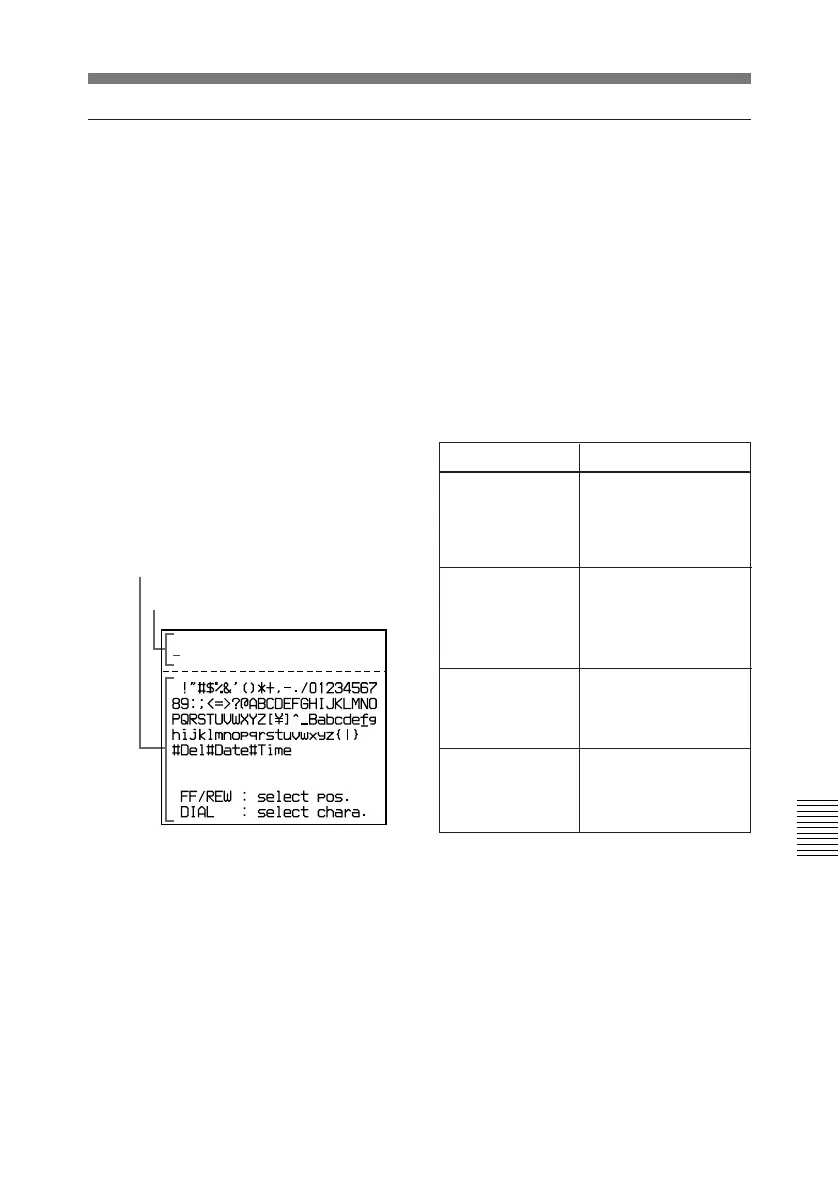
The Text Data Creation Screen
appears and the
F FWD button lights.
4 Enter the data in the data entry
section.
To specify the data entry
position: Move the cursor to
the right by pressing the F
FWD button or to the left by
pressing the REW button.
To select a character to enter:
Rotate the jog dial to move the
cursor to the desired character,
then press the jog dial.
To delete a character from the
data entry section: Select
#Del in the character selection
section.
To enter the date: Select #Date
in the character selection
section.
To enter the time: Select #Time
in the character selection
section.
Data entry section
Character selection section
Operation
Cursor movement
Rotate upwards
Moves to the right.
When the last
character is reached,
moves to the first
character.
Rotate downward
Moves to the left.
When the first
character is reached,
moves to the last
character.
Rotate upwards
while pressing the
SHIFT button
Moves one line up.
When the cursor is in
the top line, moves to
the bottom line.
Rotate downward
while pressing the
SHIFT button
Moves one line down.
When the cursor is in
the bottom line,
moves to the top line.



 To Next Page