Power Preparations
2-2 Preparations
Chapter 2 Preparations
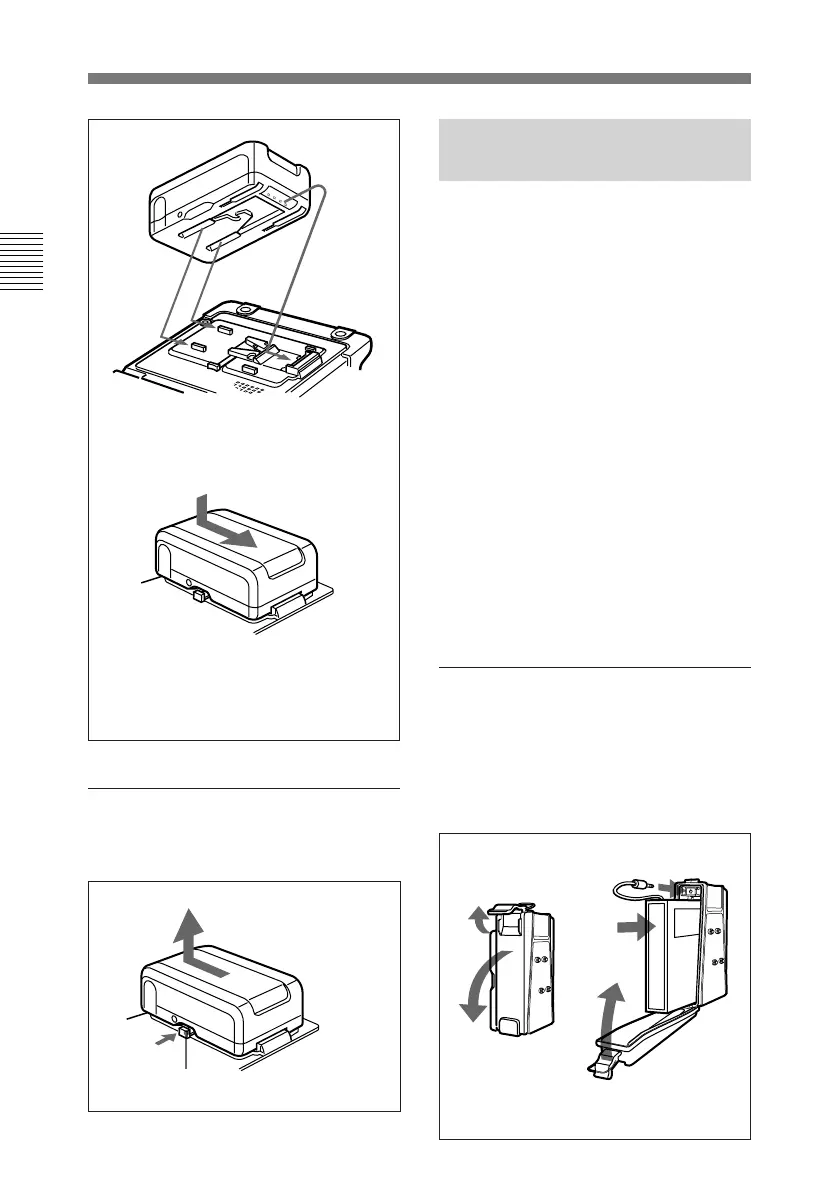
To remove the battery pack
With the lever pushed in, slide the BP-
L60(A)/L90(A) out.
2-1-3 Using the BP-
90(A) Battery Pack
Different battery adaptors are used
when mounting the BP-90(A) on the
top panel of this unit and when
connecting it the DC IN connector.
This unit can be operated for about 60
minutes at normal temperature on a
fully charged BP-90(A) Battery Pack.
To charge the battery pack
Before use, be sure to charge the
battery pack with the BC-210/210CE/
410/410CE Battery Charger. It takes
about 2 hours to charge the BP-90(A).
For more information about how to
charge the battery pack, refer to the
manual for the BC-210/210CE/410/
410CE.
To attach to the top panel of
this unit
Use the DC-L90 Battery Adaptor.
1 Mount the BP-90(A) in the DC-
L90.
Lever
BP-L60(A)/L90(A)
1 Align the groove on the top
panel of the BP-L60(A)/L90(A)
with the guides.
2 Slide the BP-L60(A)/L90(A) in
so that its connector is firmly
connected to the unit’s battery
connector.
1 Lift the lever up.
2 Open the side
cover.
3 Insert the BP-90(A).
4 Push the plug in.
5 Close the side
cover and pull
the lever down.



 To Next Page