Handling Cassettes
2-6 Preparations
Chapter 2 Preparations
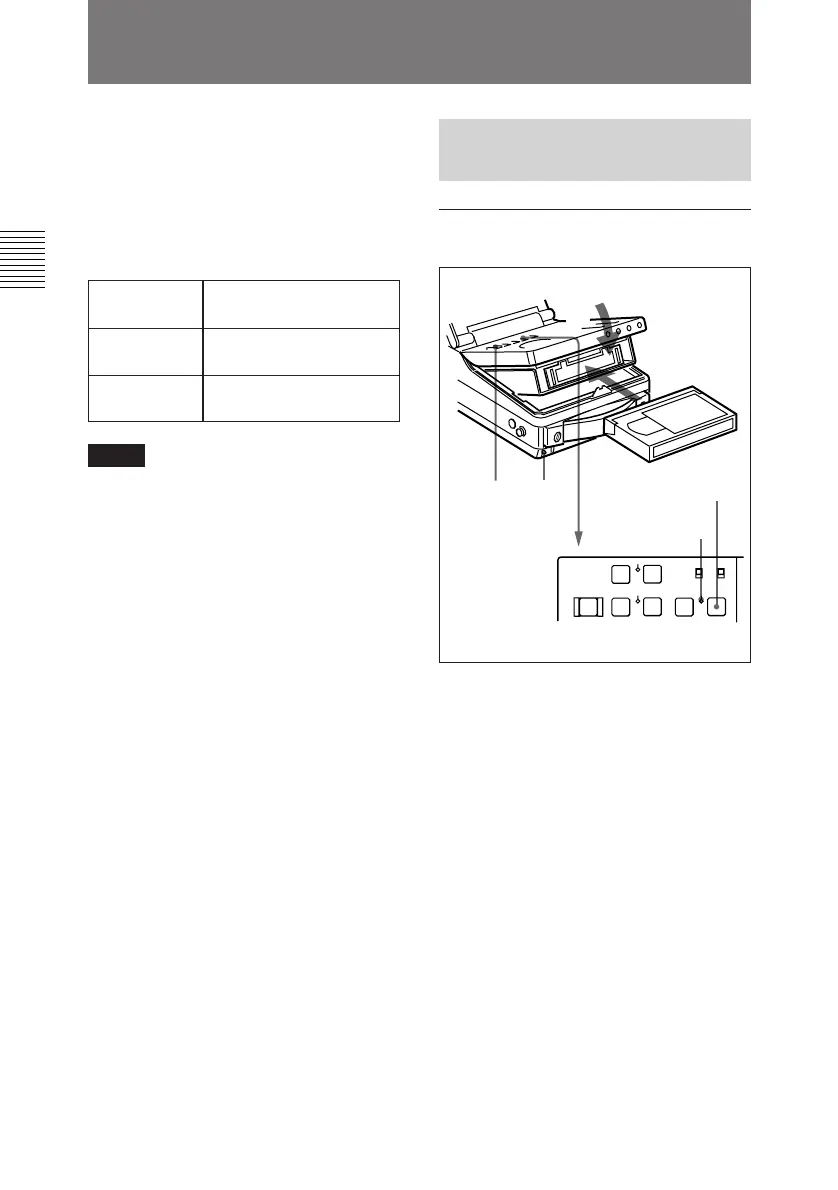
To load a cassette
1 Set the POWER switch to ON.
2 Press the EJECT button.
The control panel lifts up and the
cassette compartment opens.
3 Load a cassette in the direction
shown in the figure after checking
the following points.
• That “ERROR-10” is not
displayed in the sub LCD.
• That there is no slack in the tape.
4 Close the control panel. (You
should hear a click.)
The STANDBY indicator lights.
2-3 Handling Cassettes
To record with this unit, you can use
half-inch width Betacam SX S
cassettes, Betacam SP S cassettes
(metal tape), or UVW S cassettes
(metal tape).
Usable Cassettes
Notes
• Digital Betacam cassettes cannot be
used.
• Oxide tapes recorded in the Betacam
format and metal tapes recorded in
the Betacam SP format can be only
played back.
Betacam SX BCT-12SX/22SX/32SX/
60SX
Betacam SP
(metal tape)
BCT-5MA/10MA/20MA/
30MA
UVW (metal
tape)
UVWT-10MA/20MA/
30MA
2-3-1 Loading/Ejecting
Cassettes
21
3
4
STANDBY
indicator
STOP button



 To Next Page