Editing 3-19
Chapter 3 Editing
3-7 Special Editing
This section explains the following
kinds of editing.
• Quick editing
• Continuous editing
• Manual editing
3-7-1 Quick Editing
After selecting the edit mode, you can
work more efficiently by using quick
editing, which allows you to set edit
points and preview at the same time.
Proceed as follows.
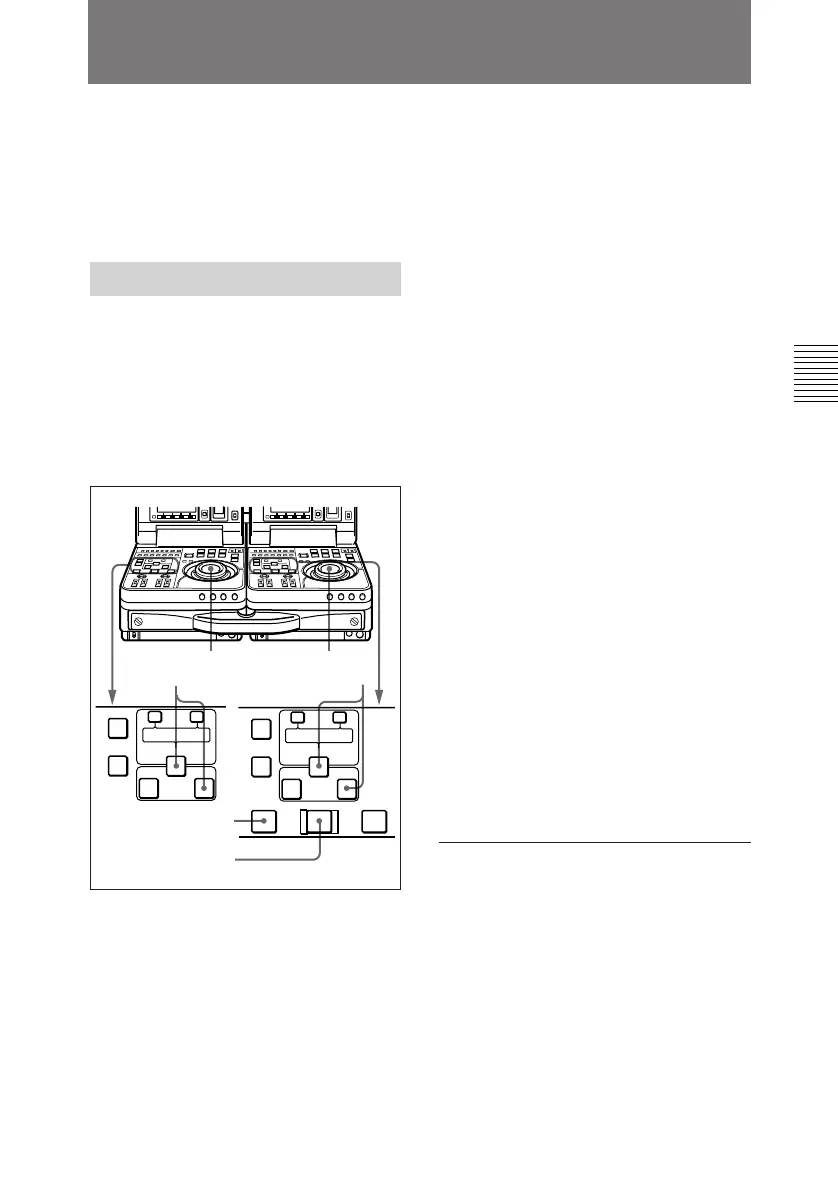
1 Stop the tapes at the points where
you want to set the recorder side
and player side IN points.
11
2,4
5
33
AUTO EDIT
AUDIO IN
TRIM
LIST MARK
GOOD
SHOT
ENTRY SHIFT
IN OUT
–+
TRIM
LIST MARK
GOOD
SHOT
ENTRY SHIFT
IN OUT
–+
DELETE
AUDIO IN
DELETE
PREVIEW REVIEW
2 Press the recorder side PREVIEW
button.
A preview starts. The points
selected in step 1 are set as the IN
points, and the IN buttons of the
recorder and player units light.
3 At the point where you want to set
the OUT point, press the recorder
side or player side OUT button
together with the ENTRY/SHIFT
button.
The OUT point is set, and the
OUT button that you pressed
lights.
4 Conduct another preview and
modify the edit points as required.
5 Press the AUTO EDIT button.
The edit starts.
When the edit finishes, the
recorder unit stops at the OUT
point and player unit stops 2
seconds after the OUT point.
To edit even more quickly
1 Stop the tapes at the points where
you want to set the recorder side
and player side IN points.
(Continued)



 To Next Page