Editing 3-17
Chapter 3 Editing
3-6 Preread Editing
Video and audio signals (channels 1
to 4), already recorded onto the tape,
can be used as an edit source for insert
editing. This type of editing is called
“preread editing”, as this unit uses the
preread heads to read the signals in
advance.
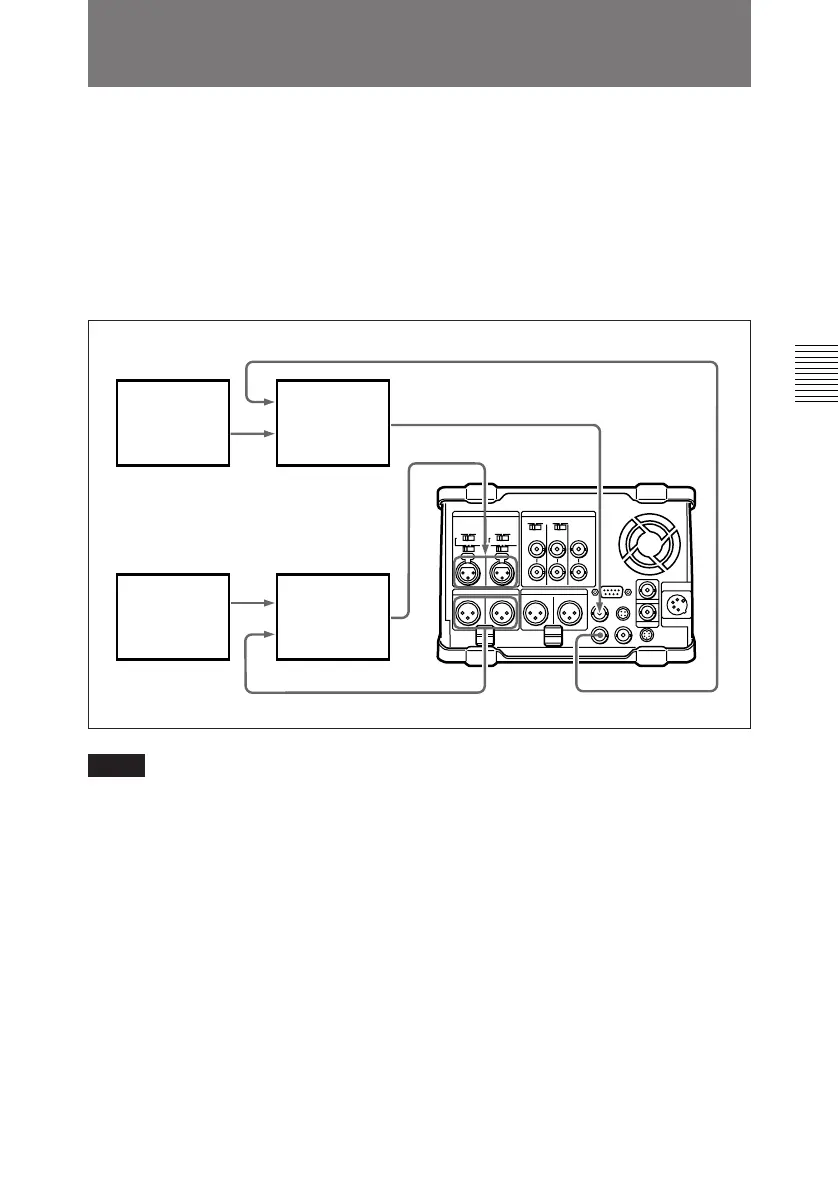
Signals read in advance can be sent to
mixers for mixing and can be returned
to the original channels or other audio
channels (1 to 4).
For preread editing, set the
“PREREAD” item on Video Setting
Page 1/2 of the Sub LCD menu to
“ON”.
Video source Video switcher
SDI or analog video output
SDI or analog video input
Audio source
Audio mixer
SDI or analog audio input
SDI or analog audio output
Notes
• In preread editing, if an input video
signal is used as the reference signal
for the output video signal,
oscillation may occur because of
loop-closing. To avoid this, set the
“OUT REF” item on Video Setting
Page 1/2 of the Sub LCD menu to
“REF” and set the item 309 in the
setup menu to “AUTO1” to select
the external reference signal for
preread editing.
• When preread mode is selected, this
unit will not shift into E-E mode in
any operation mode, to avoid
oscillation caused by the loop
connection. When preread mode is
turned off, however, the E-E signal is
output and oscillation may occur if
connection between the input and
output of the same channel is not
removed after preread editing.
To prevent the oscillation, select PB
mode for the video and digital audio
channels in all the modes before the
preread editing, as follows:



 To Next Page