Executing an Edit
3-12 Editing
Chapter 3 Editing
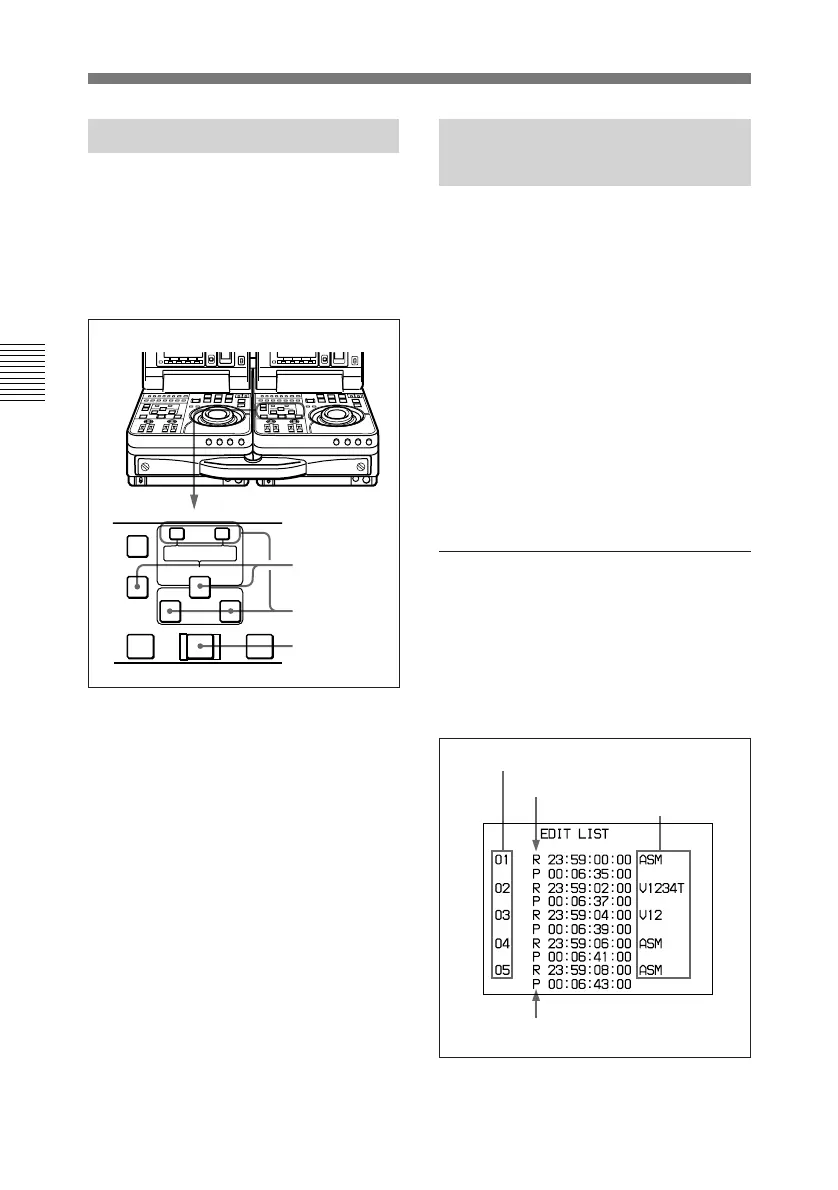
3-4-3 Redoing an Edit
Edit point data is retained even after
you execute an edit, until you set new
edit points.
You can redo an edit after modifying
the edit point data.
1 Press the recorder side DELETE
button together with the ENTRY/
SHIFT button.
2 Modify the edit points.
See “To Modify edit points
slightly” (page 3-9) for the
procedure.
3 Press the AUTO EDIT button.
The edit is executed.
1
2
3
AUTO EDIT
AUDIO IN
TRIM
LIST MARK
GOOD
SHOT
ENTRY SHIFT
IN OUT
–+
DELETE
PREVIEW REVIEW
3-4-4 Displaying the
Results of Editing
This unit can save the editing results
of the most recent 20 events in
memory. You can recall the saved
information, and amend it later. (For
example, using preread editing, you
can use this for redoing A/B roll
editing or amending the base tape.)
The information which can be saved is
the recorder IN/OUT points , player
IN/OUT points, the edit preset, and
DMC editing start speed, and the
saved data is preserved even when the
unit is powered off.
Displaying the event
information
Press the TRIM–/LIST button.
This displays a list as shown below.
To end the display, press the TRIM–/
LIST button once more.
Event number
R: recorder IN point
P: player IN point
Edit preset



 To Next Page