Recording and Playback 4-5
Chapter 4 Recording and Playback
4-3-2 Playback
Operation
Confirm the recording format of the
cassette (SX, SP or OX) indicated on
the sub LCD.
Then, perform the following
procedure.
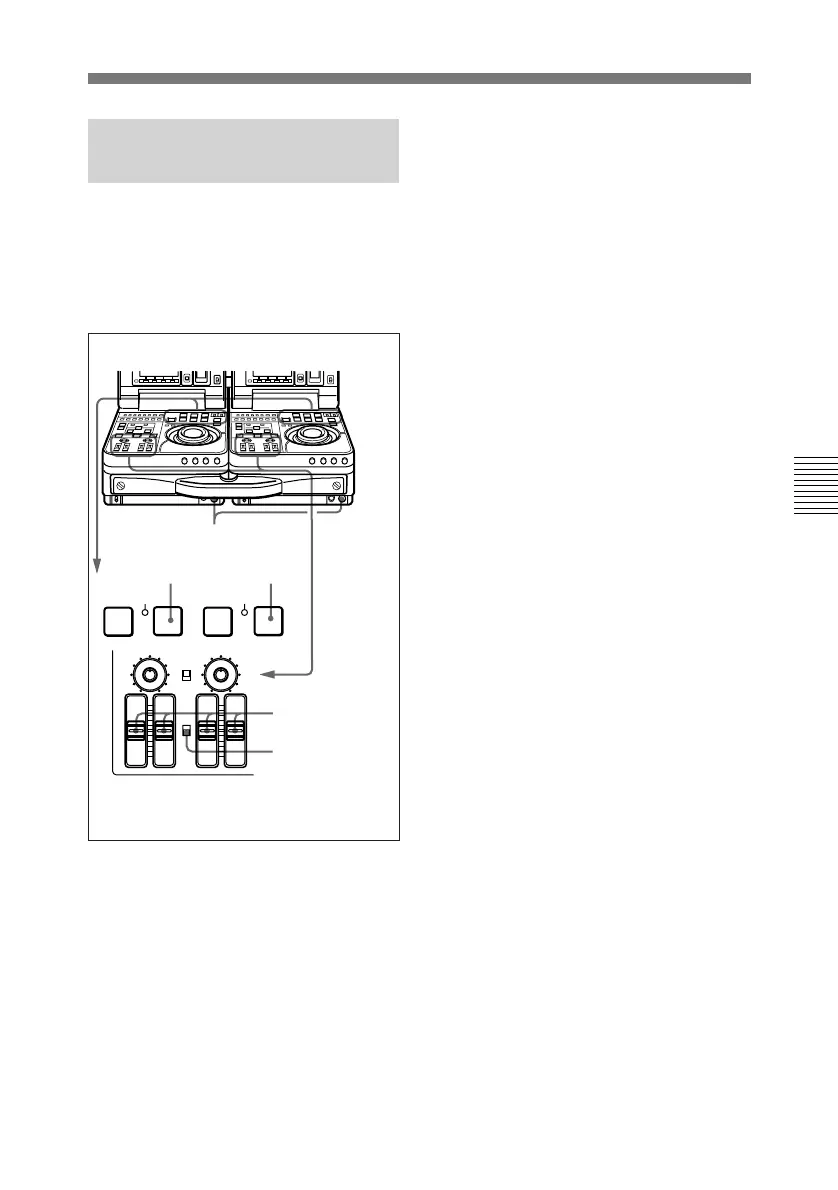
1 Press the PLAY button.
Playback starts.
To adjust speaker/headphones
audio level
Rotate the LEVEL knob on the
front control section.
12
REW PLAY F FWD
SERVO
)
0p
4
AUDIO INPUT
PB
AUDIO
CH-1 CH-2
PRESET
VARIABLE
CH-1
PRESET
VARIABLE
CH-2 CH-3 CH-4
STOP
STANDBY
To adjust audio playback level
Set the PB AUDIO PRESET/
VARIABLE switch to
VARIABLE, and adjust using the
PB AUDIO CH-1 to CH-4 level
adjustment sliders.
2 Press the STOP button to stop
playback.
If playback continues to the end
of the tape, the tape automatically
rewinds to the beginning and
stops.
PB AUDIO
PRESET/
VARIABLE
switch
LEVEL knob
PB AUDIO CH-1
to CH-4 level
adjustment sliders



 To Next Page