EasyManua.ls Logo

Sony EV-S7000 - Hookup 2: VCR setup; Hookup 2: VCR Plus+ channel setup

Sony EV-S7000
84 pages
Print Icon
To Next Page IconTo Next Page
To Previous Page IconTo Previous Page
Loading...
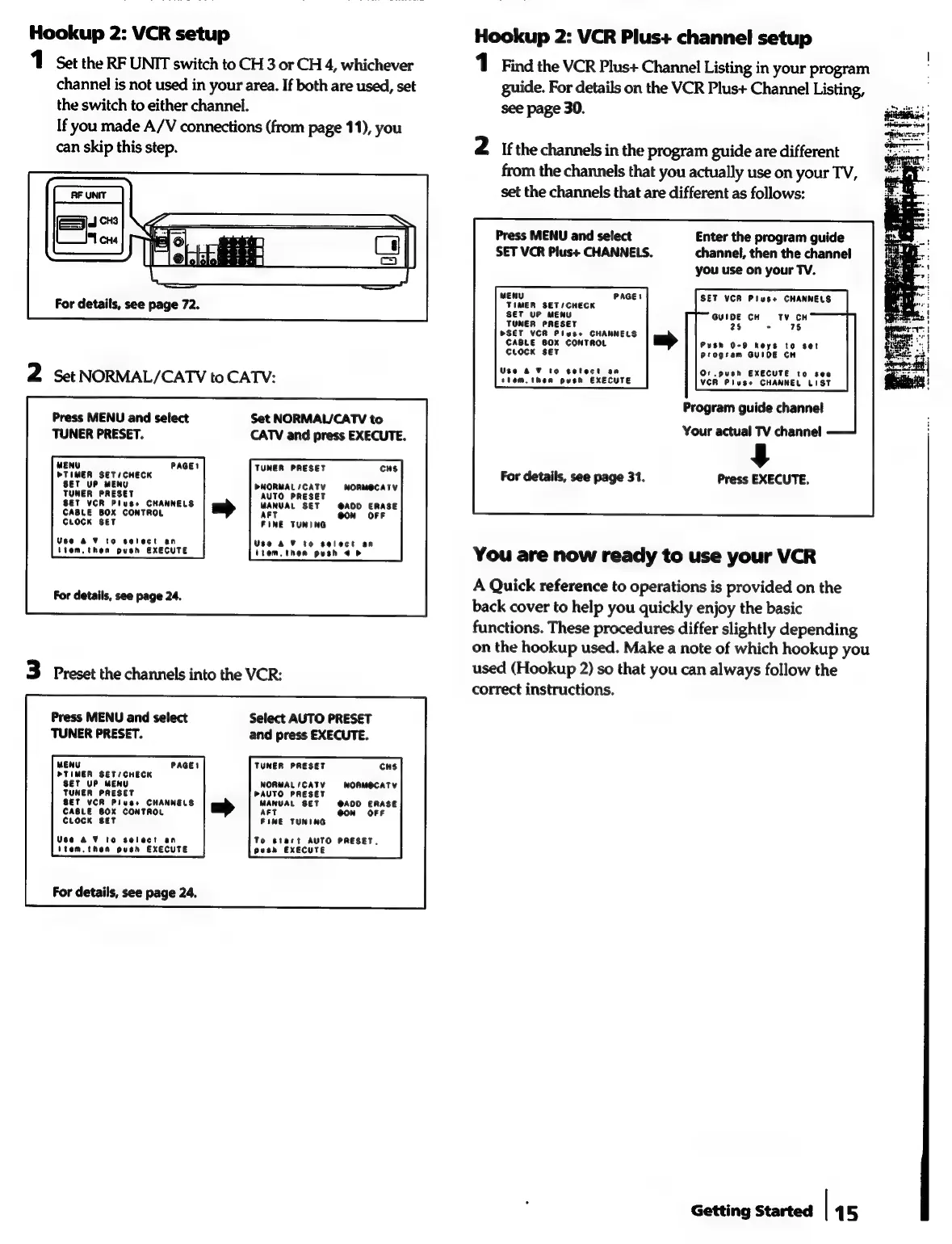
Hookup
2:
VCR
setup
Hookup
2:
VCR
Plus+
channel
setup
1
Set
the
RF
UNIT
switch
to
CH
3
or
CH
4,
whichever
1
Find
the
VCR
Plus+
Channel
Listing
in
your
program
channel
is
not
used
in
your
area.
If
both
are
used,
set
guide.
For
details
on
the
VCR
Plus+
Channel
Listing,
the
switch
to
either
channel.
see
page
30.
If
you
made
A/V
connections
(from
page
11),
you
can
skip
this
step.
2
ifthe
channels
in
the
program
guide
are
different
from
the
channels
that
you
actually
use
on
your
TV,
set
the
channels
that
are
different
as
follows:
Press
MENU
and
select
Enter
the
program
guide
SET
VCR
Plus+
CHANNELS.
channel,
then
the
channel
you
use
on
your
TV.
,
bee
seriencee
PAGE!
SET
VCR
Plus+
CHANNELS
For
details,
see
page
72.
See
ye
nena
eee.
.
<0.
ei
TUNER
PRESET
25
-
76
BOSET
VCR
Pluses
one
CABLE
BOX
CONT
Push
0-9
keys
to
set
CLOCK
SET
Progtam
GUIDE
CH
2
Set
NORMAL/CATV
to
CATV:
ttom,
then
push.
EXECUTE
VCR
Pluss
CHANNEL
List
Program
guide
channel
Press
MENU
and
select
Set
NORMAL/CATV
to
TUNER
PRESET.
CATV
and
press
EXECUTE.
Your
actual
TV
channel
$
For
details,
see
page
31.
Press
EXECUTE.
MENU
PAGE!
TUNER
PRESET
CHS
OTIMER
SETS
CHECK
UP
MEN
PNORMAL/CATV
NORMOCATY
1
AUTO
PRESET
VCR
Plus+
CHANNELS
MANUAL
SET
@ADD
ERASE
CABLE
BOX
CONTROL
art
@ON
OFF
CLOCK
SET
FINE
TUNING
Veo
&2
¥
to
select
an
Use
&
%
to
select
an
(tem,
thea
push
EXECUTE
item.
then
push
4
>
You
are
now
ready
to
use
your
VCR
A
Quick
reference
to
operations
is
provided
on
the
back
cover
to
help
you
quickly
enjoy
the
basic
functions.
These
procedures
differ
slightly
depending
on
the
hookup
used.
Make
a
note
of
which
hookup
you
3
Preset
the
channels
into
the
VCR:
used
(Hookup
2)
so
that
you
can
always
follow
the
j
correct
instructions.
For
details,
see
page
24.
Press
MENU
and
select
Select
AUTO
PRESET
TUNER
PRESET.
and
press
EXECUTE.
MENU
PAGE!
TUNER
PRESET
CHS
PTIMER
SET/CHECK
UP
MENU
NORMAL
/
CATV
NORMOCATV
PAUTO
PRESET
eT
T
VCR
Pluss
aoc
MANUAL
SET
@A0D
ERASE
rose
eer
CONTROL
AFT
@ON
OFF
CcLor
FINE
TUNING
Veo
a
¥
to
select
an
To
start
AUTO
PRESET.
item.
then
push
EXECUTE
pesh
EXECUTE
For
details,
see
page
24.
Getting
Started
|
15