EasyManua.ls Logo

Sony EV-S7000 - Editing with another VCR

Sony EV-S7000
84 pages
Print Icon
To Next Page IconTo Next Page
To Previous Page IconTo Previous Page
Loading...
Editing
with
another
VCR
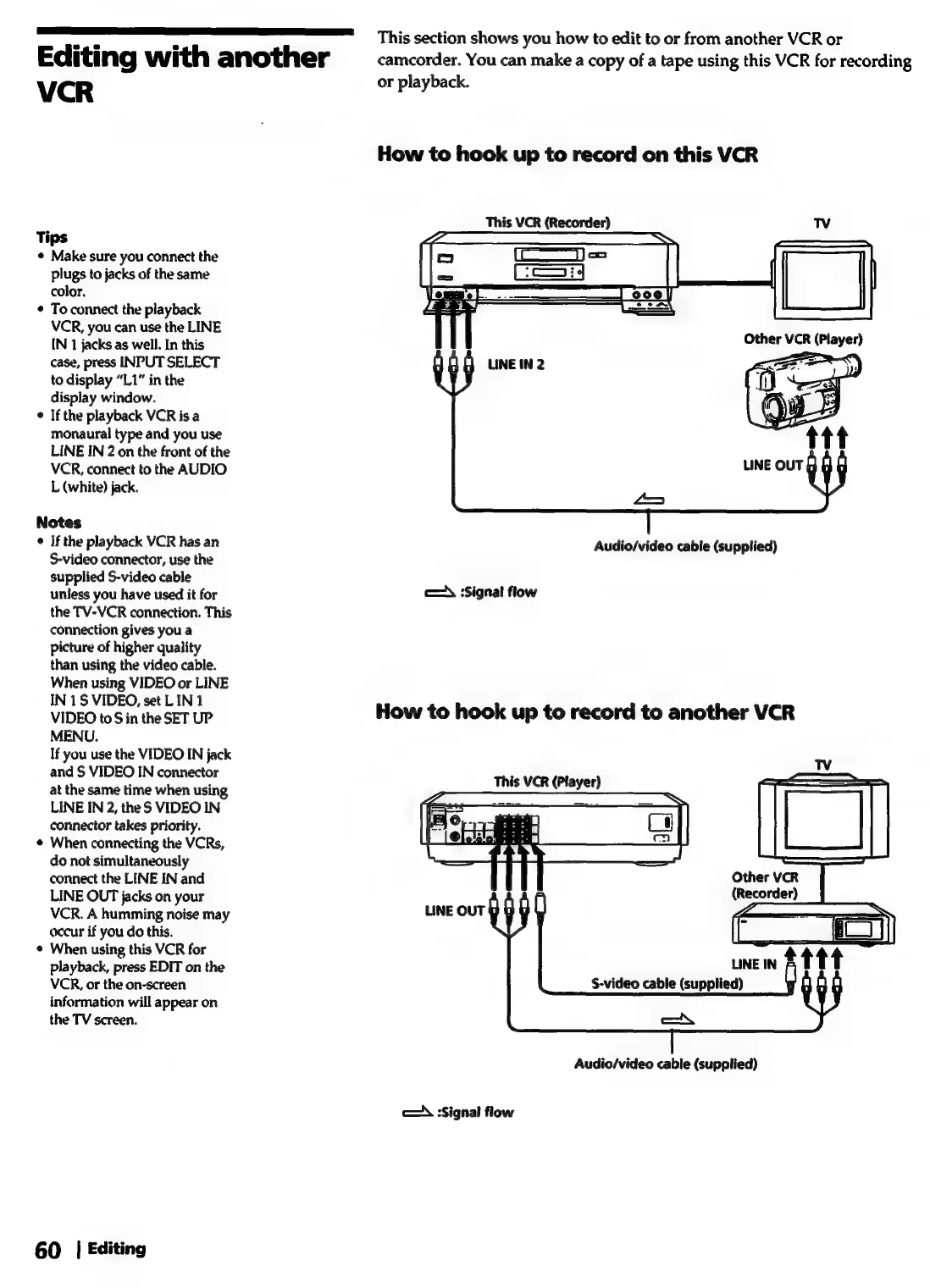
Tips
¢
Make
sure
you
connect
the
plugs
to
jacks
of
the
same
color.
To
connect
the
playback
VCR,
you
can
use
the
LINE
IN
1
jacks
as
well.
In
this
case,
press
INPUT
SELECT
to
display
“L1”
in
the
display
window.
If
the
playback
VCR
is
a
monaural
type
and
you
use
LINE
IN
2
on
the
front
of
the
VCR,
connect
to
the
AUDIO
L
(white)
jack.
Notes
¢
If
the
playback
VCR
has
an
S-video
connector,
use
the
supplied
S-video
cable
unless
you
have
used
it
for
the
TV-VCR
connection.
This
connection
gives
you
a
picture
of
higher
quality
than
using
the
video
cable.
When
using
VIDEO
or
LINE
IN
1S
VIDEO,
set
LIN
1
VIDEO
to
S
in
the
SET
UP
MENU.
If
you
use
the
VIDEO
IN
jack
and
S
VIDEO
IN
connector
at
the
same
time
when
using
LINE
IN
2,
the
S
VIDEO
IN
connector
takes
priority.
When
connecting
the
VCRs,
do
not
simultaneously
connect
the
LINE
IN
and
LINE
OUT
jacks
on
your
VCR.
A
humming
noise
may
occur
if
you
do
this.
When
using
this
VCR
for
playback,
press
EDIT
on
the
VCR,
or
the
on-screen
information
will
appear
on
the
TV
screen.
60
|
Editing
This
section
shows
you
how
to
edit
to
or
from
another
VCR
or
camcorder.
You
can
make
a
copy
of
a
tape
using
this
VCR
for
recording
or
playback.
How
to
hook
up
to
record
on
this
VCR
This
VCR
(Recorder)
TV
Other
VCR
(Player)
LINE
IN
2
Audio/video
cable
(supplied)
A
Signal
flow
How
to
hook
up
to
record
to
another
VCR
This
VCR
(Player)
Other
VCR
(Recorder)
S-video
cable
(supplied)
Audio/video
cable
(supplied)
cA
Signal
flow