EasyManua.ls Logo

Sony EV-S7000 - Page 61

Sony EV-S7000
84 pages
Print Icon
To Next Page IconTo Next Page
To Previous Page IconTo Previous Page
Loading...
Note
¢
Make
sure
that
the
safety
tab
is
in
the
correct
position.
If
the
playback
VCR
is
a
VHS
model,
make
sure
that
the
safety
tab
on
the
source
tape
has
been
removed.
Tips
¢
To
make
your
editing
more
precise,
release
the
VCRs
from
pause
by
pressing
§f
PAUSE
buttons
on
the
VCRs,
not
on
the
remote
commander.
*
To
cut
out
unwanted
events
while
editing,
press
18
PAUSE
on
this
VCR
when
an
unwanted
event
begins.
When
it
ends,
press
§8
PAUSE
again
to
resume
recording
(assemble
editing).
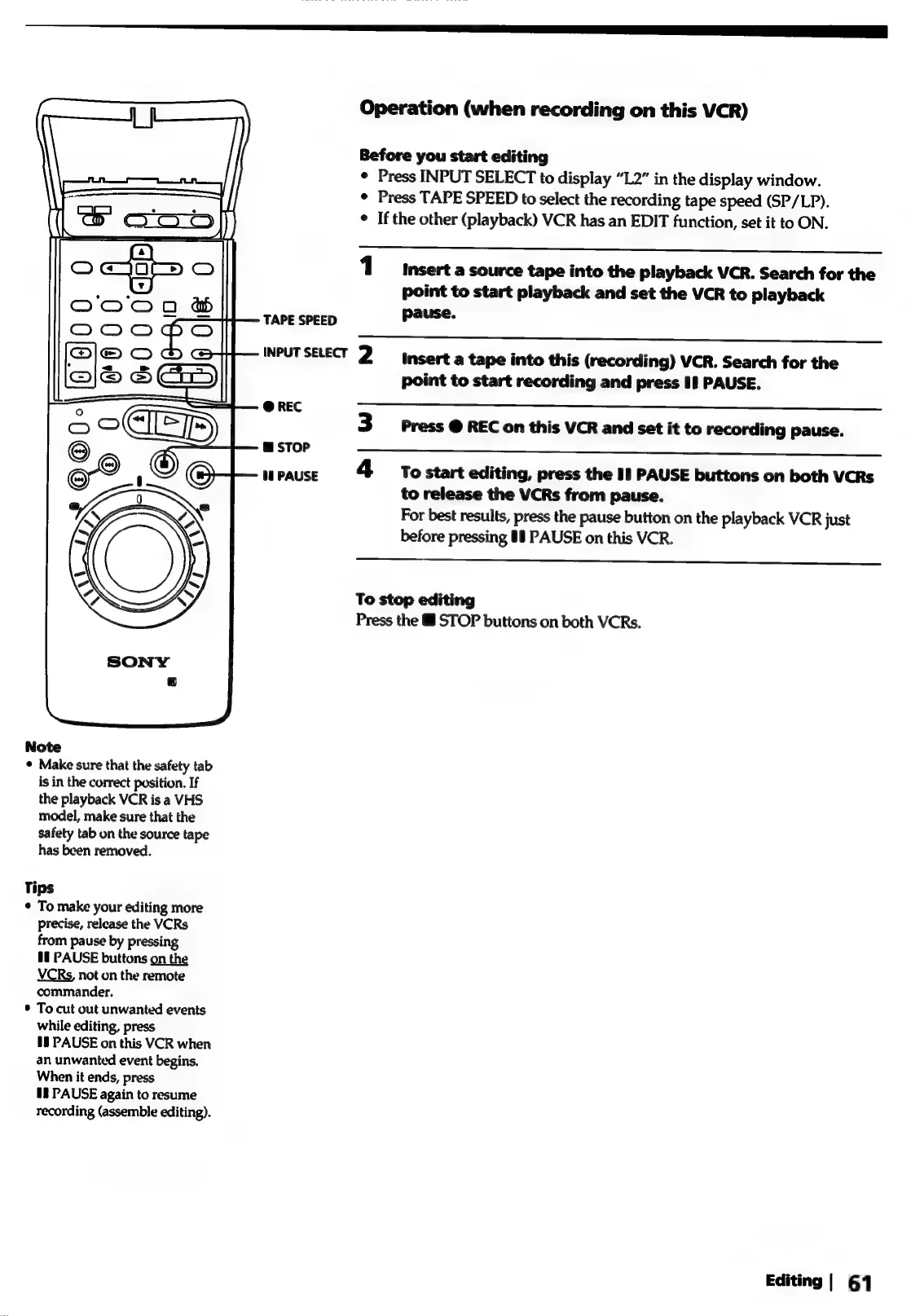
TAPE
SPEED
INPUT
SELECT
@
REC
@
STOP
§§
PAUSE
Operation
(when
recording
on
this
VCR)
Before
you
start
editing
¢
Press
INPUT
SELECT
to
display
“L2”
in
the
display
window.
¢
Press
TAPE
SPEED
to
select
the
recording
tape
speed
(SP/LP).
e
If
the
other
(playback)
VCR
has
an
EDIT
function,
set
it
to
ON.
1
msert
a
source
tape
into
the
playback
VCR.
Search
for
the
point
to
start
playback
and
set
the
VCR
to
playback
pause.
2
mserta
tape
into
this
(recording)
VCR.
Search
for
the
point
to
start
recording
and
press
11
PAUSE.
Press
@
REC
on
this
VCR
and
set
it
to
recording
pause.
4
§tostart
editing,
press
the
I!
PAUSE
buttons
on
both
VCRs
to
release
the
VCRs
from
pause.
For
best
results,
press
the
pause
button
on
the
playback
VCR
just
before
pressing
#8
PAUSE
on
this
VCR.
To
stop
editing
Press
the
&
STOP
buttons
on
both
VCRs.
Editing
|
61