EasyManua.ls Logo

Sony EV-S7000 - Checking;cancelling timer settings

Sony EV-S7000
84 pages
Print Icon
To Next Page IconTo Next Page
To Previous Page IconTo Previous Page
Loading...
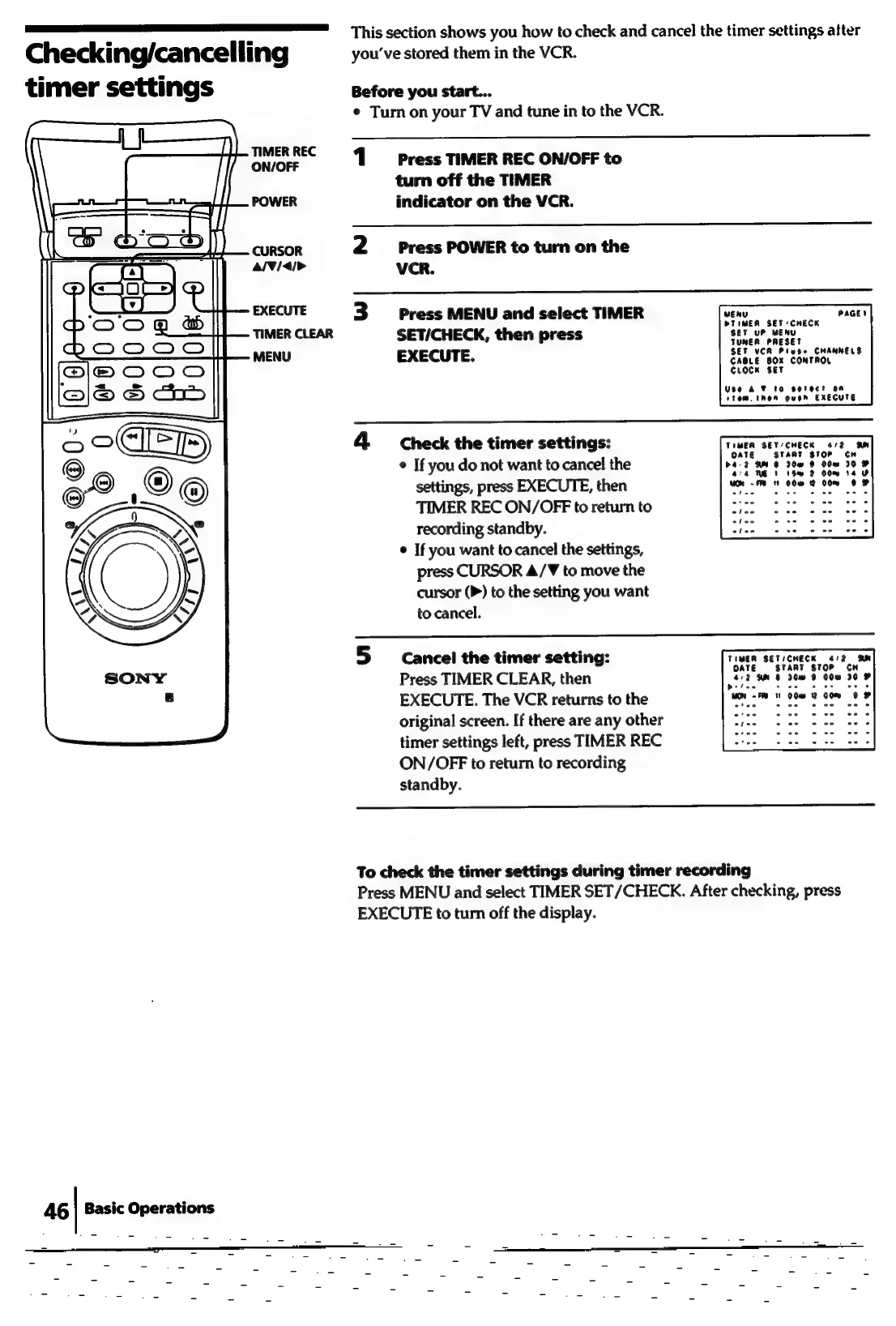
Checking/cancelling
timer
settings
TIMER
REC
ON/OFF
POWER
CURSOR
al¥/<i>
4G
|
Basic
Operations
This
section
shows
you
how
to
check
and
cancel
the
timer
settings
after
you've
stored
them
in
the
VCR.
Before
you
start...
¢
Turn
on
your
TV
and
tune
in
to
the
VCR.
1
Press
TIMER
REC
ON/OFF
to
turn
off
the
TIMER
indicator
on
the
VCR.
2
Press
POWER
to
turn
on
the
VCR.
3
Press
MENU
and
select
TIMER
SET/CHECK,
then
press
EXECUTE.
PaGE?
ser
SEF
VCR
Piyee
CHANNELS
CABLE
BOX
CONTROL
curocn
set
Use
&
¥
to
serect
an
stom.
then
push
EXECUTE
4
Check
the
timer
settings:
©
If
you
do
not
want
to
cancel
the
settings,
press
EXECUTE,
then
a
ee
ae
ee
TIMER
REC
ON/OFF
to
return
to
iets
Saree)
Suter
ace
recording
standby.
phen
2
kos
ee
oe
¢
If
you
want
to
cancel
the
settings,
press
CURSOR
4/T¥
to
move
the
cursor
(P)
to
the
setting
you
want
to
cancel.
TIMER
SET:CHECK
4/2
SM
OATE
START
STOP
CH
>4-2
WHS
30m
9
00m
30
aa
NE
1
thm
2
00m
14
olee
5
cancel
the
timer
setting:
TIMER
SETICHECK
4/2
SN
Tt
OATE
START
STOP
CH
Press
TIMER
CLEAR,
then
£12
9m
8
30m
9
00
30
EXECUTE.
The
VCR
returns
to
the
Oe
8
O08:
OOD
ee,
original
screen.
If
there
are
any
other
tes:
enter
a
es
2c
oe
timer
settings
left,
press
TIMER
REC
ON/OFF
to
return
to
recording
standby.
To
check
the
timer
settings
during
timer
recording
Press
MENU
and
select
TIMER
SET/CHECK.
After
checking,
press
EXECUTE
to
turn
off
the
display.

Related product manuals