EasyManua.ls Logo

Sony EV-S7000 - Setting the clock

Sony EV-S7000
84 pages
Print Icon
To Next Page IconTo Next Page
To Previous Page IconTo Previous Page
Loading...
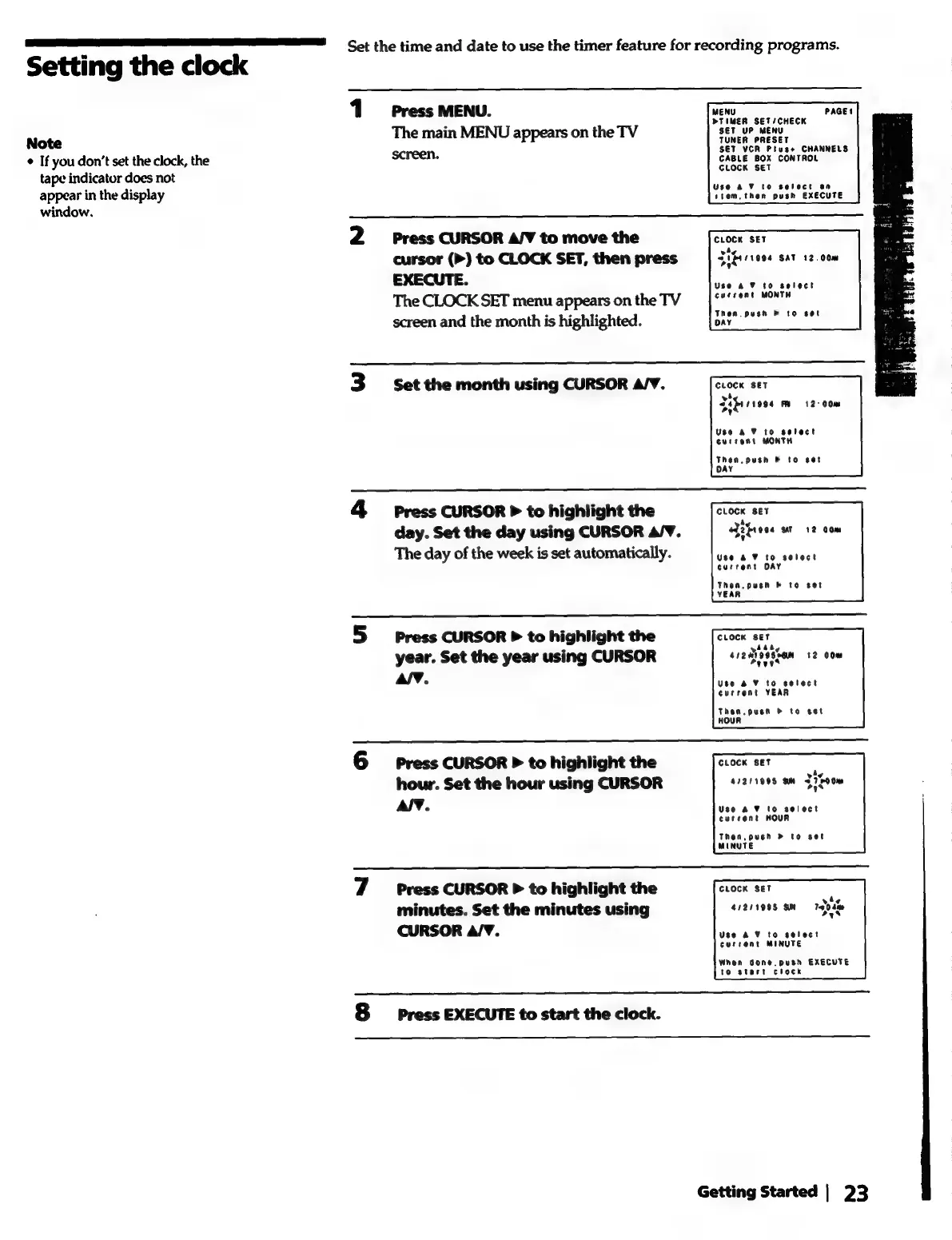
Set
the
time
and
date
to
use
the
timer
feature
for
recording
programs.
Setting
the
clock
1
Press
MENU.
MENU
PAGEt
TIMER
SET
/CHEC
Note
The
main
MENU
appears
on
the
TV
"se
uP
MeN
"
*
If
you
don’t
set
the
clock,
the
screen.
CABLE
BOK
CONTROL
tape
indicator
does
not
ecsaieee
appear
in
the
display
tiem.
then
posh
EXECUTE
window.
2
Press
CURSOR
A/V
to
move
the
CLOCK
SET
cursor
(P)
to
CLOCK
SET,
then
press
[Si
f+/1904
sat
12.000
EXECUTE.
Use
AF
to
select
The
CLOCK
SET
menu
appearsonthe
TV
‘*""e""
wonr#
screen
and
the
month
is
highlighted.
Then
push
b
to
set
3
Set
the
month
using
CURSOR
A/V.
cuocK
Ser
wh.
Seber
s9ss
Fe
12
00m
Use
a2
F
to
select
current
MONTH
Then.
push
&
to
set
OAY
4
Press
CURSOR
P
to
highlight
the
oroen
oer
day.
Set
the
day
using
CURSOR
A/V.
eJ2frece
st
12
com
The
day
of
the
week
is
set
automatically.
dicen
a
wr
te
caehene
current
DAY
Then,
push
&
to
set
YEAR
5
press
CURSOR
P
to
highlight
the
ctocK
ser
year.
Set
the
year
using
CURSOR
ci2diesen
12
00m
aly.
Use
BV
to
sotect
current
YEAR
Then.
pusn
&
to
set
HOUR
6
Press
CURSOR
P
to
highlight
the
cLocKx
set
;
hour.
Set
the
hour
using
CURSOR
41211998
9m
J
7G00m
Al¥.
Use
a ¥
to
select
current
NOUR
Then,
push
»
to
set
MINUTE
7
Press
CURSOR
P
to
highlight
the
CLOCK
Set
minutes.
Set
the
minutes
using
41211995
9M
CURSOR
A/V.
Use
AV
to
select
current
MINUTE
When
done.
push
EXECUTE
to
start
clock
8
press
EXECUTE
to
start
the
clock.
Getting
Started
|
23