EasyManua.ls Logo

Sony EV-S7000 - Additional Operations; Playing;searching at various speeds

Sony EV-S7000
84 pages
Print Icon
To Next Page IconTo Next Page
To Previous Page IconTo Previous Page
Loading...
Additional
Operations
Playing/searching
at
various
speeds
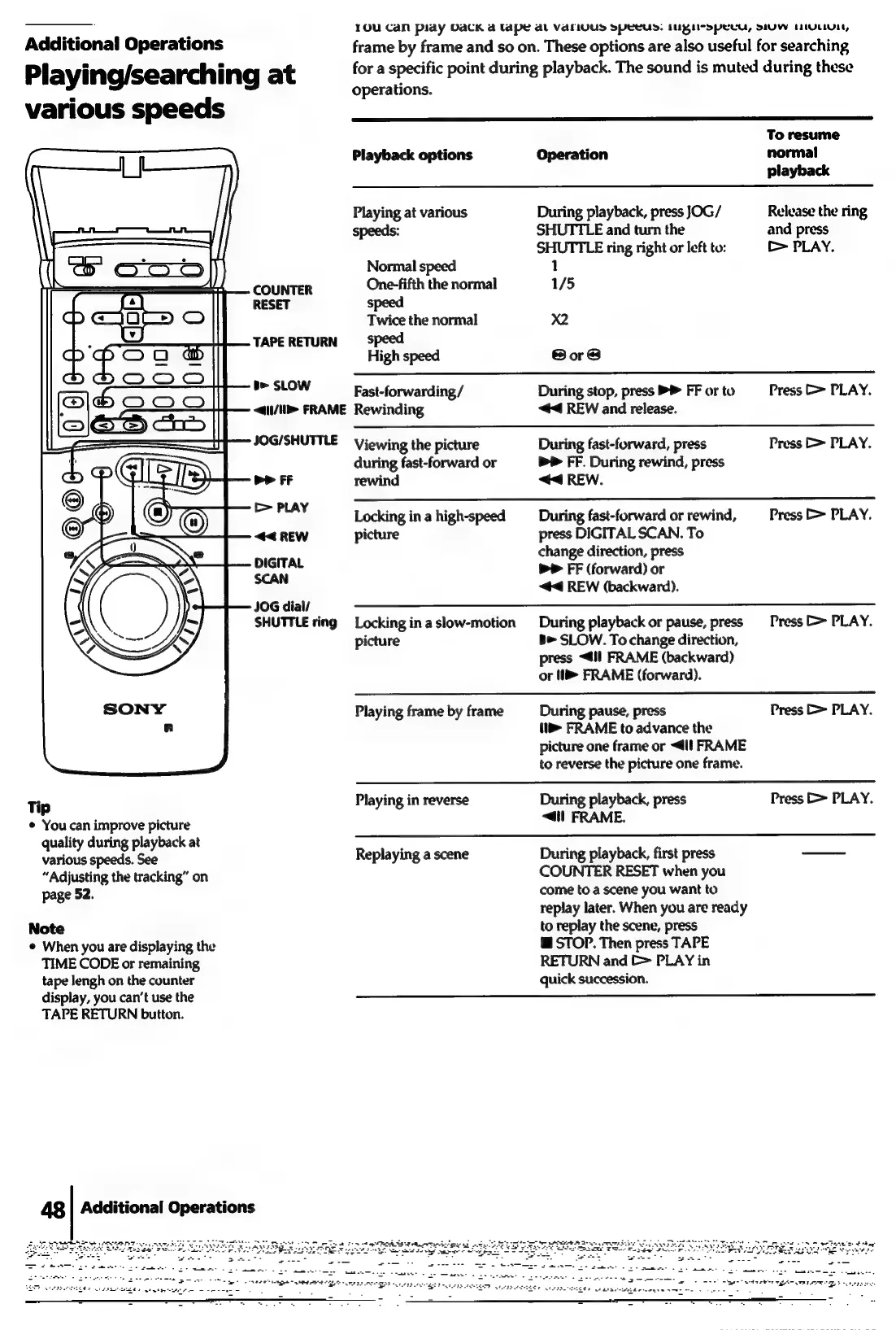
COUNTER
RESET
TAPE
RETURN
be
SLOW
<4(1/\1>
FRAME
Tip
¢
You
can
improve
picture
quality
during
playback
at
various
speeds.
See
“Adjusting
the
tracking”
on
page
52.
Note
¢
When
you
are
displaying
the
TIME
CODE
or
remaining
tape
lengh
on
the
counter
display,
you
can’t
use
the
TAPE
RETURN
button.
48
|
Additional
Operations
10u
Can
piay
ODacKa
tape
Al
VALLUUDS
SPCCUS.
IUPIIrSpeCcu,
SIUW
tULIUEL,
frame
by
frame
and
so
on.
These
options
are
also
useful
for
searching
for
a
specific
point
during
playback.
The
sound
is
muted
during
these
operations.
To
resume
Playback
options
Operation
normal
playback
Playing
at
various
During
playback,
press
JOG/
Release
the
ring
speeds:
SHUTTLE
and
turn
the
and
press
SHUTTLE
ring
right
or
left
to:
[>
PLAY.
Normal
speed
1
One-fifth
the
normal
1/5
speed
Twice
the
normal
X2
speed
High
speed
Sore
Fast-forwarding/
During
stop,
press
PP
FF
or
to
Press
PLAY.
Rewinding
<4
REW
and
release.
Viewing
the
picture
During
fast-forward,
press
Press
&
PLAY.
during
fast-forward
or
bP
FF.
During
rewind,
press
rewind
<4
REW.
Locking
in
a
high-speed
During
fast-forward
or
rewind,
Press
D>
PLAY.
picture
press
DIGITAL
SCAN.
To
change
direction,
press
bP
FF
(forward)
or
<4
REW
(backward).
Locking
inaslow-motion
During
playback
or
pause,
press
=
Press
b>
PLAY.
picture
b>
SLOW.
To
change
direction,
press
<@il
FRAME
(backward)
or
11
FRAME
(forward).
Playing
frame
by
frame
During
pause,
press
Press
>
PLAY.
(tb
FRAME
to
advance
the
picture
one
frame
or
<4ll
FRAME
to
reverse
the
picture
one
frame.
Playing
in
reverse
During
playback,
press
Press
>
PLAY.
<4.
FRAME.
Replaying
a
scene
During
playback,
first
press
COUNTER
RESET
when
you
come
to
a
scene
you
want
to
replay
later.
When
you
are
ready
to
replay
the
scene,
press
@
STOP.
Then
press
TAPE
RETURN
and
[>
PLAY
in
quick
succession.

Related product manuals