EasyManua.ls Logo

Sony EV-S7000 - Assemble editing

Sony EV-S7000
84 pages
Print Icon
To Next Page IconTo Next Page
To Previous Page IconTo Previous Page
Loading...
Assemble
editing
Tips
©
If
the
playback
VCR
you're
using
does
not
have
the
TIME
CODE
WRITE
function
but
only
a
real-time
counter,
precise
editing
cannot
be
guaranteed.
For
the
TIME
CODE
WRITE
function
to
work
correctly,
you
must
enter
the
time
code
on
the
entire
portion
of
the
tape
you
want
to
edit.
When
using
the
TIME
CODE
WRITE
function,
you
can
easily
search
for
a
desired
event
as
each
frame
is
given
a
readable
code
signal.
Notes
¢
The
TIME
CODE
WRITE
function
on
this
VCR
and
that
on
professional-level
VCRs
are
not
compatible.
¢
If
you
press
another
button
while
writing
the
time
code,
writing
stops
automatically.
If
you
use
a
tape
that
has
been
recorded
in
both
SP
and
LP
tape
speeds,
the
TIME
CODE
WRITE
function
may
not
work
properly.
If
you
connect
to
a
video
camera
that
shows
streaks
or
snow
when
freezing
the
picture,
the
text
on
the
screen
may
be
difficult
to
read.
Make
your
editing
decisions
visually
to
ensure
that
the
events
you
want
to
edit
are
precisely
aligned.
When
using
the
TIME
CODE
WRITE
function,
a
black
band
may
appear
at
the
bottom
of
the
screen.
This
is
not
an
indication
of
a
malfunction.
This
black
band
will
not
appear
on
the
events
you
are
going
to
edit.
66
|
Editing
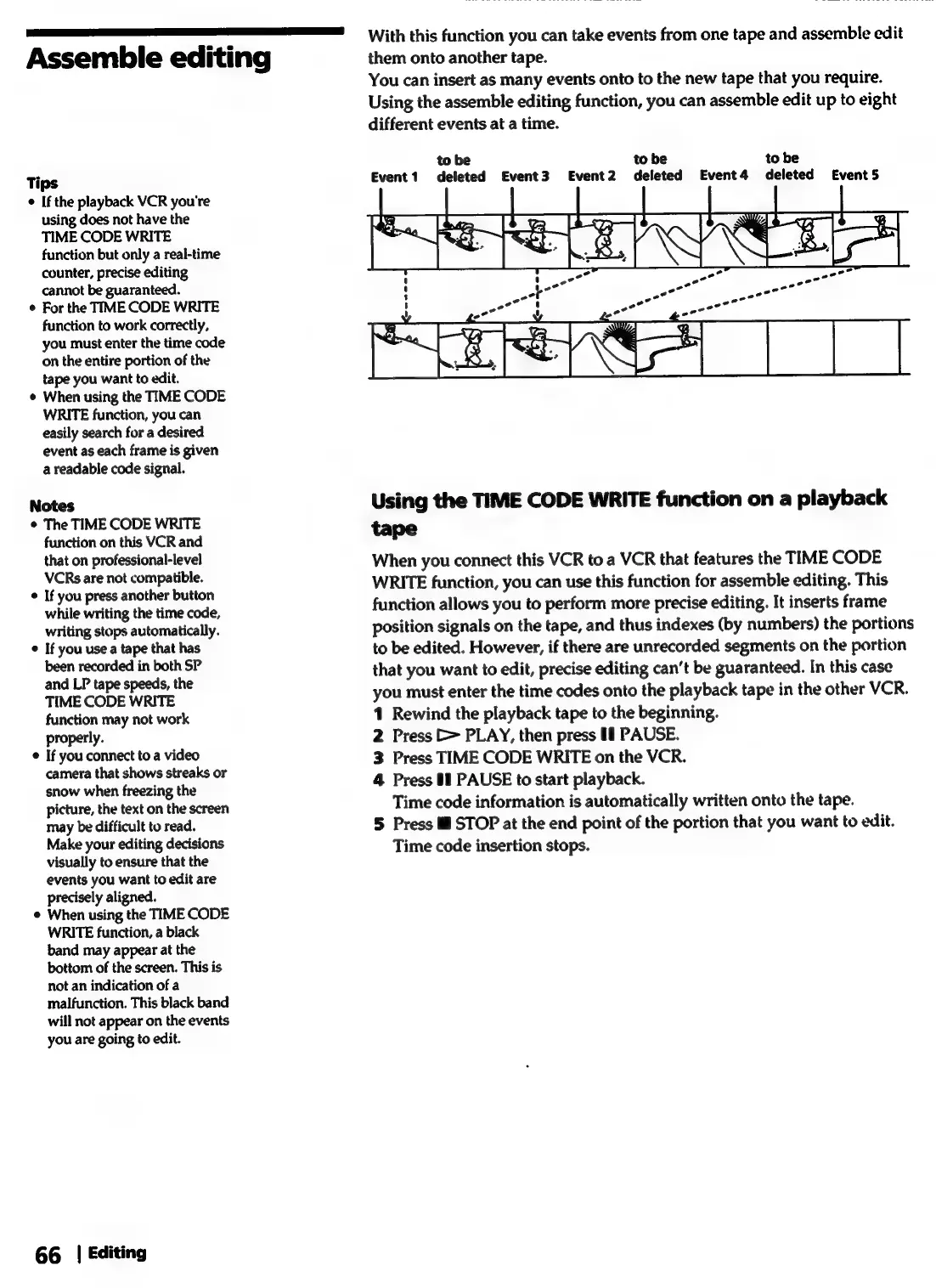
With
this
function
you
can
take
events
from
one
tape
and
assemble
edit
them
onto
another
tape.
You
can
insert
as
many
events
onto
to
the
new
tape
that
you
require.
Using
the
assemble
editing
function,
you
can
assemble
edit
up
to
eight
different
events
at
a
time.
to
be
deleted
Event
3
to
be
to
be
Event
1
Event2
deleted
Event4
deleted
€Event5
Using
the
TIME
CODE
WRITE
function
on
a
playback
tape
When
you
connect
this
VCR
to
a
VCR
that
features
the
TIME
CODE
WRITE
function,
you
can
use
this
function
for
assemble
editing.
This
function
allows
you
to
perform
more
precise
editing.
It
inserts
frame
position
signals
on
the
tape,
and
thus
indexes
(by
numbers)
the
portions
to
be
edited.
However,
if
there
are
unrecorded
segments
on
the
portion
that
you
want
to
edit,
precise
editing
can’t
be
guaranteed.
In
this
case
you
must
enter
the
time
codes
onto
the
playback
tape
in
the
other
VCR.
1
Rewind
the
playback
tape
to
the
beginning.
2
Press
>
PLAY,
then
press
1!
PAUSE.
3
Press
TIME
CODE
WRITE
on
the
VCR.
4
Press
#1
PAUSE
to
start
playback.
Time
code
information
is
automatically
written
onto
the
tape.
5
Press
Ml
STOP
at
the
end
point
of
the
portion
that
you
want
to
edit.
Time
code
insertion
stops.