EasyManua.ls Logo

Sony EV-S7000 - Additional Information; General Setup Information

Sony EV-S7000
84 pages
Print Icon
To Next Page IconTo Next Page
To Previous Page IconTo Previous Page
Loading...
Setung
tne
Kr
UNIT
Additional
information
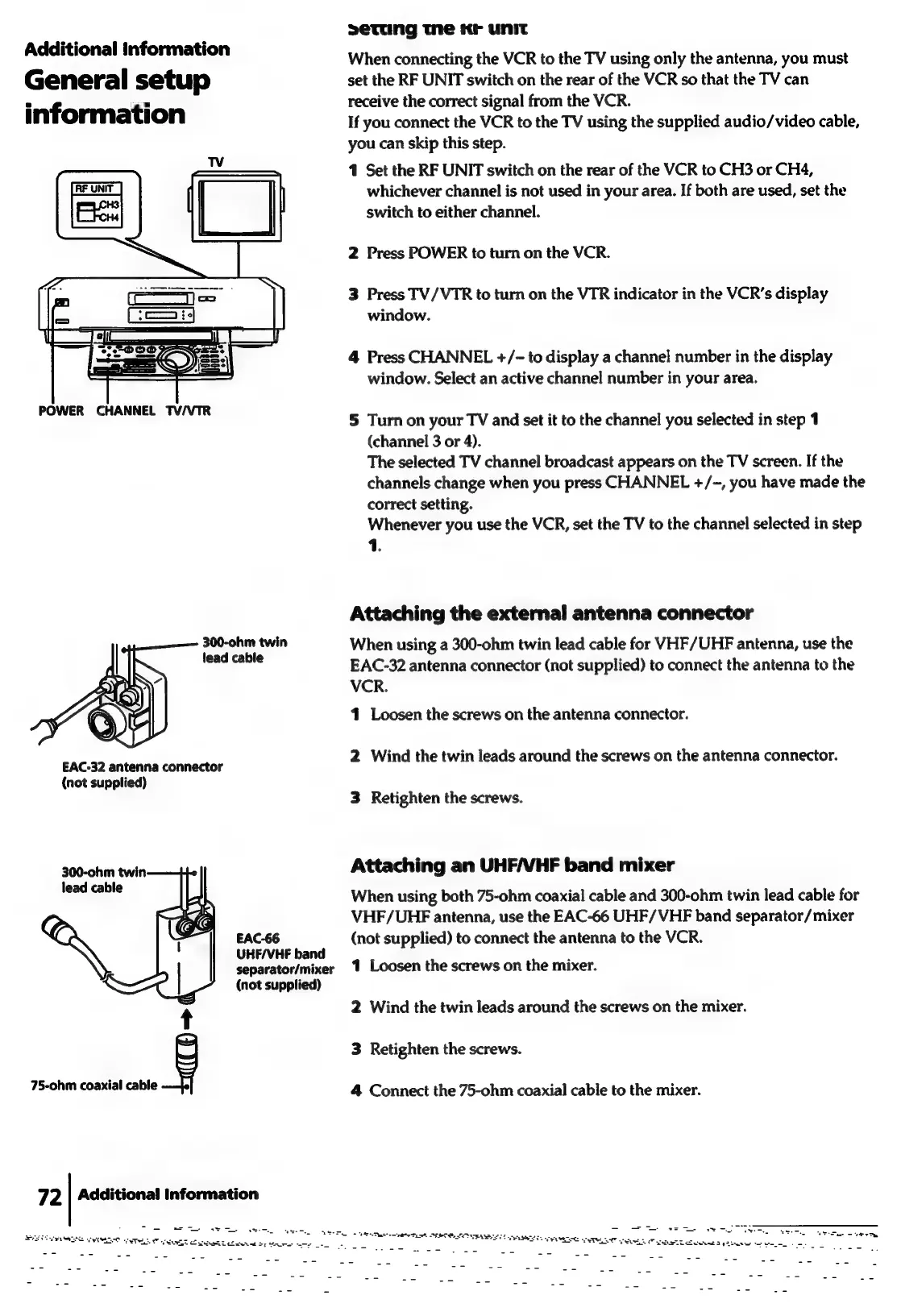
When
connecting
the
VCR
to
the
TV
using
only
the
antenna,
you
must
General
setup
set
the
RF
UNIT
switch
on
the
rear
of
the
VCR
so
that
the
TV
can
inf
ti
receive
the
correct
signal
from
the
VCR.
inrormation
If
you
connect
the
VCR
to
the
TV
using
the
supplied
audio/video
cable,
you
can
skip
this
step.
1
Set
the
RF
UNIT
switch
on
the
rear
of
the
VCR
to
CH3
or
CH4,
whichever
channel
is
not
used
in
your
area.
If
both
are
used,
set
the
switch
to
either
channel.
2
Press
POWER
to
turn
on
the
VCR.
3
Press
TV/VTR
to
turn
on
the
VTR
indicator
in
the
VCR’s
display
window.
4
Press
CHANNEL
+/-
to
display
a
channel
number
in
the
display
window.
Select
an
active
channel
number
in
your
area.
POWER
CHANNEL
TV/VTR
2
5
Turn
on
your
TV
and
set
it
to
the
channel
you
selected
in
step
1
(channel
3
or
4).
The
selected
TV
channel
broadcast
appears
on
the
TV
screen.
If
the
channels
change
when
you
press
CHANNEL
+/~,
you
have
made
the
correct
setting.
Whenever
you
use
the
VCR,
set
the
TV
to
the
channel
selected
in
step
1.
Attaching
the
external
antenna
connector
ane
oe
twin
When
using
a
300-ohm
twin
lead
cable
for
VHF/UHF
antenna,
use
the
eed
abe
EAC-32
antenna
connector
(not
supplied)
to
connect
the
antenna
to
the
VCR.
41
Loosen
the
screws
on
the
antenna
connector.
2
Wind
the
twin
leads
around
the
screws
on
the
antenna
connector.
EAC-32
antenna
connector
(not
supplied)
3
Retighten
the
screws.
300-ohm
twin
Attaching
an
UHF/VHF
band
mixer
ane
When
using
both
75-ohm
coaxial
cable
and
300-ohm
twin
lead
cable
for
VHF/UHF
antenna,
use
the
EAC-66
UHF/VHF
band
separator/
mixer
EAC-66
(not
supplied)
to
connect
the
antenna
to
the
VCR.
UHE/VHF
band
;
separator/mixer
1
Loosen
the
screws
on
the
mixer.
(not
supplied)
2
Wind
the
twin
leads
around
the
screws
on
the
mixer.
g
3
Retighten
the
screws.
75-ohm
coaxial
cable
4
Connect
the
75-ohm
coaxial
cable
to
the
mixer.
Additional
Information
72
ied
a
eee
asa
lene
eT
a
etre
ech
Te
SUE
EE
Loe
band
Ee
gt
eee
Gee
A
a
SESE
EOI
TEL
oe
eee
rere
oe
SEEN
SELE
SS
SRE
ARIE
TLIO
WU
OP
ie
ee
tie
oe

Related product manuals