EasyManua.ls Logo

Sony EV-S7000 - Recording TV programs using the timer

Sony EV-S7000
84 pages
Print Icon
To Next Page IconTo Next Page
To Previous Page IconTo Previous Page
Loading...
Recording
TV
programs
using
the
timer
3
Set
the
time
to
start
recording:
This
section
shows
you
how
to
let
the
VCR
automatically
start
and
stop
recording
TV
programs.
You
can
preset
up
to
eight
programs
within
a
one
month
time
frame.
If
VCR
Plus+
is
available
in
your
area,
see
the
section
“Recording
TV
programs
using
VCR
Plus+”
on
page
44
for
easier
timer
recording.
Before
you
start...
¢
Check
that
the
clock
is
set
correctly.
e
Insert
a
tape
with
its
safety
tab
in
place.
Make
sure
the
tape
is
longer
than
the
total
recording
time.
¢
Turn
on
your
TV
and
tune
in
to
the
VCR.
When
using
a
cable
box,
turn
it
on.
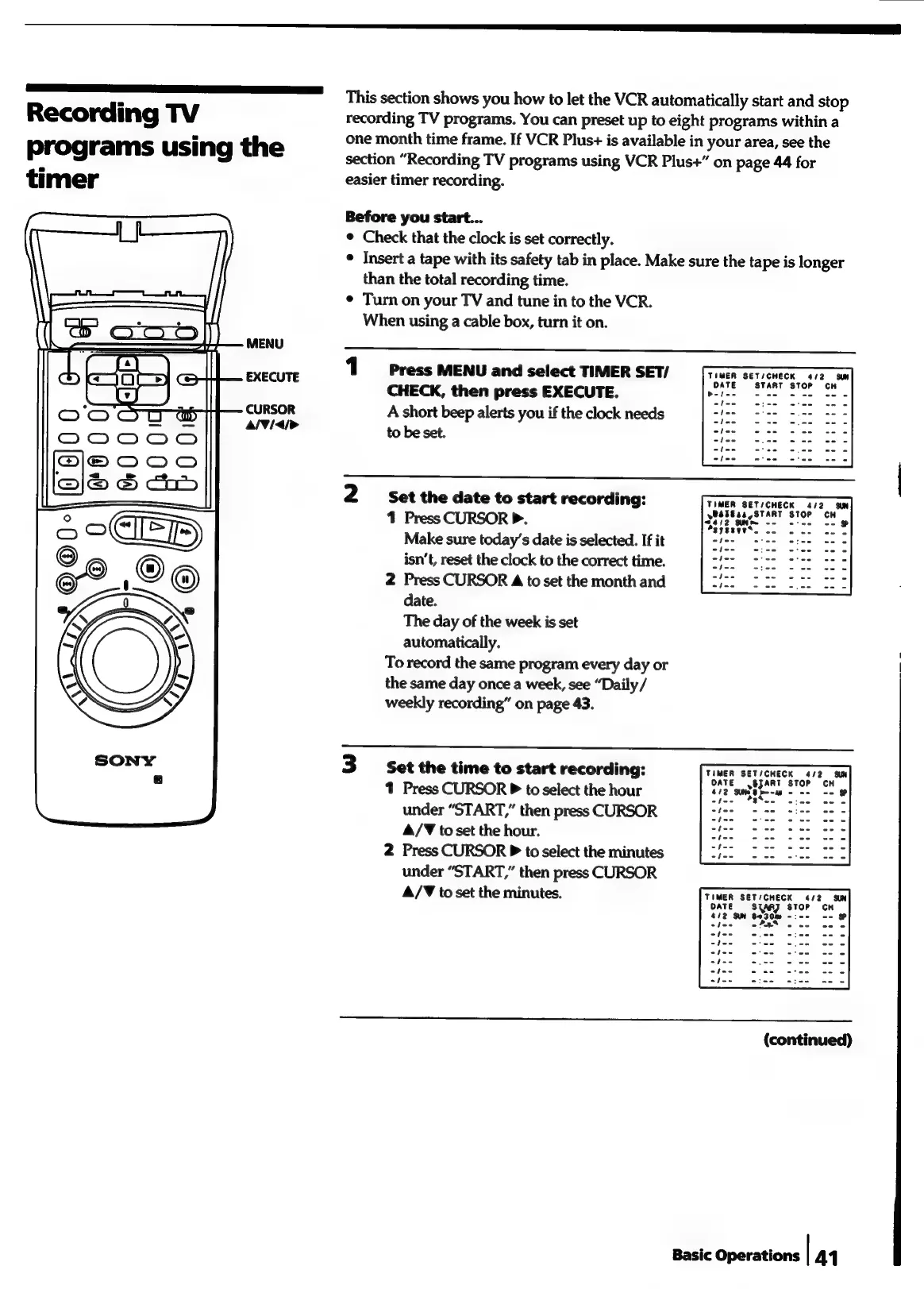
1
Press
MENU
and
select
TIMER
SET/
CHECK,
then
press
EXECUTE.
A
short
beep
alerts
you
if
the
clock
needs
to
be
set.
TIMER
SET/CHECK
4/2
SW
START
STOP
2
Set
the
date
to
start
recording:
TIMER
SET/CHECK
4/2.
ON
1
Press
CURSOR
P.
Brig
aka
Make
sure
today’s
date
is
selected.
If
it
-
isn’t,
reset
the
clock
to
the
correct
time.
2
Press
CURSOR
4
to
set
the
month
and
date.
The
day
of
the
week
is
set
automatically.
To
record
the
same
program
every
day
or
|
the
same
day
once
a
week,
see
“Daily/
weekly
recording”
on
page
43.
TIMER
SET/CHECK
4/2
SUN
ySJART
STOP
1
Press
CURSOR
P
to
select
the
hour
ia
sate
-
under
“START,”
then
press
CURSOR
4/T
to
set
the
hour.
2
Press
CURSOR
P
to
select
the
minutes
under
“START,”
then
press
CURSOR
A/T
to
set
the
minutes.
TIMER
SET/CHECK
4
DATE
STARZ
STOP
412
SIN
8030m
-:--
-
Pas
(continued)
Basic
Operations
|
44

Related product manuals