EasyManua.ls Logo

Sony EV-S7000 - Searching using the index function - index search (continued)

Sony EV-S7000
84 pages
Print Icon
To Next Page IconTo Next Page
To Previous Page IconTo Previous Page
Loading...
Searching
using
the
index
function
index
search
(continued)
Notes
¢
If
the
tape
you
are
using
has
no
index
marks
the
visual
scan
function
doesn’t
work.
e
If
the
first
scene
appears
in
black
and
white
the
other
scenes
may
also
be
in
black
and
white.
¢
After
you
press
VISUAL
SCAN
while
the
tape
is
rewinding,
the
counter
displays
“-:-~:--:~”
¢
When
using
the
visual
scan
function
the
first
scene
on
the
first
few
seconds
of
the
tape
may
not
be
displayed.
¢
If
the
tape
contains
unrecorded
portions
between
scenes,
the
screen
may
turn
black-and-white
during
visual
scan.
56
|
Additional
Operations
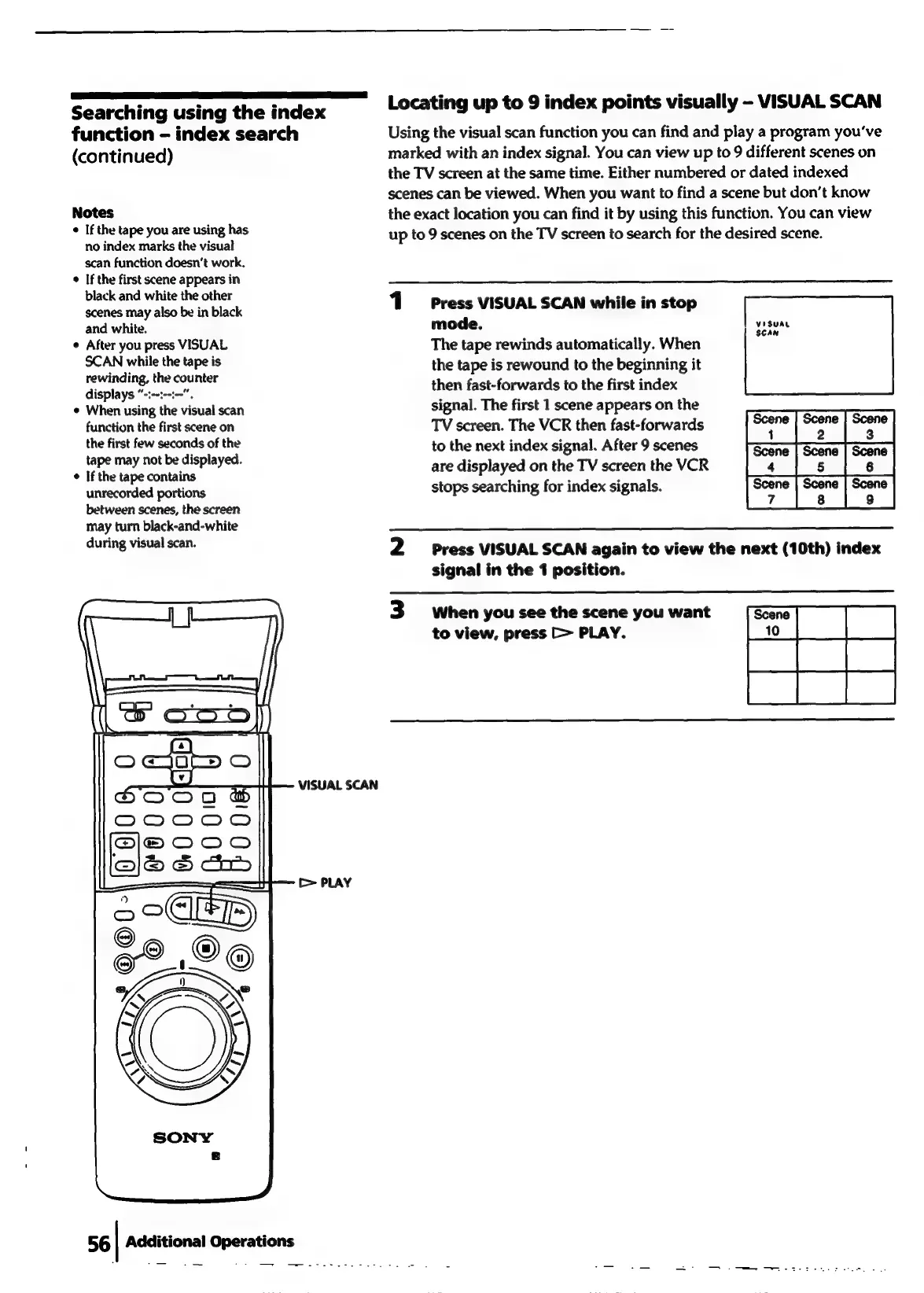
VISUAL
SCAN
Locating
up
to
9
index
points
visually
-
VISUAL
SCAN
Using
the
visual
scan
function
you
can
find
and
play
a
program
you've
marked
with
an
index
signal.
You
can
view
up
to
9
different
scenes
on
the
TV
screen
at
the
same
time.
Either
numbered
or
dated
indexed
scenes
can
be
viewed.
When
you
want
to
find
a
scene
but
don’t
know
the
exact
location
you
can
find
it
by
using
this
function.
You
can
view
up
to
9
scenes
on
the
TV
screen
to
search
for
the
desired
scene.
1
Press
VISUAL
SCAN
while
in
stop
mode.
The
tape
rewinds
automatically.
When
the
tape
is
rewound
to
the
beginning
it
then
fast-forwards
to
the
first
index
signal.
The
first
1
scene
appears
on
the
TV
screen.
The
VCR
then
fast-forwards
to
the
next
index
signal.
After
9
scenes
are
displayed
on
the
TV
screen
the
VCR
stops
searching
for
index
signals.
VisuaL
SCAN
i
2
3
4
§
6
7
8
9
2
siPress
VISUAL
SCAN
again
to
view
the
next
(10th)
index
signal
in
the
1
position.
3
When
you
see
the
scene
you
want
to
view,
press
[>
PLAY.

Related product manuals