EasyManua.ls Logo

Sony EV-S7000 - Additional Operations (continued); Marking index signals; Erasing index signals

Sony EV-S7000
84 pages
Print Icon
To Next Page IconTo Next Page
To Previous Page IconTo Previous Page
Loading...
Notes
¢
When
you
mark
an
index
signal,
the
recorded
sound
may
be
interrupted
and
a
black
bar
appears
on
at
the
bottom
of
the
TV
screen,
but
the
tape
will
not
be
damaged.
Leave
an
interval
between
indices
of
at
least
2
minutes
for
SP
mode,
and
at
least
4
minutes
for
LP
mode,
so
that
the
VCR
can
detect
the
signals
correctly.
If
you
mark
or
erase
an
index
signal
on
a
tape
that
has
been
marked
with
date
codes,
the
date
codes
may
be
erased.
You
can’t
mark
or
erase
index
signals
on
cassettes
that
have
their
safety
tab
in
the
red
position.
Note
©
You
can't
erase
index
signals
that
occur
at
the
beginning
of
the
tape,
or
those
on
tapes
marked
by
a
video
camera
or
other
VCR.
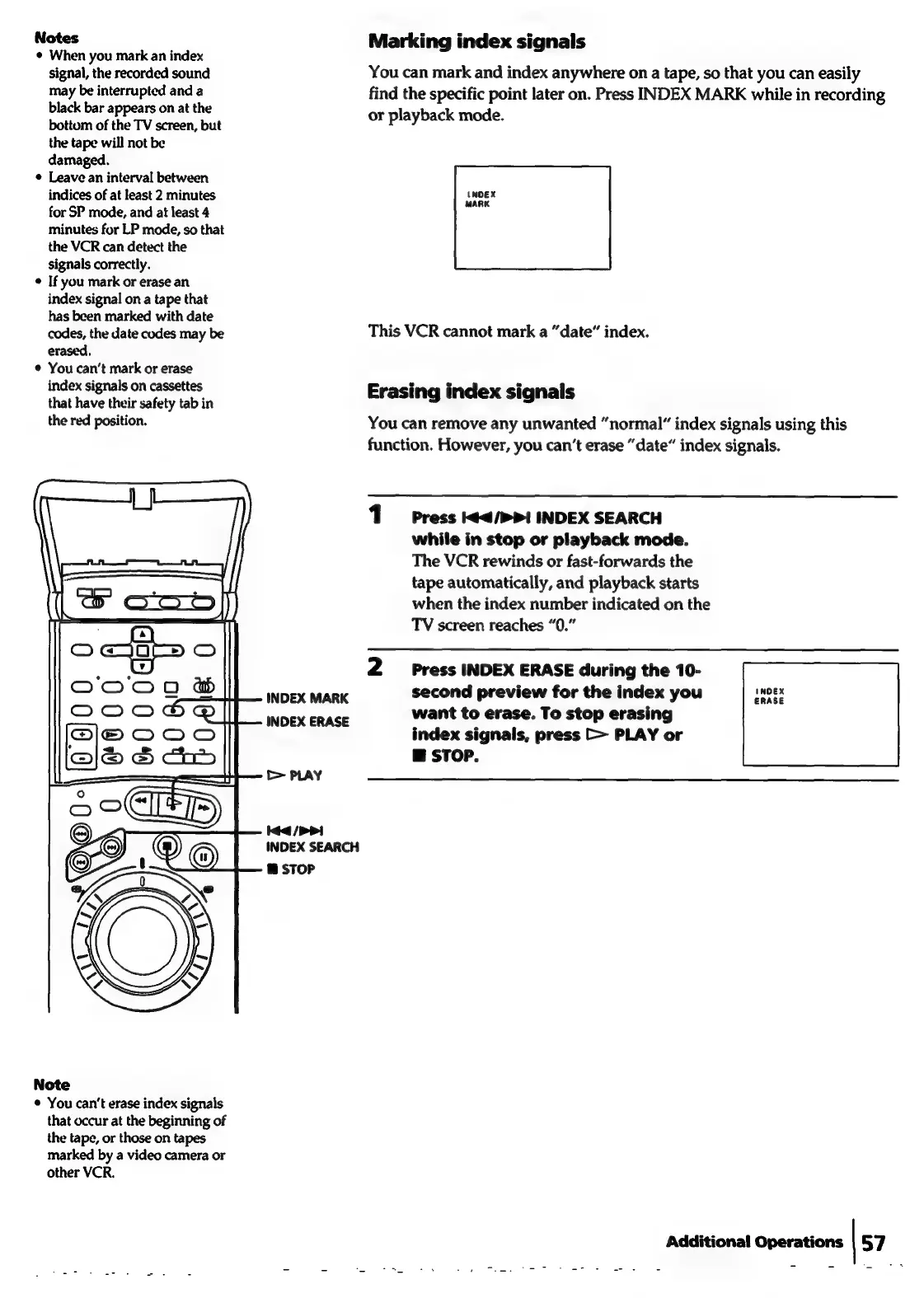
Marking
index
signals
You
can
mark
and
index
anywhere
on
a
tape,
so
that
you
can
easily
find
the
specific
point
later
on.
Press
INDEX
MARK
while
in
recording
or
playback
mode.
This
VCR
cannot
mark
a
“date”
index.
Erasing
index
signals
You
can
remove
any
unwanted
“normal”
index
signals
using
this
function.
However,
you
can’t
erase
“date”
index
signals.
1
Press
44/>>1
INDEX
SEARCH
while
in
stop
or
playback
mode.
The
VCR
rewinds
or
fast-forwards
the
tape
automatically,
and
playback
starts
when
the
index
number
indicated
on
the
TV
screen
reaches
“0.”
2
Press
INDEX
ERASE
during
the
10-
second
preview
for
the
index
you
want
to
erase.
To
stop
erasing
index
signals,
press
>>
PLAY
or
@
STOP.
Additional
Operations
|
57