EasyManua.ls Logo

Sony EV-S7000 - Setting up cable box control

Sony EV-S7000
84 pages
Print Icon
To Next Page IconTo Next Page
To Previous Page IconTo Previous Page
Loading...
Setting
up
cable
box
control
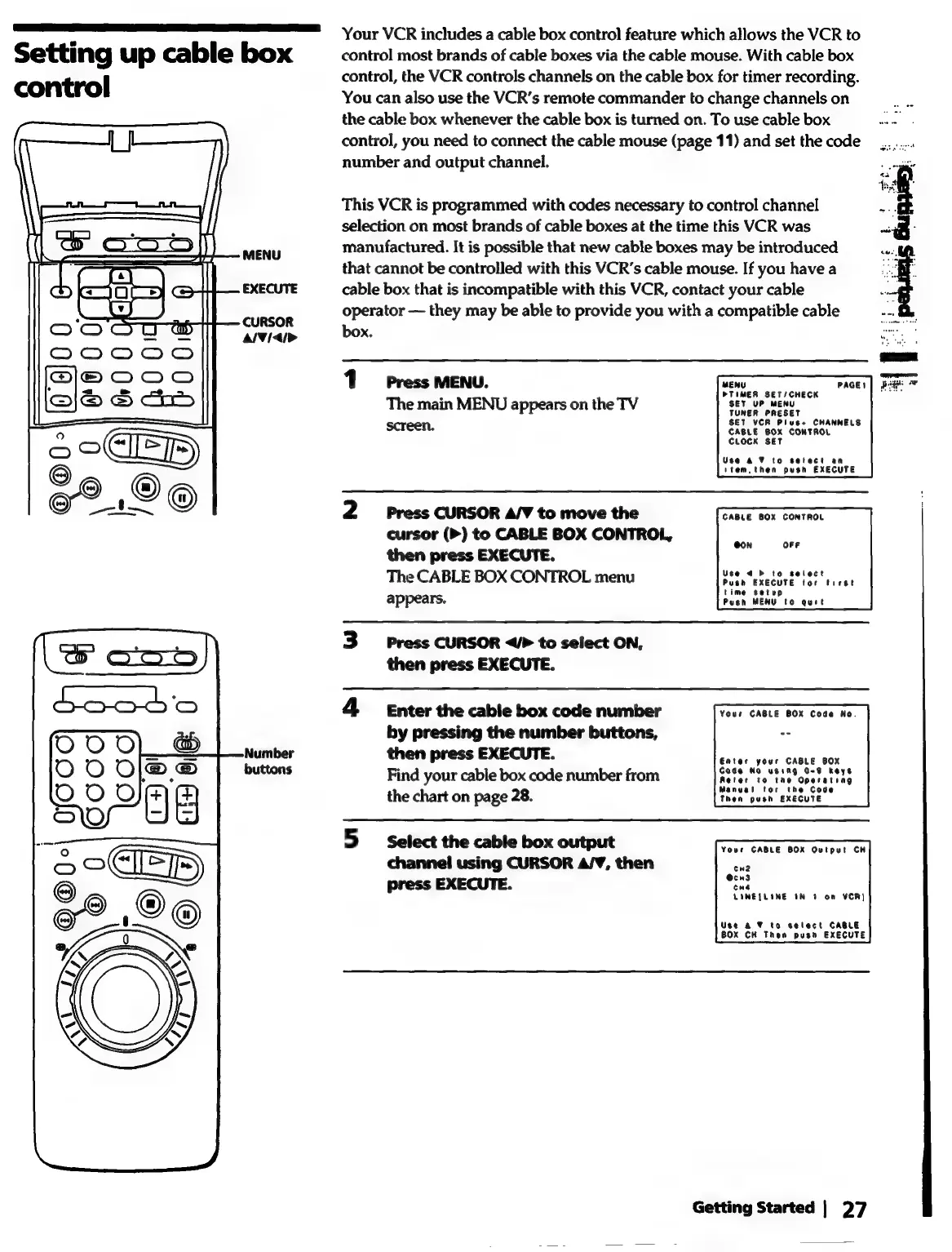
MENU
EXECUTE
CURSOR
al¥
{</>
Your
VCR
includes
a
cable
box
control feature
which
allows
the
VCR
to
control
most
brands
of
cable
boxes
via
the
cable
mouse.
With
cable
box
control,
the
VCR
controls
channels
on
the
cable
box
for
timer
recording.
You
can
also
use
the
VCR’s
remote
commander
to
change
channels
on
the
cable
box
whenever
the
cable
box
is
turned
on.
To
use
cable
box
Paes
control,
you
need
to
connect
the
cable
mouse
(page
11)
and
set
the
code
number
and
output
channel.
This
VCR
is
programmed
with
codes
necessary
to
control
channel
selection
on
most
brands
of
cable
boxes
at
the
time
this
VCR
was
manufactured.
It
is
possible
that
new
cable
boxes
may
be
introduced
that
cannot
be
controlled
with
this
VCR’s
cable
mouse.
If
you
have
a
cable
box
that
is
incompatible
with
this
VCR,
contact
your
cable
operator
—
they
may
be
able
to
provide
you
with
a
compatible
cable
box.
1
Press
MENU.
Pes
neae
|
The
main
MENU
appears
on
the
TV
SET
UP
MENU
TUNER
PRESET
SET
VCR
Plus+
CHANNELS
CABLE
BOX
CONTROL
CLOCK
SET
screen.
Use
& 7
to
setect
an
item,
then
push
EXECUTE
2
Press
CURSOR
A/V
to
move
the
cursor
(>)
to
CABLE
BOX
CONTROL,
then
press
EXECUTE.
The
CABLE
BOX
CONTROL
menu
Posh
EXECUTE
tor
tuest
appears.
Push
MENU
to
quit
CABLE
BOX
CONTROL
3
Press
CURSOR
</>
to
select
ON,
then
press
EXECUTE.
4
Enter
the
cable
box
code
number
Your
GABLE
BOX
Code
No.
by
pressing
the
number
buttons,
23
then
press
EXECUTE.
Enter
your
CABLE
BOX
Find
your
cable
box
code
number
from
Reler
te
the
Operating
the
chart
on
page
28.
Then
pesn
EXECUTE.
3
Select
the
cable
box
output
Fear
canig
son
oriray
hs
channel
using
CURSOR
A/V,
then
cw2
press
EXECUTE.
vent
cua
LINE{LINE
IN
4
On
VCR)
Use
a ¥
to
select
CABLE
BOX
CH
Then push
EXECUTE
Getting
Started
|
27