EasyManua.ls Logo

Sony EV-S7000 - Setting up cable box control (continued)

Sony EV-S7000
84 pages
Print Icon
To Next Page IconTo Next Page
To Previous Page IconTo Previous Page
Loading...
Setting
up
cable
box
control
(continued)
Note
¢
When
CABLE
BOX
CONTROL
is
set
to
ON,
you
can
change
the
input
source
by
pressing
INPUT
SELECT.
However,
you
cannot
change
the
preset
tuner
channels.
28
=
|
Getting
Started
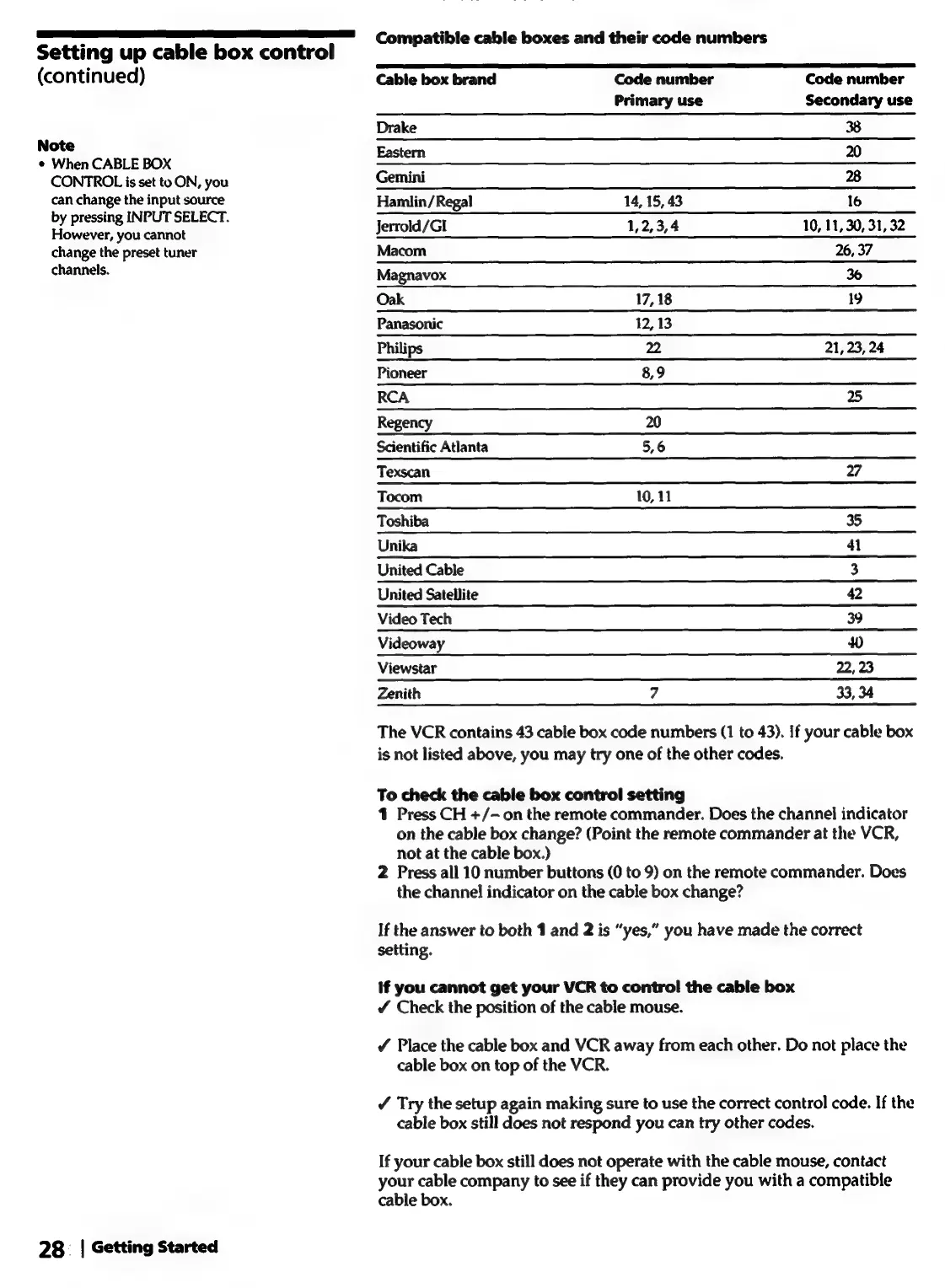
Compatible
cable
boxes
and
their
code
numbers
Cable
box
brand
Code
number
Code
number
Primary
use
Secondary
use
Drake
38
Eastern
20
Gemini
28
Hamlin/Regal
14,
15,
43
16
Jerrold/GI
1,2,3,4
10,
11,
30,
31,
32
Macom
26,
37
Magnavox
36
Oak
17,
18
19
Panasonic
12,
13
Philips
22
21, 23,
24
Pioneer
8,9
RCA
25
Regency
20
Scientific
Atlanta
5,6
Texscan
27
Tocom
10,
11
Toshiba
35
Unika
41
United
Cable
3
United
Satellite
42
Video
Tech
39
Videoway
Ww
Viewstar
22,
23
Zenith
7
33,
34
The
VCR
contains
43
cable
box
code
numbers
(1
to
43).
If
your
cable
box
is
not
listed
above,
you
may
try
one
of
the
other
codes.
To
check
the
cable
box
control
setting
1
Press
CH
+/-
on
the
remote
commander.
Does
the
channel
indicator
on
the
cable
box
change?
(Point
the
remote
commander
at
the
VCR,
not
at
the
cable
box.)
2
Press
all
10
number
buttons
(0
to
9)
on
the
remote
commander.
Does
the
channel
indicator
on
the
cable
box
change?
If
the
answer
to
both
1
and
2
is
“yes,”
you
have
made
the
correct
setting.
If
you
cannot
get
your
VCR
to
control
the
cable
box
Check
the
position
of
the
cable
mouse.
¢
Place
the
cable
box
and
VCR
away
from
each
other.
Do
not
place
the
cable
box
on
top
of
the
VCR.
/
Try
the
setup
again
making
sure
to
use
the
correct
control
code.
If
the
cable
box
still
does
not
respond
you
can
try
other
codes.
If
your
cable
box
still
does
not
operate
with
the
cable
mouse,
contact
your
cable
company
to
see
if
they
can
provide
you
with
a
compatible
cable
box.

Related product manuals