EasyManua.ls Logo

Sony EV-S7000 - Adjusting the picture

Sony EV-S7000
84 pages
Print Icon
To Next Page IconTo Next Page
To Previous Page IconTo Previous Page
Loading...
7
: :
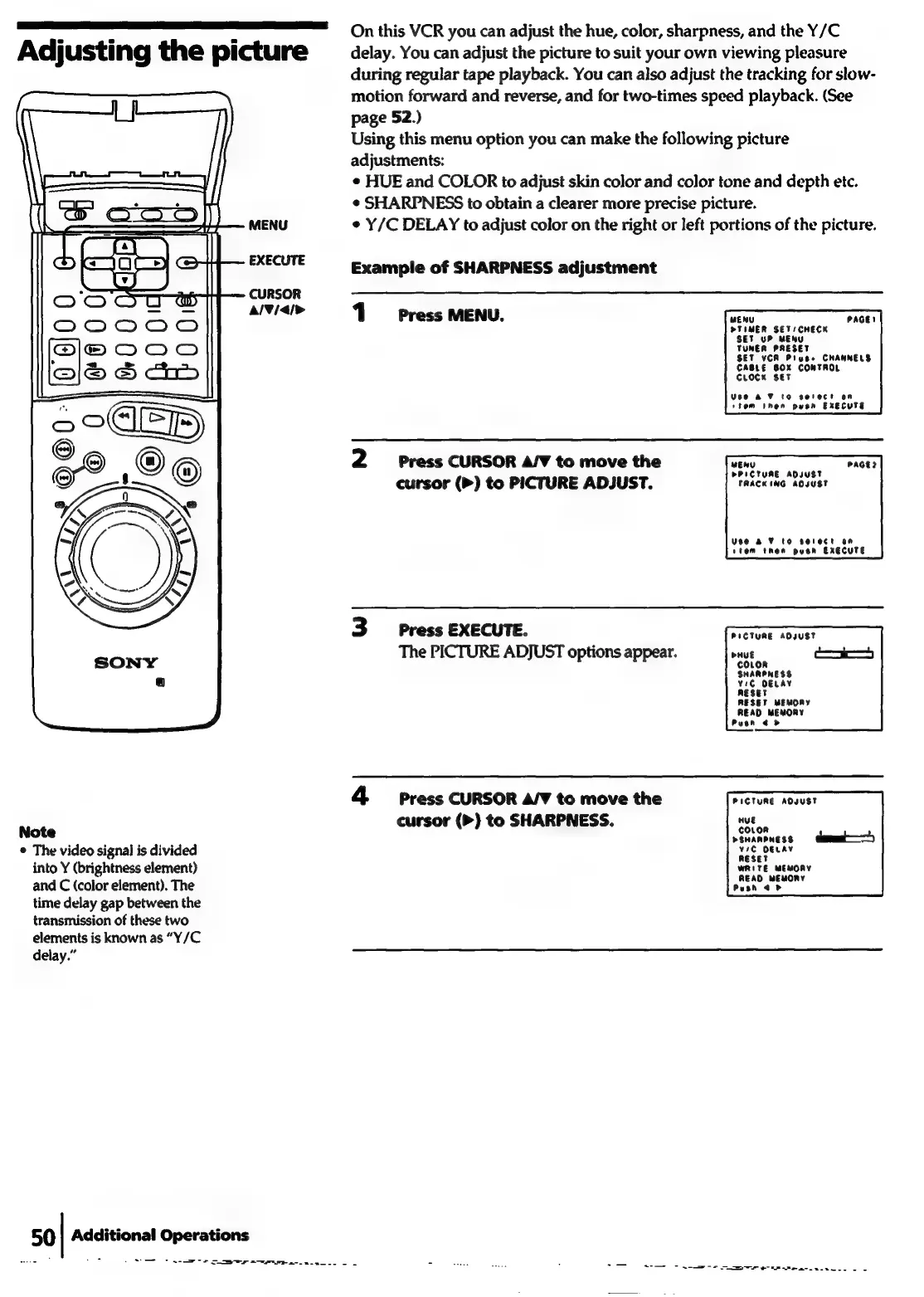
On
this
VCR
you
can
adjust
the
hue,
color,
sharpness,
and
the
Y/C
Adjusting
the
picture
delay.
You
can
adjust
the
picture
to
suit
your
own
viewing
pleasure
during
regular
tape
playback.
You
can
also
adjust
the
tracking
for
slow-
motion
forward
and
reverse,
and
for
two-times
speed
playback.
(See
page
52.)
Using
this
menu
option
you
can
make
the
following
picture
adjustments:
¢
HUE
and
COLOR
to
adjust
skin
color
and
color
tone
and
depth
etc.
¢
SHARPNESS
to
obtain
a
clearer
more
precise
picture.
MENU
¢
Y/C
DELAY
to
adjust
color
on
the
right
or
left
portions
of
the
picture.
EXECUTE
Example
of
SHARPNESS
adjustment
CURSOR
alVial>
1
Press
MENU.
CAGE!
MENU
PTIMER
SETS
CHECK
P
MENU
et
yi
wi
TUNER
PRESET
SET
VCR
Piuse
CHANNELS
CABLE
BOX
CONTROL
CcLrocKn
set
Use
&F
to
serect
on
stom
Inen
pysn
EXECUTE
PAGE?
2
Press
CURSOR
A/V
to
move
the
MENU
cursor
(>)
to
PICTURE
ADJUST.
"TRACKING
ADJUST
Use
a
¥
to
serect
an
stem
then
pyusen
EXECUTE
3
Press
EXECUTE.
PICTURE
ADJUST
The
PICTURE
ADJUST
options
appear.
ei
SHARPNESS
¥iC
DELAY
RESET
MEMORY
READ
MEMORY
Puen
<>
4
Press
CURSOR
A/V
to
move
the
PICTURE
AOJUST
HUE
Note
cursor
(>)
to
SHARPNESS.
®
The
video
signal
is
divided
into
Y
(brightness
element)
WRITE
WEMORY
and
C
(color
element).
The
Barras
time
delay
gap
between
the
transmission
of
these
two
elements
is
known
as
“Y/C
delay.”
50
|
Additional
Operations
Nore
Soe
ae
o-
ee
s
e
Tr
eer
enter
ele.
8

Related product manuals