EasyManua.ls Logo

Sony EV-S7000 - Page 55

Sony EV-S7000
84 pages
Print Icon
To Next Page IconTo Next Page
To Previous Page IconTo Previous Page
Loading...
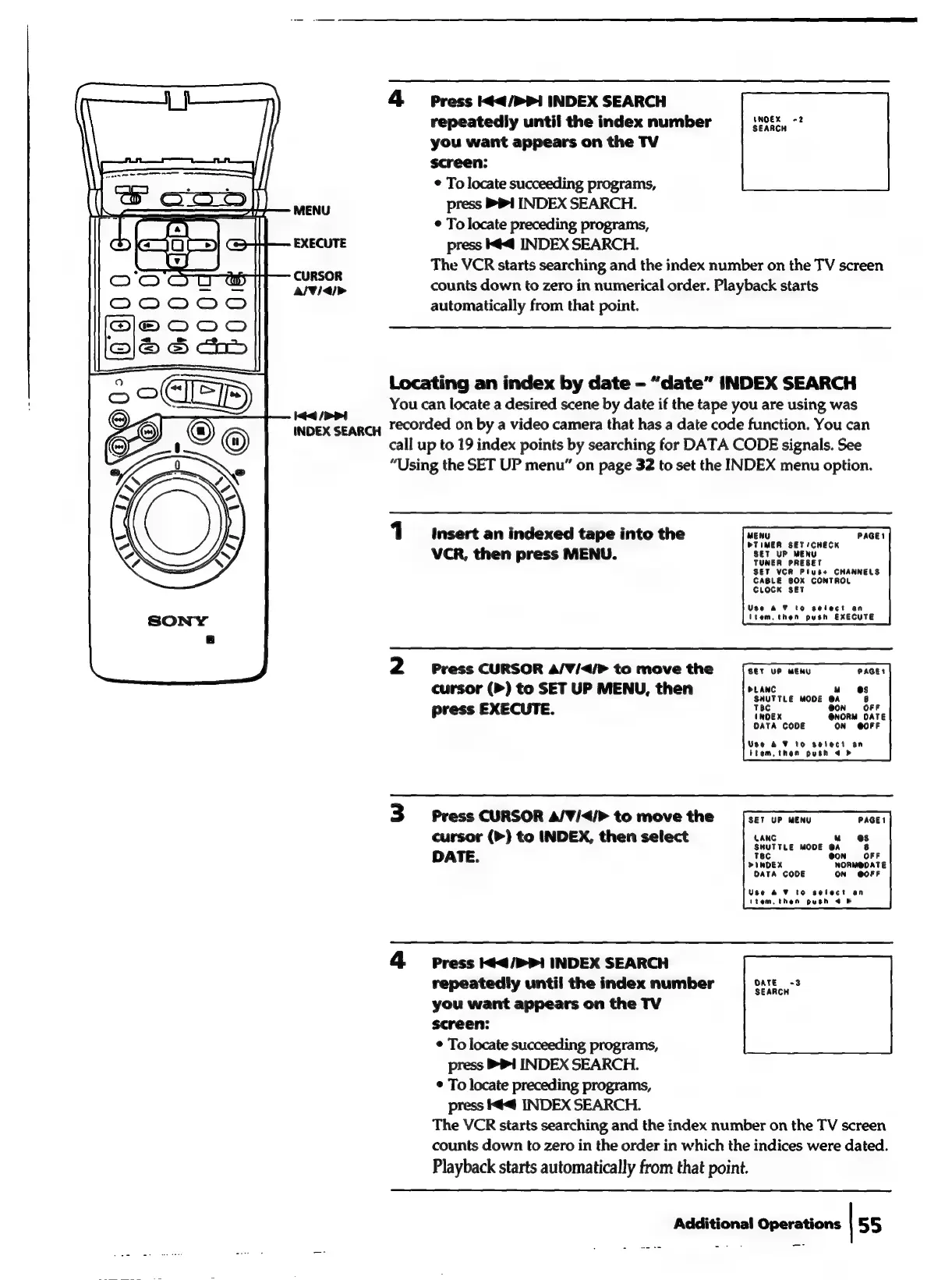
4
Press
I¢</>>1
INDEX
SEARCH
repeatedly
until
the
index
number
sean
you
want
appears
on
the
TV
screen:
¢
To
locate
succeeding
programs,
MENU
press
1
INDEX
SEARCH.
*
To
locate
preceding
programs,
EXECUTE
press
@<@
INDEX
SEARCH.
The
VCR
starts
searching
and
the
index
number
on
the
TV
screen
CURSOR
:
AV/<4/>
counts
down
to
zero
in
numerical
order.
Playback
starts
automatically
from
that
point.
Locating
an
index
by
date
-
“date”
INDEX
SEARCH
You
can
locate
a
desired
scene
by
date
if
the
tape
you
are
using
was
id
/>
>i
$
INDEX
SEARCH
Tecorded
on
by
a
video
camera
that
has
a
date
code
function.
You
can
call
up
to
19
index
points
by
searching
for
DATA
CODE
signals.
See
“Using
the
SET
UP
menu”
on
page
32
to
set
the
INDEX
menu
option.
1
Insert
an
indexed
tape
into
the
MENU
PAGE!
PTIMER
SET/CHECK
SET
UP
MENU
VCR,
then
press
MENU.
SET
UP
MENU
SET
VCR
Plus+
CHANNELS
CABLE
BOX
CONTROL
CLOCK
SET
Use
a7
to
select
an
item.then
push
EXECUTE
2
Press
CURSOR
A/V¥/<4/>
to
move
the
SET
UP
MENU
cursor
(>)
to
SET
UP
MENU,
then
press
EXECUTE.
PLANC
u“
SHUTTLE
MODE
@A
Tec
@On
(NOEX
OATA
CODE
ON
@OFF
Use
&
¥
to
seteci
an
item,
then
push
4 b
3
Press
CURSOR
A/V¥/</>
to
move
the
SET
UP
MENU
PAGE!
cursor
(>)
to
INDEX,
then
select
DATE.
LANG
uw
6@sS
SHUTTLE
MODE
@A
8
Tec
@ON
OFF
PINDEX
NORMODATE
DATA
CODE
ON
GOFF
Use
&2
V7
to
select
an
(tem.
then
push
4
&
4
Press
I¢4/>>1
INDEX
SEARCH
repeatedly
until
the
index
number
you
want
appears
on
the
TV
screen:
*
To
locate
succeeding
programs,
press
BPI
INDEX
SEARCH.
¢
To
locate
preceding
programs,
press
ké<@
INDEX
SEARCH.
The
VCR
starts
searching
and
the
index
number
on
the
TV
screen
counts
down
to
zero
in
the
order
in
which
the
indices
were
dated.
Playback
starts
automatically
from
that
point.
Additional
Operations
|
55

Related product manuals