EasyManua.ls Logo

Sony EV-S7000 - Searching using the index function - index search

Sony EV-S7000
84 pages
Print Icon
To Next Page IconTo Next Page
To Previous Page IconTo Previous Page
Loading...
Searching
using
the
index
function
—
index
search
Notes
¢
You
can’t
mark
an
index
signal
when
you
start
recording
from
recording
pause.
However,
while
in
recording
pause,
you
can
mark
an
index
signal
if
the
channel
is
changed.
°
Leave
an
interval
of
at
least
2
minutes
for
SP
mode,
and
at
least
4
minutes
for
LP
mode,
between
indices
so
that
the
VCR
can
detect
the
signals
correctly.
°
An
index
signals
is
a
10-
second
preview,
and
the
last
scene
of
this
10-second
interval
remains
displayed
on
the
TV
screen
after
the
preview.
54
|
Additional
Operations
MENU
EXECUTE
CURSOR
Al¥/<4i>
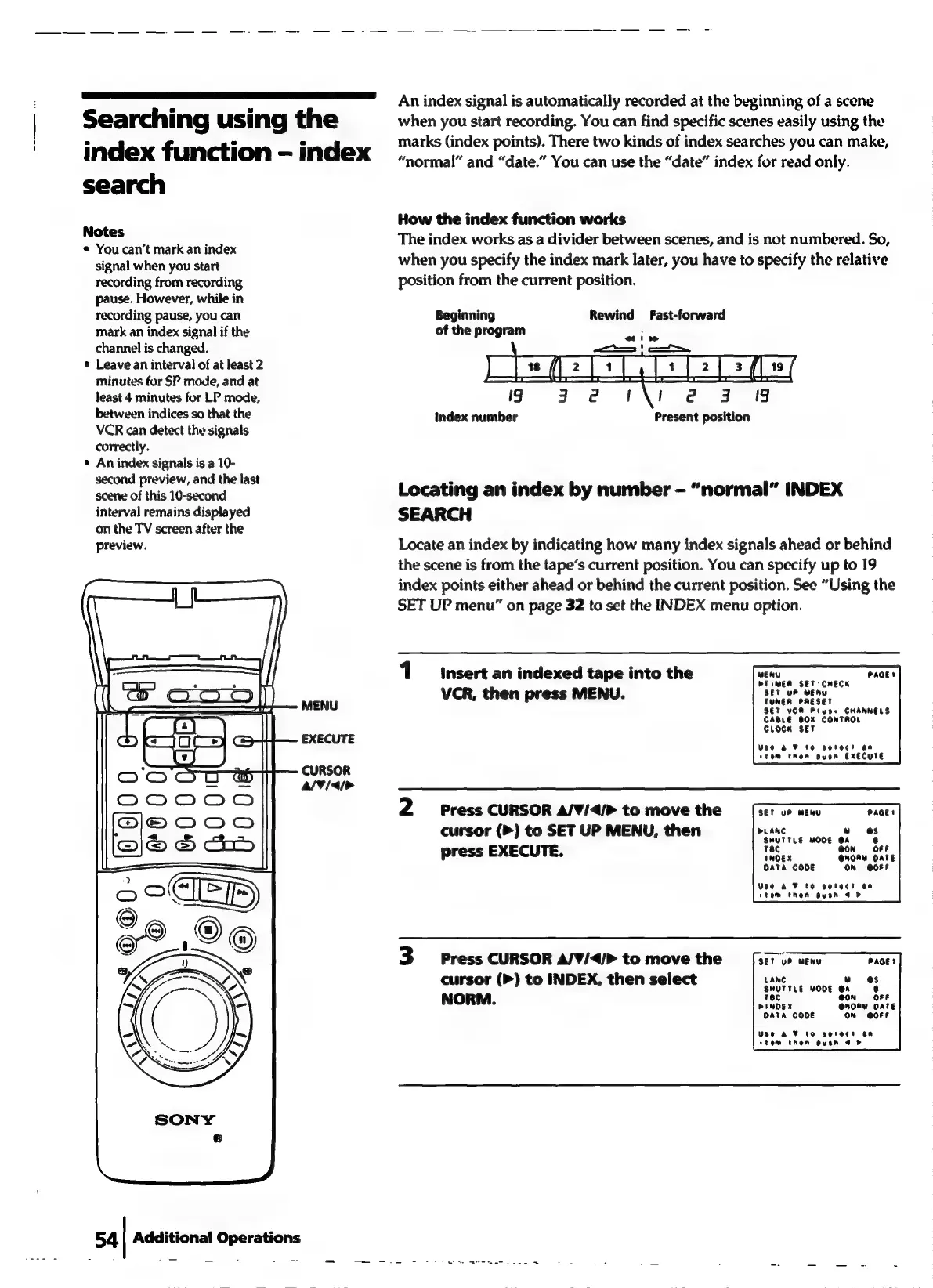
An
index
signal
is
automatically
recorded
at
the
beginning
of
a
scene
when
you
start
recording.
You
can
find
specific
scenes
easily
using
the
marks
(index
points).
There
two
kinds
of
index
searches
you
can
make,
“normal”
and
“date.”
You
can use
the
“date”
index
for
read
only.
How
the
index
function
works
The
index
works
as
a
divider
between
scenes,
and
is
not
numbered.
So,
when
you
specify
the
index
mark
later,
you
have
to
specify
the
relative
position
from
the
current
position.
Rewind
Fast-forward
Beginning
of
the
program
19
Index
number
Present
position
Locating
an
index
by
number
-
“normal”
INDEX
SEARCH
Locate
an
index
by
indicating
how
many
index
signals
ahead
or
behind
the
scene
is
from
the
tapes
current
position.
You
can
specify
up
to
19
index
points
either
ahead
or
behind
the
current
position.
See
“Using
the
SET
UP
menu”
on
page
32
to
set
the
INDEX
menu
option.
1
insert
an
indexed
tape
into
the
weny
PAGE!
DTIMEA
SET:
CHECK
SET
UP
WENY
VCR,
then
press
MENU.
a
be
SET
VER
Pluse
CHANNELS
CABLE
BOX
CONTROL
CLOCK
SET
Use
a2
¥
10
Serec!
an
stem
then
oven
EXECUTE
2
Press
CURSOR
A/V¥/<4/>
to
move
the
SET
uP
MENU
cursor
(>)
to
SET
UP
MENU,
then
>
press
EXECUTE.
LANC
w
SHUTTLE
MODE
OA
TEC
@
INOEX
Oata CODE
ON
@OFF
Use
2
V7
to
select
en
tem
then
oysn
4
>
3
Press
CURSOR
A/V/</>
to
move
the
cursor
(>)
to
INDEX,
then
select
NORM.
SET
UP
MENY
PAGE)
LANC
»
@s
SHUTTLE
MODE
@A
6
Tec
iN
FF
PINOEX
@NORY
DATE
Data CODE
ON
@OFF
Use
aA
V¥
to
serect
an
stem
Then
OVEN
4 &