EasyManua.ls Logo

Sony EV-S7000 - Hookup 3: VCR setup; Hookup 3: VCR Plus+ channel setup

Sony EV-S7000
84 pages
Print Icon
To Next Page IconTo Next Page
To Previous Page IconTo Previous Page
Loading...
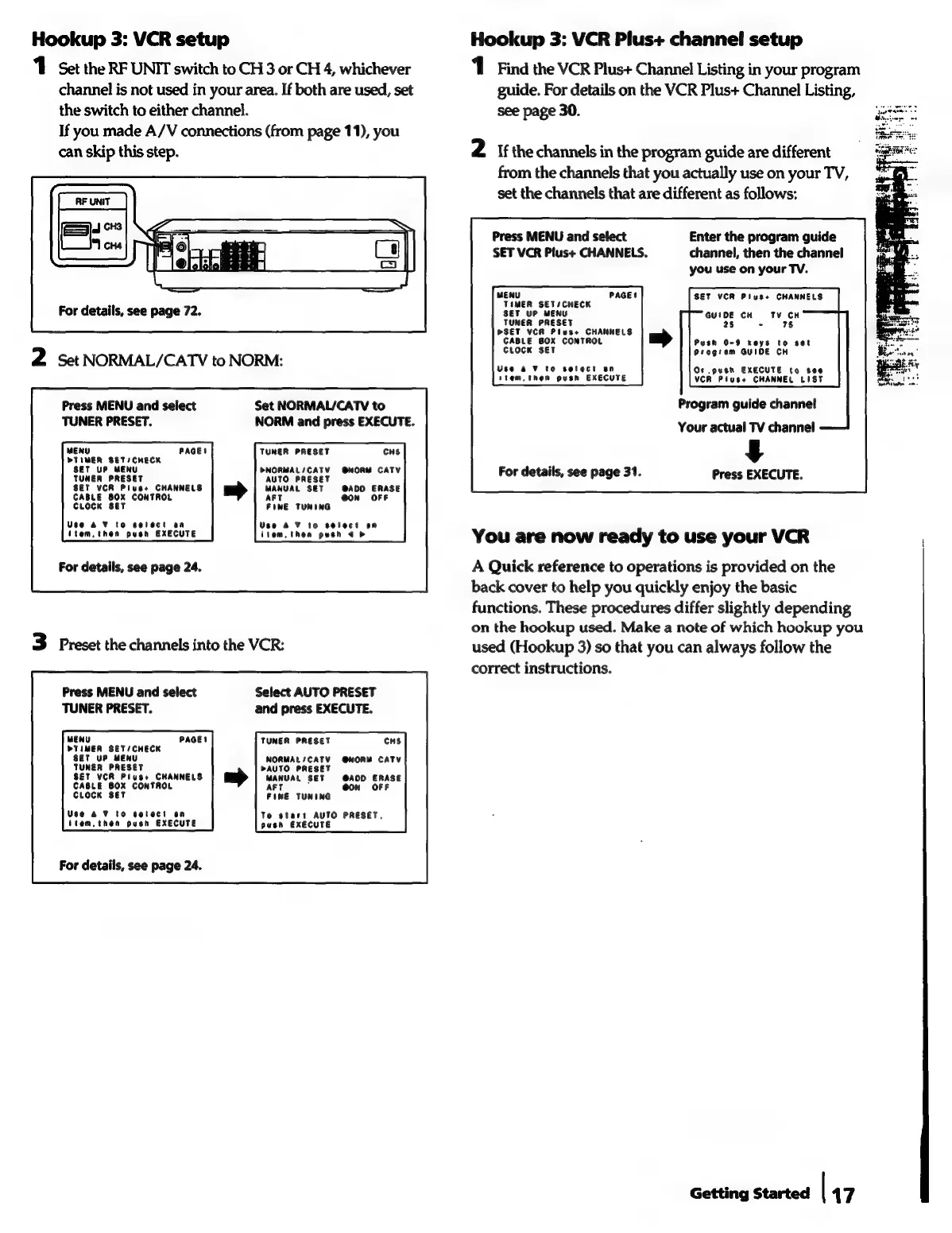
Hookup
3:
VCR
setup
Hookup
3:
VCR
Plus+
channel
setup
1
Set
the
RF
UNIT
switch
to
CH
3
or
CH
4,
whichever
1
Find
the
VCR
Plus+
Channel
Listing
in
your
program
channel
is
not
used
in
your
area.
If
both
are
used,
set
guide.
For
details
on
the
VCR
Plus+
Channel
Listing,
the
switch
to
either
channel.
see
page
30.
If
you
made
A/V
connections
(from
page
11),
you
can
skip
this
step.
2
If
the
channels
in
the
program
guide
are
different
from
the
channels
that
you
actually
use
on
your
TV,
set
the
channels
that
are
different
as
follows:
Press
MENU
and
select
Enter
the
program
guide
SET
VCR
Plus+
CHANNELS.
channel,
then
the
channel
you
use
on
your
TV.
MENU
PAGE!
SET
VCR
Plus+
CHANNELS
TIMER
SETSCHECK
SET
UP
MENU
TUNER
PRESET
PSET
VCR
Plus+
CHANNELS
CABLE
BOX
CONTROL
Push
0-9
keys
to
set
CLOCK
SET
Program
GUIDE
CH
2
Set
NORMAL/CATV
to
NORM:
gna
termes
Bee
Ake
stem,
then
push
EXECUTE
VCR
Pluss
CHANNEL
LIST
For
details,
see
page
72.
GUIDE
CH
TV
CH
25
-
78
Program
guide
channel
Your
actual
TV
channel
4
For
details,
see
page
31.
Press
EXECUTE.
Press
MENU
and
select
Set
NORMAL/CATV
to
TUNER
PRESET.
NORM
and
press
EXECUTE.
MENU
PAGE!
TUNER
PRESET
CHS
PTIMER
SETICHECK
SET
UP
MENU
PNORMAL/CATV
@NORM
CATV
TUNER
PRESET
AUTO
PRESET
SET
VCR
Pluses
CHANNELS
MANUAL
SET
@ADO
ERASE
CABLE
80X
CONTROL
AFT
ON
OFF
CLOCK
Ser
FINE
TUNING
Vigsthen
push
EXECUTE
Liescthin
gare
You
are
now
ready
to
use
your
VCR
For
details,
see
page
24.
A
Quick
reference
to
operations
is
provided
on
the
back
cover
to
help
you
quickly
enjoy
the
basic
functions.
These
procedures
differ
slightly
depending
on
the
hookup
used.
Make
a
note
of
which
hookup
you
3
Preset
the
channels
into
the
VCR:
used
(Hookup
3)
so
that
you
can
always
follow
the
correct
instructions.
Press
MENU
and
select
Select
AUTO
PRESET
TUNER
PRESET.
and
press
EXECUTE.
MENU
PAGE!
TUNER
PRESET
CHS
PTIMER
SET/CHECK
SET
uP
MENU
NORMAL/CATV
@NORM
CATV
TUNER
PRESET
PAUTO
PRESET
SET
VCR
Plus+
CHANNELS
MANUAL
SET
@ADD
ERASE
CABLE
BOX
CONTROL
aft
;
CLOCK
SET
FINE
TUNING
Use
a
¥
to
cetect
on
To
start
AUTO
PRESET.
item,
then
push
EXECUTE
push
EXECUTE
For
details,
see
page
24.
Getting
Started
|
17