EasyManua.ls Logo

Sony EV-S7000 - Presetting;disabling channels manually

Sony EV-S7000
84 pages
Print Icon
To Next Page IconTo Next Page
To Previous Page IconTo Previous Page
Loading...
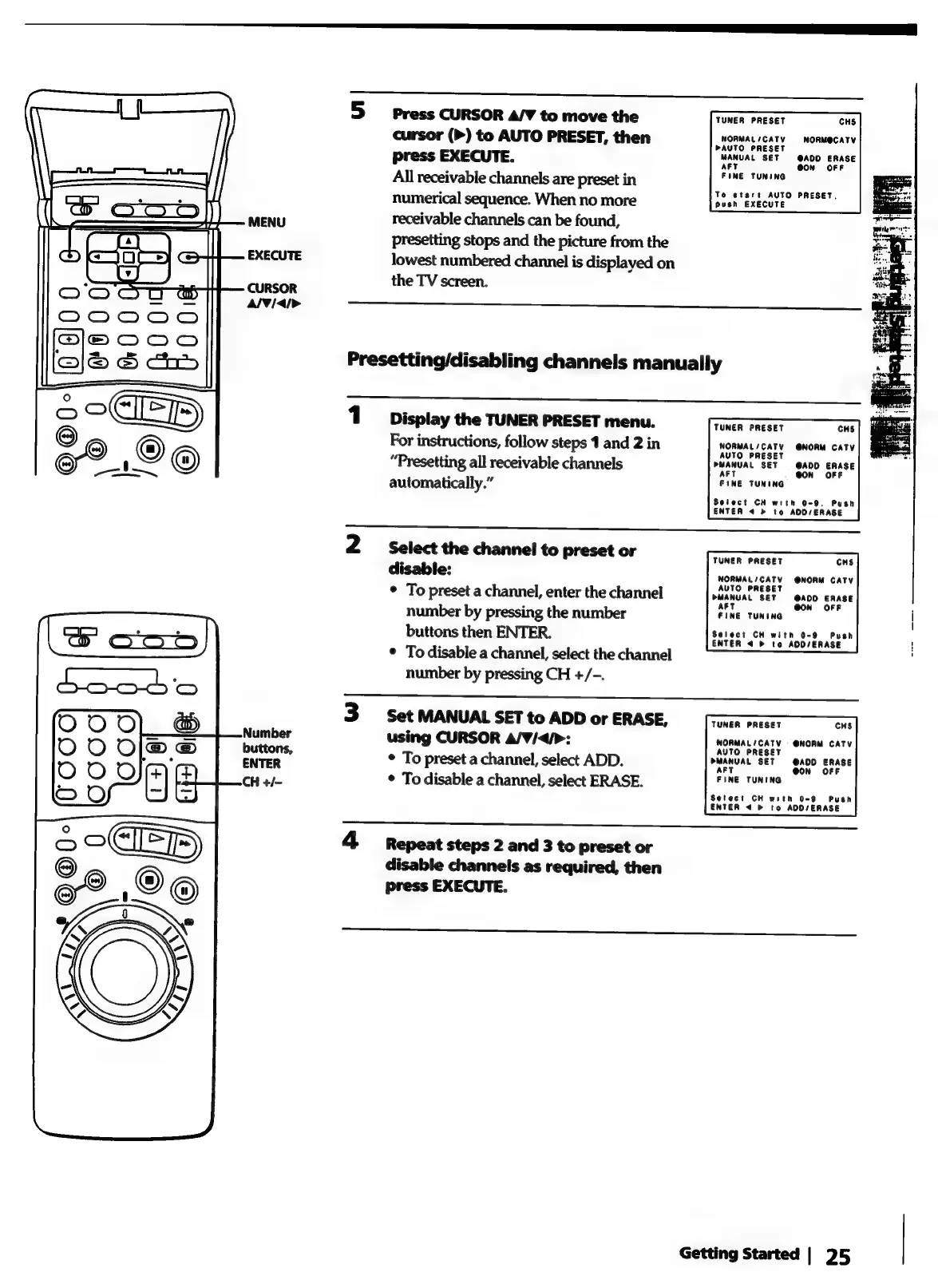
MENU
EXECUTE
CURSOR
Al¥idi>
5
Press
CURSOR
A/V
to
move
the
TUNER
PRESET
CHS
cursor
(>)
to
AUTO
PRESET,
then
NORMAL
CAT
NORM@CATY
press
EXECUTE.
MANUAL
SET
noo
sRAse
All
receivable
channels
are
preset
in
lah:
°
To
start
AUTO
PRESET,
numerical
sequence.
When
no
more
push
EXECUTE
receivable
channels
can
be
found,
presetting
stops
and
the
picture
from
the
lowest
numbered
channel
is
displayed
on
the
TV
screen.
Presetting/disabling
channels
manually
1
Display
the
TUNER
PRESET
menu.
TUNER
PRESET
cus
For
instructions,
follow
steps
1
and
2
in
NORMAL
/
CATV
@NORM
cAty
“Presetting
all
receivable
channels
PMANUAL
SET
—
@ADD
ERASE
automatically.”
PINE
TUNING
Select
CH
with
0-9.
Push
ENTER
4 >
to
ADD/ERASE
2
Select
the
channel
to
preset
or
TUNER
PRESET
cus
disable:
NORMAL/CATV
@NORM
CATV
*
To
preset
a
channel,
enter
the
channel
PUANUAL
SET
@ADD
ERASE
number
by
pressing
the
number
eine
tuning
OOM
OFF
|
buttons
then
ENTER.
cAren'
<b
To
hosvenase’”
|
*
To
disable
a
channel,
select
the
channel
number
by
pressing
CH
+/-.
eee
3
Set
MANUAL
SET
to
ADD
or
ERASE,
TUNER
PRESET
cus
using
CURSOR
A/V¥/<4/>:
NOMMALIGATY
-
@HORM.
CATY
*
To
preset
a
channel,
select
ADD.
ue
SA00
'snase
*
To
disable
a
channel,
select
ERASE.
TUNE
TUNING
Setect
CH
with
0-9
Push
ENTER
4
®
to
AOD/ERASE
4
Repeat
steps
2
and
3
to
preset
or
disable
channels
as
required,
then
press
EXECUTE.
OO
ror
Getting
Started
|
25