EasyManua.ls Logo

Sony EV-S7000 - Page 33

Sony EV-S7000
84 pages
Print Icon
To Next Page IconTo Next Page
To Previous Page IconTo Previous Page
Loading...
|
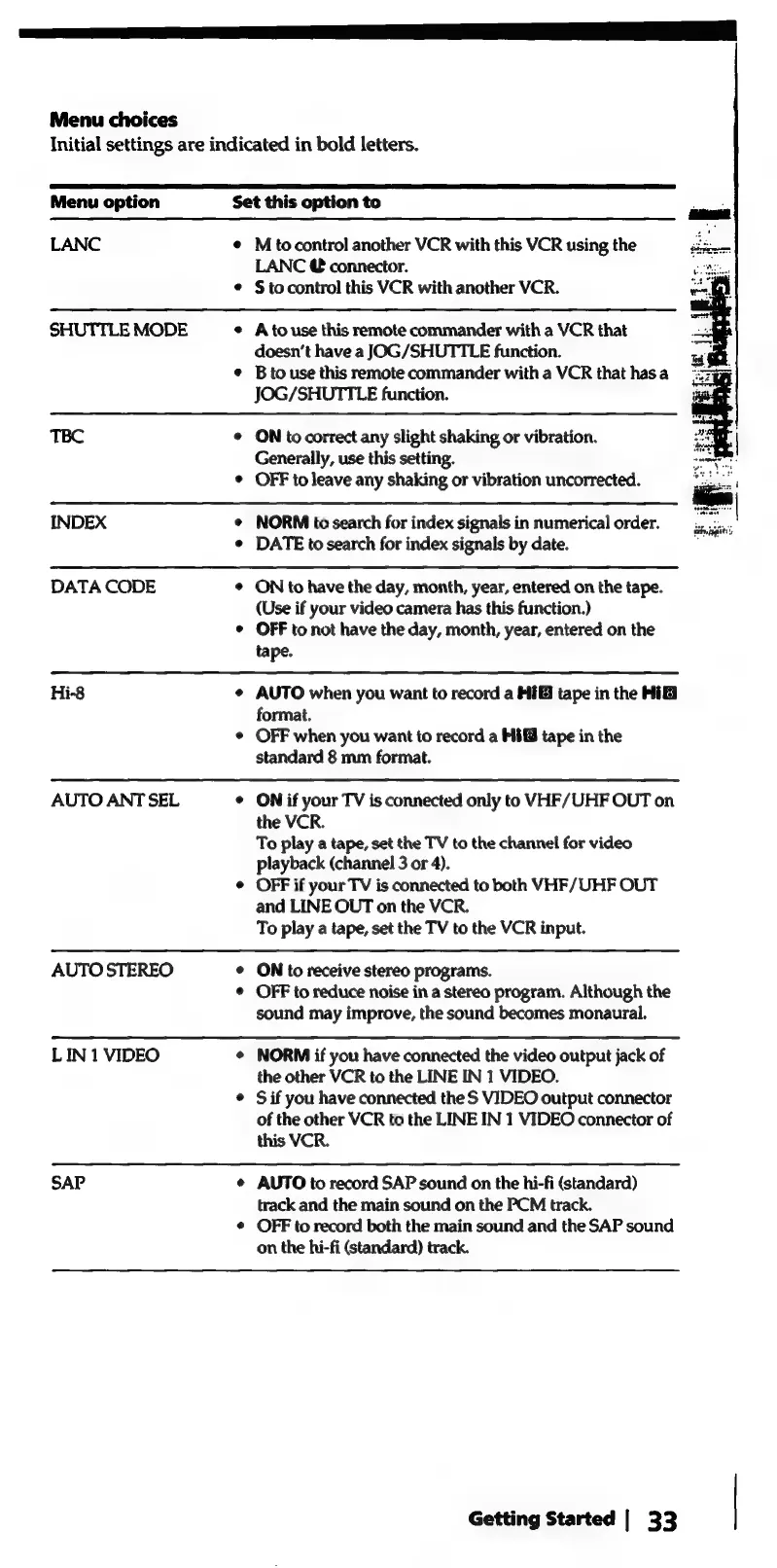
Menu
choices
Initial
settings
are
indicated
in
bold
letters.
Menu
option
Set
this
option
to
LANC
¢
M
tocontrol
another
VCR
with
this
VCR
using
the
LANC
@
connector.
¢
§tocontrol
this
VCR
with
another
VCR.
SHUTTLE
MODE
e
Atouse
this
remote
commander
with
a
VCR
that
doesn’t
have
a
JOG/SHUTTLE
function.
e
Btouse
this
remote
commander
with
a
VCR
that
has
a
JOG/SHUTTLE
function.
TBC
e
ON
tocorrect
any
slight
shaking
or
vibration.
Generally,
use
this
setting.
¢
OFF
to
leave
any
shaking
or
vibration
uncorrected.
INDEX
¢
NORM
to
search
for
index
signals
in
numerical
order.
¢
DATE
to
search
for
index
signals
by
date.
DATA
CODE
¢
ON
to
have
the
day,
month,
year,
entered
on
the
tape.
(Use
if
your
video
camera
has
this
function.)
OFF
to
not
have
the
day,
month,
year,
entered
on
the
tape.
Hi-8
¢
AUTO
when
you
want
to
record
a
MIG
tape
in
the
Hi
format.
¢
OFF
when
you
want
to
record
a
Mi
tape
in
the
standard
8
mm
format.
AUTO
ANT
SEL
e
ON
if
your
TV
is
connected
only
to
VHF/UHF
OUT
on
the
VCR.
To
play
a
tape,
set
the
TV
to
the
channel
for
video
playback
(channel
3
or
4).
¢
OFF
if
your
TV
is
connected
to
both
VHF/UHF
OUT
and
LINE
OUT
on
the
VCR.
To
play
a
tape,
set
the
TV
to
the
VCR
input.
AUTO
STEREO
¢
ON
to
receive
stereo
programs.
©
OFF
to
reduce
noise
in
a
stereo
program.
Although
the
sound
may
improve,
the
sound
becomes
monaural.
LIN
1
VIDEO
¢
NORM
if
you
have
connected
the
video
output
jack
of
the
other
VCR
to
the
LINE
IN
1
VIDEO.
©
Sif
you
have
connected
the
S
VIDEO
output
connector
of
the
other
VCR
to
the
LINE
IN
1
VIDEO
connector
of
this
VCR.
SAP
¢
AUTO
to
record
SAP
sound
on
the
hi-fi
(standard)
track
and
the
main
sound
on
the
PCM
track.
¢
OFF
to
record
both
the
main
sound
and
the
SAP
sound
on
the
hi-fi
(standard)
track.
Getting
Started
|
33

Related product manuals