EasyManua.ls Logo

Sony EV-S7000 - Playing a tape (continued)

Sony EV-S7000
84 pages
Print Icon
To Next Page IconTo Next Page
To Previous Page IconTo Previous Page
Loading...
Playing
a
tape
(continued)
Notes
¢
Normally
set
the
AUDIO
MONITOR
switch
to
PCM
to
enjoy
high-quality
playback
sound.
¢
The
additionally
dubbed
sound
can’t
be
heard
if
the
AUDIO
MONITOR
switch
is
set
to
STD
(Hi-Fi).
36
|
Basic
Operations
Selecting
the
audio
recording
pattern
Select
the
desired
track
to
play
back
by
setting
the
AUDIO
MONITOR
switch
on
the
VCR.
To
listen
to
Set
the
AUDIO
MONITOR
switch
to
Digital
stereo
signals
recorded
on
PCM
the
PCM
track
Mixed
sound
of
the
PCM
track
and
MIX
the
standard
track
Hi-fi
stereo
sound
recorded
on
the
STD
(Hi-Fi)
standard
track
Additionally
dubbed
sound
PCM
Additionally
dubbed
sound
and
the
MIX
original
sound
on
the
standard
track
if
the
sound
is
not
heard
or
is
heard
only
intermittently
When
a
tape
which
has
been
recorded
on
a
video
camera
recorder
or
a
video
cassette
recorder
without
the
PCM
function
is
played
on
this
unit,
set
the
AUDIO
MONITOR
setting
to
STD.
The
PCM
indicator
may
blink,
but
it
will
not
affect
the
sound.
When
the
TV/VCR
connection
is
made
to
a
TV
without
audio/video
inputs
To
monitor
the
playback
sound
in
stereo,
connect
the
VCR
to
a
stereo
system.
To
listen
to
the
sound
on
both
the
PCM
and
the
standard
track
Set
the
AUDIO
MONITOR
switch
on
the
operation
panel
to
MIX.
If
the
sound
is
hard
to
distinguish,
use
the
STD
AUDIO
LEVEL
to
adjust
the
standard
sound
level.
You
cannot
adjust
the
PCM
sound
level.
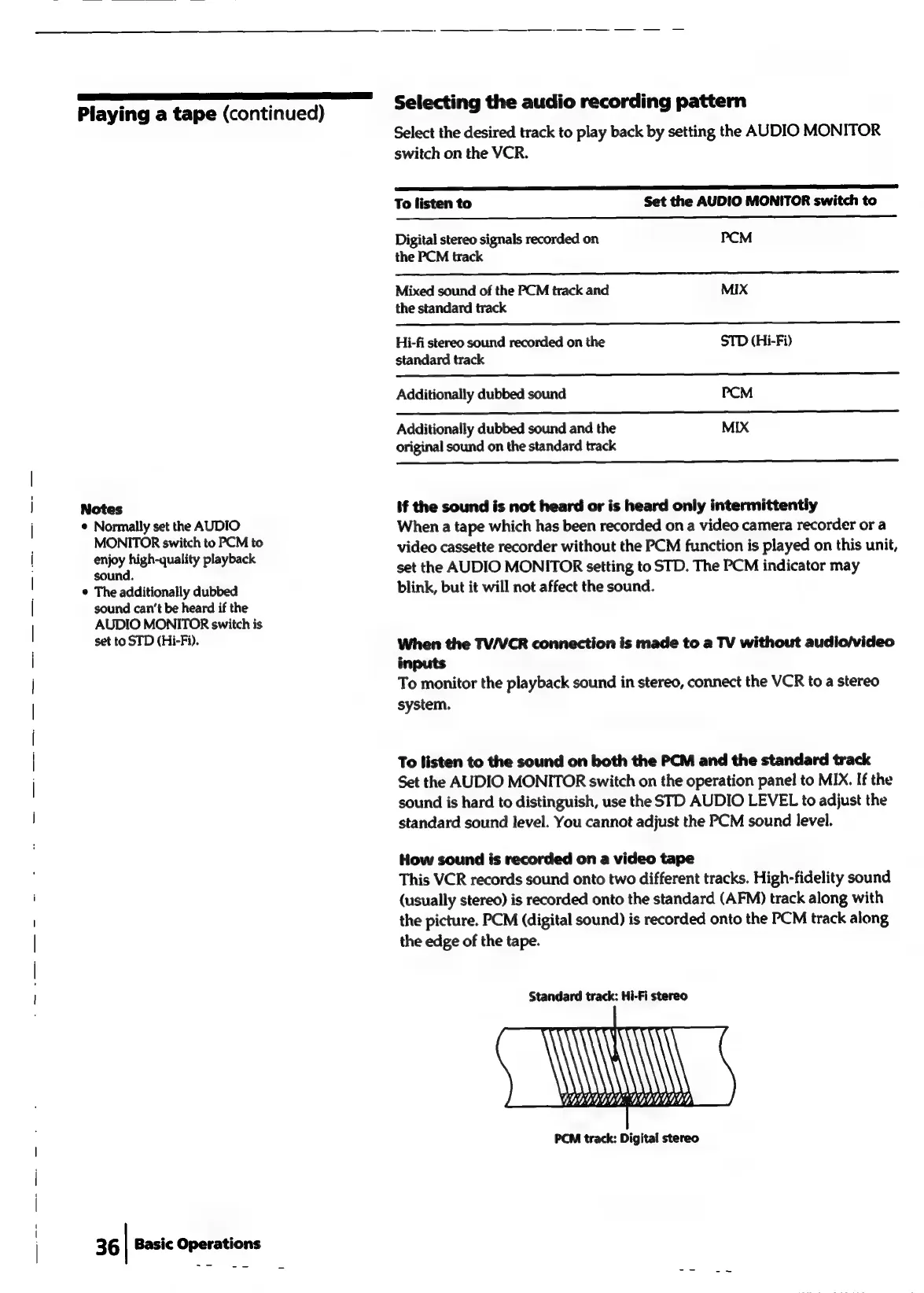
How
sound
is
recorded
on
a
video
tape
This
VCR
records
sound
onto
two
different
tracks.
High-fidelity
sound
(usually
stereo)
is
recorded
onto
the
standard
(AFM)
track
along
with
the
picture.
PCM
(digital
sound)
is
recorded
onto
the
PCM
track
along
the
edge
of
the
tape.
Standard
track:
Hi-Fi
stereo
iN
4
G9G9GG0G:,
GOGGUGY
PCM
track:
Digital
stereo