EasyManua.ls Logo

Sony EV-S7000 - Page 84

Sony EV-S7000
84 pages
Print Icon
To Previous Page IconTo Previous Page
Loading...
eee
See
eee
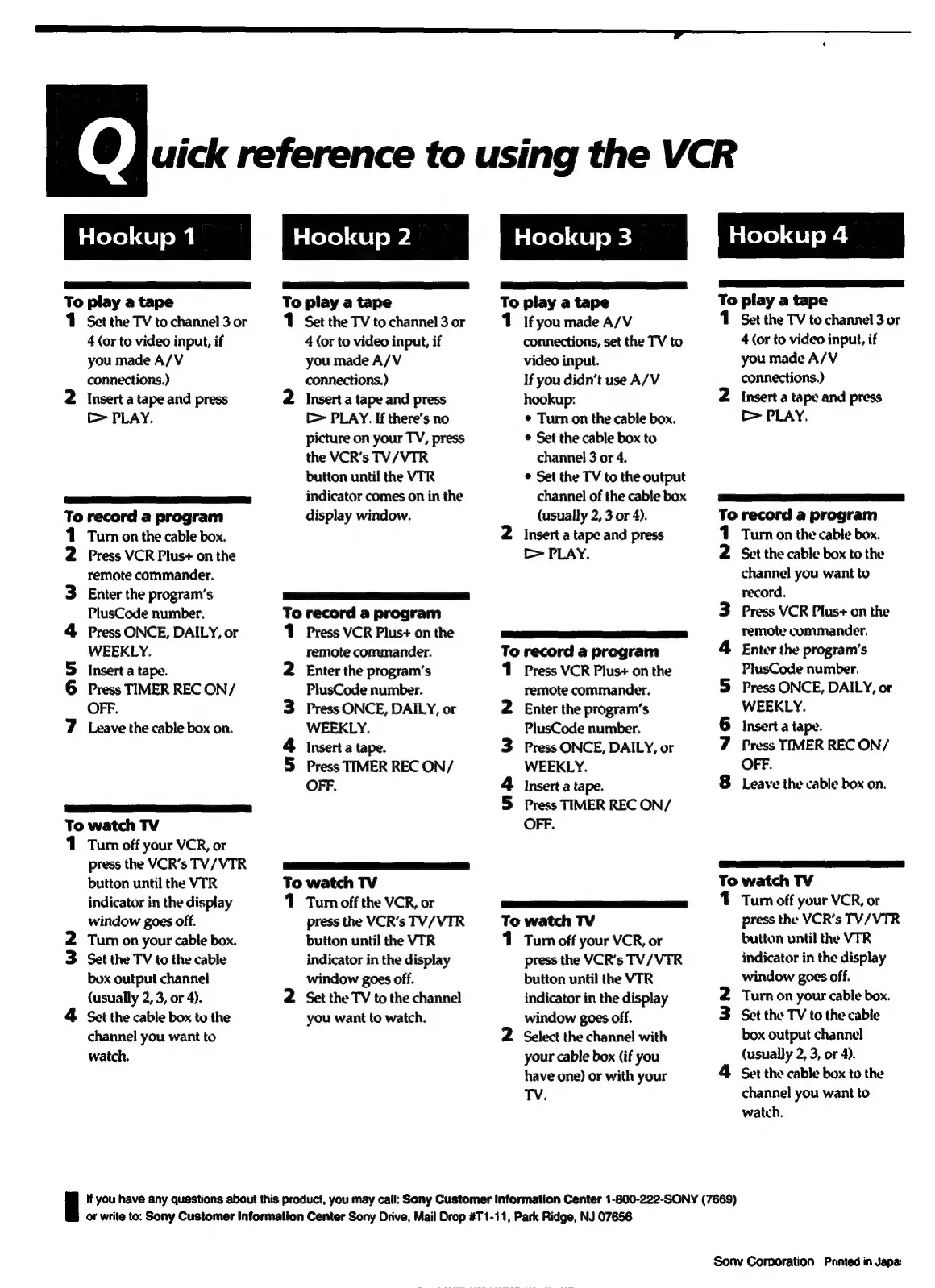
To
play
a
tape
1
Sect
the
TV
to
channel
3
or
4
(or
to
video
input,
if
you
made
A/V
connections.)
2
Insert
a
tape
and
press
>
PLAY.
ED
To
record
a
program
Turn
on
the
cable
box.
Press
VCR
Plus+
on
the
remote
commander.
Enter
the
program’s
PlusCode
number.
Press
ONCE,
DAILY,
or
WEEKLY.
Insert
a
tape.
Press
TIMER
REC
ON/
OFF.
Leave
the
cable
box
on.
w~
Qu
&
W
Na
ee)
To
watch
TV
1
Tum
off
your
VCR,
or
press
the
VCR’s
TV/VTR
button
until
the
VTR
indicator
in
the
display
window
goes
off.
2
Tum
on
your
cable
box.
3
Set
the
TV
to
the
cable
box
output
channel
(usually
2, 3,
or
4).
4
Set
the
cable
box
to
the
channel
you
want
to
watch.
eae
ee
eT)
To
play
a
tape
1
Set
the
TV
to
channel
3
or
4
(or
to
video
input,
if
you
made
A/V
connections.)
2
Inserta
tape
and
press
[>
PLAY.
If
there’s
no
picture
on
your
TV,
press
the
VCR’s
TV/VTR
button
until
the
VTR
indicator
comes
on
in
the
display
window.
ye)
To
record
a
program
1
Press
VCR
Plus+
on
the
remote
commander.
Enter
the
program's
PlusCode
number.
Press
ONCE,
DAILY,
or
WEEKLY.
Insert
a
tape.
Press
TIMER
REC
ON/
OFF.
uh
W N
SS
eae
To
watch
TV
1
Turn
off
the
VCR,
or
press
the
VCR’s
TV/VTR
button
until
the
VTR
indicator
in
the
display
window
goes
off.
2
Set
the
TV
to
the
channel
you
want
to
watch.
eel
To
play
a
tape
1
Ifyou
made
A/V
connections,
set
the
TV
to
video
input.
If
you
didn’t
use
A/V
hookup:
¢
Turn
on
the
cable
box.
*
Set
the
cable
box
to
channel
3
or
4.
¢
Set
the
TV
to
the
output
channel
of
the
cable
box
(usually
2,
3
or
4).
2
Insert
a
tape
and
press
>
PLAY.
yan
eee
eee
To
record
a
program
1
Press
VCR
Plus+
on
the
remote
commander.
2
Enter
the
program's
PlusCode
number.
3
Press
ONCE,
DAILY,
or
WEEKLY.
4
insert
a
tape.
5
Press
TIMER
REC
ON/
OFF.
LS
mee)
To
watch
TV
1
Tum
off
your
VCR,
or
press
the
VCR’s
TV/VTR
button
until
the
VTR
indicator
in
the
display
window
goes
off.
2
Select
the
channel
with
your
cable
box
(if
you
have
one)
or
with
your
TV.
uick
reference
to
using
the
VCR
EES
aaa
To
play
a
tape
1
Set
the
TV
to
channel
3
or
4
(or
to
video
input,
if
you
made
A/V
connections.)
2
Insert
a
tape
and
press
>
PLAY.
iro)
To
record
a
program
Turn
on
the
cable
box.
Set
the
cable
box
to
the
channel
you
want
to
record.
3
Press
VCR
Plus+
on
the
remote
commander.
4
Enter
the
program's
PlusCode
number.
5S
Press
ONCE,
DAILY,
or
6
7
8
BD ad
WEEKLY.
Insert
a
tape.
Press
TIMER
REC
ON/
OFF.
Leave
the
cable
box
on.
Se
ee
To
watch
TV
Tum
off
your
VCR,
or
press
the
VCR’s
TV/VTR
button
until
the
VIR
indicator
in
the
display
window
goes
off.
2
Turn
on
your
cable
box.
3
Set
the
TV
to
the
cable
box
output
channel
(usually
2,
3,
or
4).
4
Set
the
cable
box
to
the
channel
you
want
to
watch.
|
If
you
have
any
questions
about
this
product,
you
may
call:
Sony
Customer
Information
Center
1-800-222-SONY
(7669)
or
write
to:
Sony
Customer
Information
Center
Sony
Drive,
Mail
Drop
#T1-11,
Park
Ridge,
NJ
07656
Sonv
Corporation
Printed
in
Japa:

Related product manuals