EasyManua.ls Logo

Sony HCD-441 - Receiving Broadcasts; Tuner Mode Activation; Band Selection (FM;AM); Tuning Stations

Sony HCD-441
27 pages
Print Icon
To Next Page IconTo Next Page
To Previous Page IconTo Previous Page
Loading...
Receiving
Broadcasts
his
section
describes
about
the
various
convenient
ways
of
tuning.
efore
reception,
be
sure
to
connect
the
supplied
AM
and
FM
antenna.
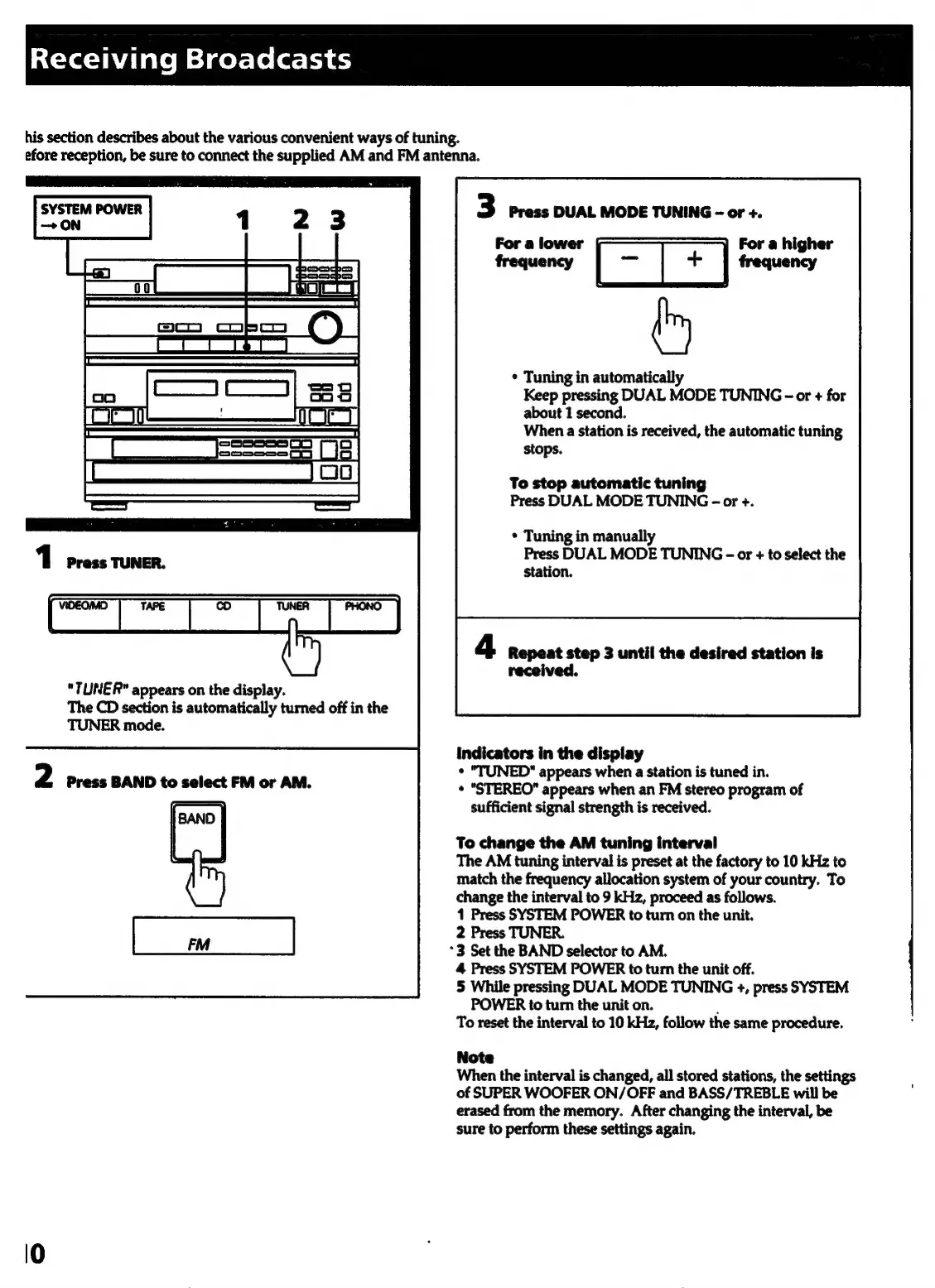
"TUNER"
appears
on
the
display.
The
CD
section
is
automatically
turned
off
in
the
TUNER
mode.
2
Press
BAND
to
select
FM
or
AM.
3
Press
DUAL
MODE
TUNING
-
or
+.
For
a
lower
se
For
a
higher
frequency
frequency
*
Tuning
in
automatically
Keep
pressing
DUAL
MODE
TUNING
-
or
+
for
about
1
second.
When
a
station
is
received,
the
automatic
tuning
stops.
To
stop
automatic
tuning
Press
DUAL
MODE
TUNING
-
or
+.
*
Tuning
in
manually
Press
DUAL
MODE
TUNING
-
or
+
to
select
the
station.
Repeat
step
3
until
the
desired
station
is
received.
Indicators
in
the
display
¢
"TUNED"
appears
when
a
station
is
tuned
in.
¢
"STEREO"
appears
when
an
FM
stereo
program
of
sufficient
signal
strength
is
received.
To
change
the
AM
tuning
interval
The
AM
tuning
interval
is
preset
at
the
factory
to
10
kHz
to
match
the
frequency
allocation
system
of
your
country.
To
change
the
interval
to
9
kHz,
proceed
as
follows.
1
Press
SYSTEM
POWER
to
turn
on
the
unit.
2
Press
TUNER.
*3
Set
the
BAND
selector
to
AM.
4
Press
SYSTEM
POWER
to
turn
the
unit
off.
5
While
pressing
DUAL
MODE
TUNING
+,
press
SYSTEM
POWER
to
turn
the
unit
on.
;
To
reset
the
interval
to
10
kHz,
follow
the
same
procedure.
Note
When
the
interval
is
changed,
all
stored
stations,
the
settings
of
SUPER
WOOFER
ON/OFF
and
BASS/TREBLE
will
be
erased
from
the
memory.
After
changing
the
interval,
be
sure
to
perform
these
settings
again.

Related product manuals