EasyManua.ls Logo

Sony HCD-441 - Adjusting the Audio; Volume Control; Bass and Treble Adjustment; Super Woofer Level Adjustment

Sony HCD-441
27 pages
Print Icon
To Next Page IconTo Next Page
To Previous Page IconTo Previous Page
Loading...
Nola
diate
mdal=wetereile
The
following
operations
apply
only
to
reproduced
sound.
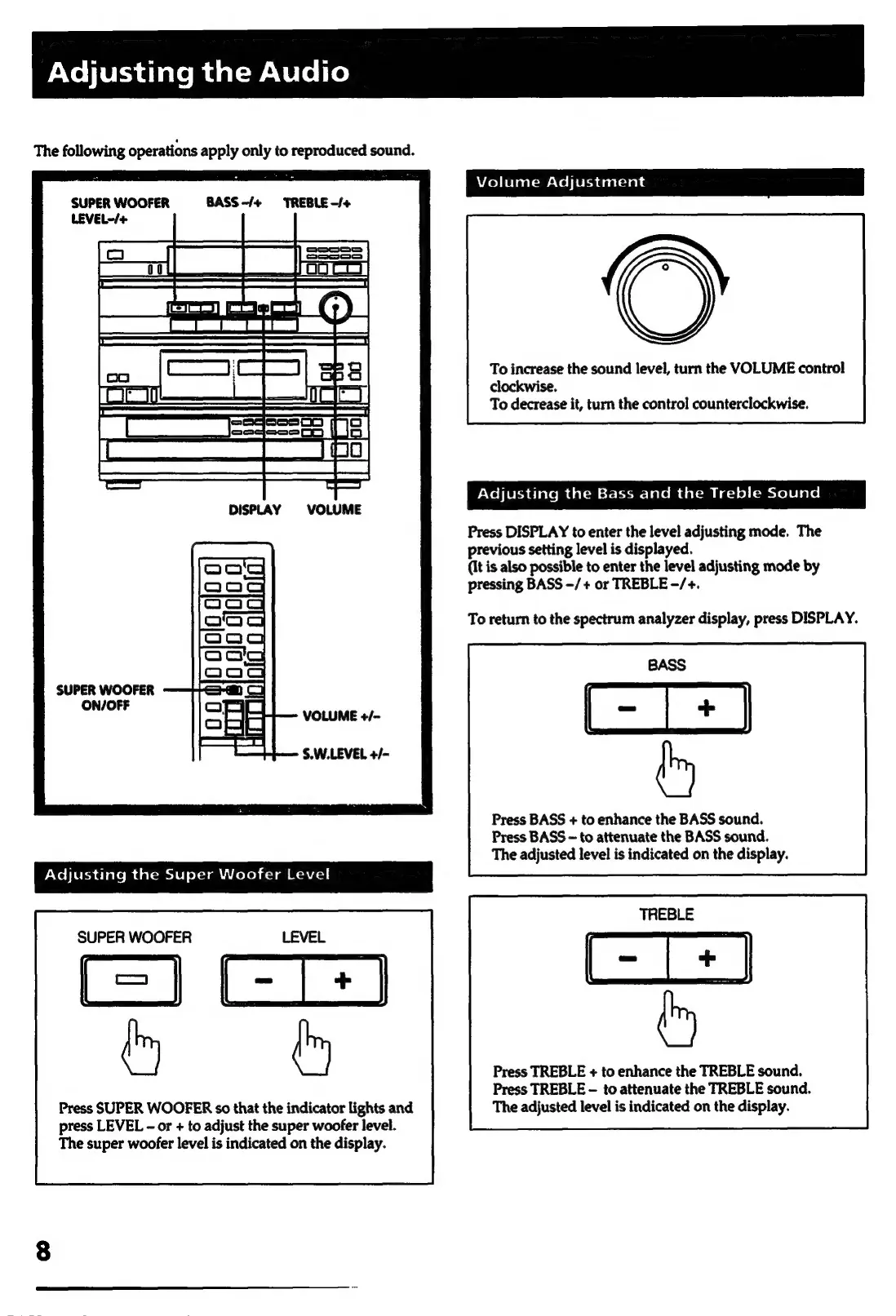
Volume
Adjustment
SUPER
WOOFER
BASS
-/+
TREBLE
-/+
LEVEL~/+
ean
To
increase
the
sound
level,
turn
the
VOLUME
control
clockwise.
To
decrease
it,
turn
the
control
counterclockwise.
Adjusting
the
Bass
and
the
Treble
Sound
DISPLAY
VOLUME
Press
DISPLAY
to
enter
the
level
adjusting
mode.
The
previous
setting
level
is
displayed.
{It
is
also
possible
to
enter
the
level
adjusting
mode
by
pressing
BASS
-/+
or
TREBLE
-/+.
To
return
to
the
spectrum
analyzer
display,
press
DISPLAY.
SUPER
WOOFER
ON/OFF
VOLUME
+/~
S.W.LEVEL
+/-
Press
BASS
+
to
enhance
the
BASS
sound.
Press
BASS
~
to
attenuate
the
BASS
sound.
The
adjusted
level
is
indicated
on
the
display.
yNeo}lerchalate
Mm
dalcmeivl
ol-tani'coleh
cc]
aa
cacos
|
SUPER
WOOFER
f=]
GT
he
&
Press
TREBLE
+
to
enhance
the
TREBLE
sound.
Press
TREBLE
-
to
attenuate
the
TREBLE
sound.
Press
SUPER
WOOFER
so
that
the
indicator
lights
and The
adjusted
level
is
indicated
on
the
display.
press
LEVEL
-
or
+
to
adjust
the
super
woofer
level.
The
super
woofer
level
is
indicated
on
the
display.

Related product manuals