EasyManua.ls Logo

Sony HCD-441 - Playing in a Random Order - Shuffle Play; Shuffle Play Modes (ALL DISCS;1 DISC); Starting Shuffle Playback; Canceling Shuffle Play

Sony HCD-441
27 pages
Print Icon
To Next Page IconTo Next Page
To Previous Page IconTo Previous Page
Loading...
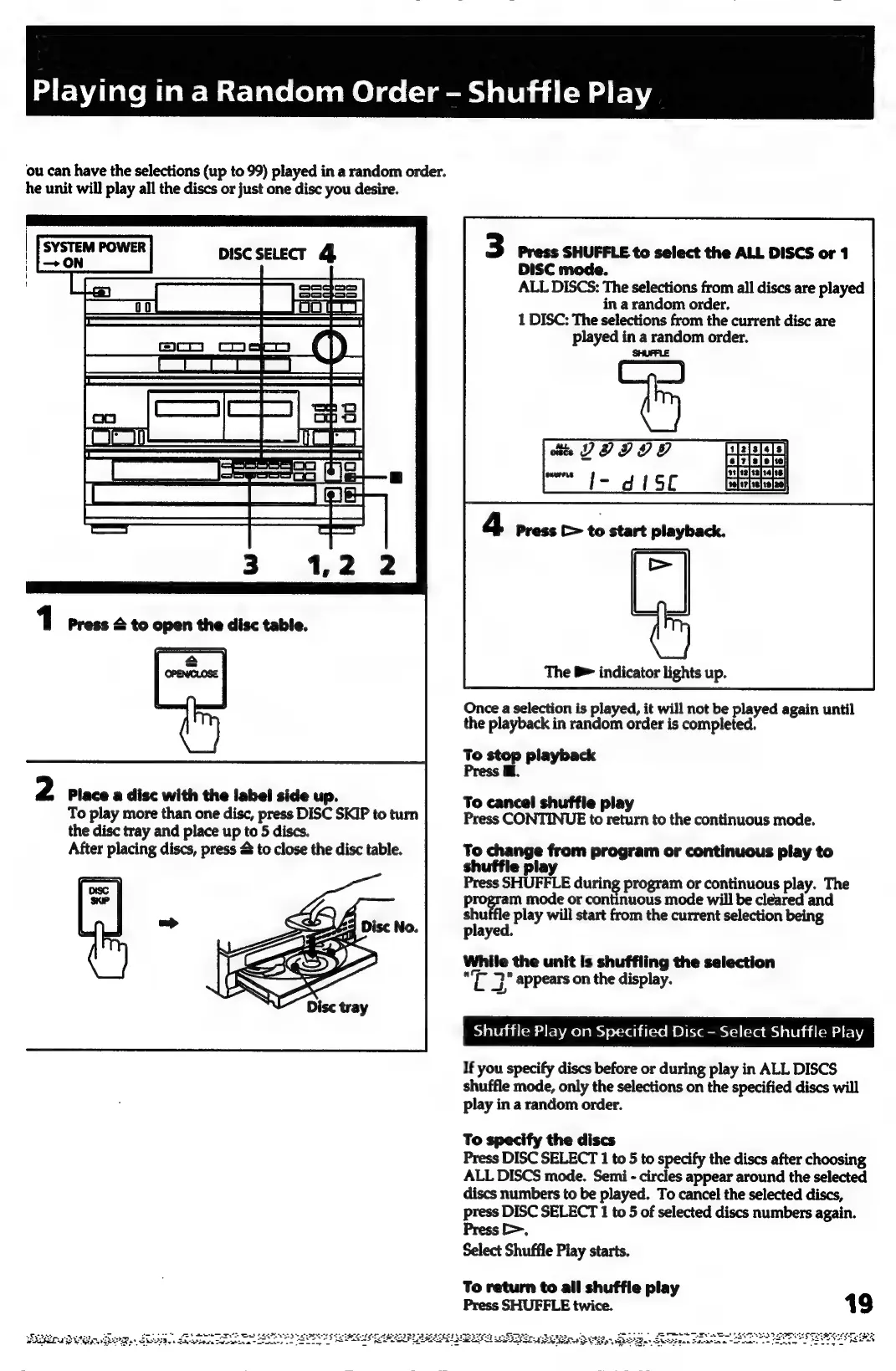
ou
can
have
the
selections
(up
to
99)
played
in
a
random
order.
he
unit
will
play
all
the
discs
or
just
one
disc
you
desire.
3
Press
SHUFFLE
to
select
the
ALL
DISCS
or
1
DISC
mode.
ALL
DISCS:
The
selections
from
all
discs
are
played
in
a
random
order.
1
DISC:
The
selections
from
the
current
disc
are
played
in
a
random
order.
SHUFFLE
tis
DODOO
pe
t=
od
1SC
The
B>
indicator
lights
up.
Once
a
selection
is
played,
it
will
not
be
played
again
until
the
playback
in
random
order
is
completed.
To
stop
playback
Press
@.
2
Place
a
disc
with
the
label
side
up.
To
play
more
than
one
disc,
press
DISC
SKIP
to
turn
the
disc
tray
and
place
up
to
5
discs.
After
placing
discs,
press
&
to
close
the
disc
table.
70
cones
from
program
or
continuous
play
to
@
pla’
Press
SHUFFLE
during
program
or
continuous
play.
The
program
mode
or
continuous
mode
will
be
cleared
and
she
|
play
will
start
from
the
current
selection
being
played.
While
the
unit
is
shuffling
the
selection
Te
7’
appears
on
the
display.
Shuffle
Play
on
Specified
Disc
-
Select
Shuffle
Play
If
you
specify
discs
before
or
during
play
in
ALL
DISCS
shuffle
mode,
only
the
selections
on
the
specified
discs
will
play
in
a
random
order.
To
cancel
shuffle
play
Press
CONTINUE
to
return
to
the
continuous
mode.
To
specify
the
discs
Press
DISC
SELECT
1
to
5
to
specify
the
discs
after
choosing
ALL
DISCS
mode.
Semi
-
circles
appear
around
the
selected
discs
numbers
to
be
played.
To
cancel
the
selected
discs,
press
DISC
SELECT
1
to
5
of
selected
discs
numbers
again.
Press
>.
Select
Shuffle
Play
starts.
To
return
to
all
shuffle
play
Press
SHUFFLE
twice.
19
Sri
et
eerie
to
een
eer
pips
grageen
asics
nop
2p
SSP.
ttn
Caveats
SASS.
Stina
seowiea
conan
2
SEE
SY
LG!
SEUSS
er
Be
Adve

Related product manuals