EasyManua.ls Logo

Sony HCD-441 - Playing the Discs - Continuous Play; Opening Disc Table; Loading CDs; Selecting Play Mode (1 DISC;ALL DISCS)

Sony HCD-441
27 pages
Print Icon
To Next Page IconTo Next Page
To Previous Page IconTo Previous Page
Loading...
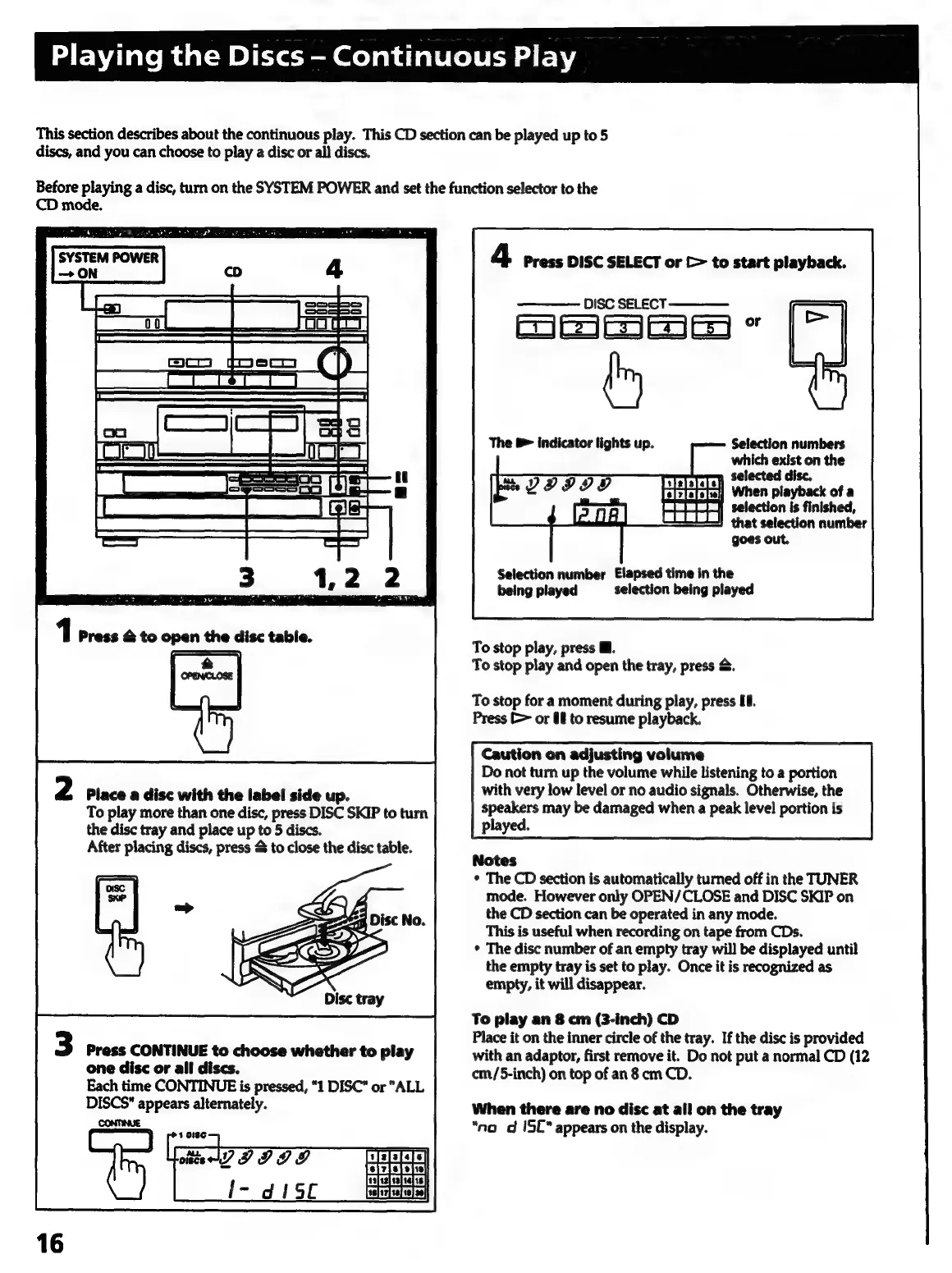
This
section
describes
about
the
continuous
play.
This
CD
section
can
be
played
up
to
5
discs,
and
you
can
choose
to
play
a
disc
or
all
discs.
Before
playing
a
disc,
turn
on
the
SYSTEM
POWER
and
set
the
function
selector
to
the
CD
mode.
[aaa
omen
aes,
SYSTEM
POWER
ON
2
Place
a
disc
with
the
label
side
up.
To
play
more
than
one
disc,
press
DISC
SKIP
to
turn
the
disc
tray
and
place
up
to
5
discs.
After
placing
discs,
press
&
to
close
the
disc
table.
Press
CONTINUE
to
choose
whether
to
play
one
disc
or
all
discs.
Each
time
CONTINUE
is
pressed,
"1
DISC"
or
"ALL
DISCS"
appears
alternately.
CONTINUE
1018¢
aa
III
DI
I-
d
ISL
Playing
the
Discs
Continuous
Play
4
Press
DISC
SELECT
or
[>
to
start
playback.
DISC
SELECT
See
or
a
te
The
&
indicator
lights
up.
Selection
numbers
which
exist
on
the
n
selected
disc.
When
playback
of
a
selection
is
finished,
that
selection
number
goes
out.
Selection
number
Elapsed
time
in
the
being
played
selection
being
played
To
stop
play,
press
@.
To
stop
play
and
open
the
tray,
press
&.
To
stop
for
a
moment
during
play,
press
U0.
Press
>
or
U8
to
resume
playback.
Caution
on
adjusting
volume
Do
not
turn
up
the
volume
while
listening
to
a
portion
with
very
low
level
or
no
audio
signals.
Otherwise,
the
speakers
may
be
damaged
when
a
peak
level
portion
is
played.
Notes
¢
The
CD
section
is
automatically
turned
off
in
the
TUNER
mode.
However
only
OPEN/CLOSE
and
DISC
SKIP
on
the
CD
section
can
be
operated
in
any
mode.
This
is
useful
when
recording
on
tape
from
CDs.
*
The
disc
number
of
an
empty
tray
will
be
displayed
until
the
empty
tray
is
set
to
play.
Once
it
is
recognized
as
empty,
it
will
disappear.
To
play
an
8
cm
(3-inch)
CD
Place
it
on
the
inner
circle
of
the
tray.
If
the
disc
is
provided
with
an
adaptor,
first
remove
it.
Do
not
put
a
normal
CD
(12
cm/5-inch)
on
top
of
an
8
cm
CD.
When
there
are
no
disc
at
all
on
the
tray
*no
d
ISC*
appears
on
the
display.

Related product manuals