EasyManua.ls Logo

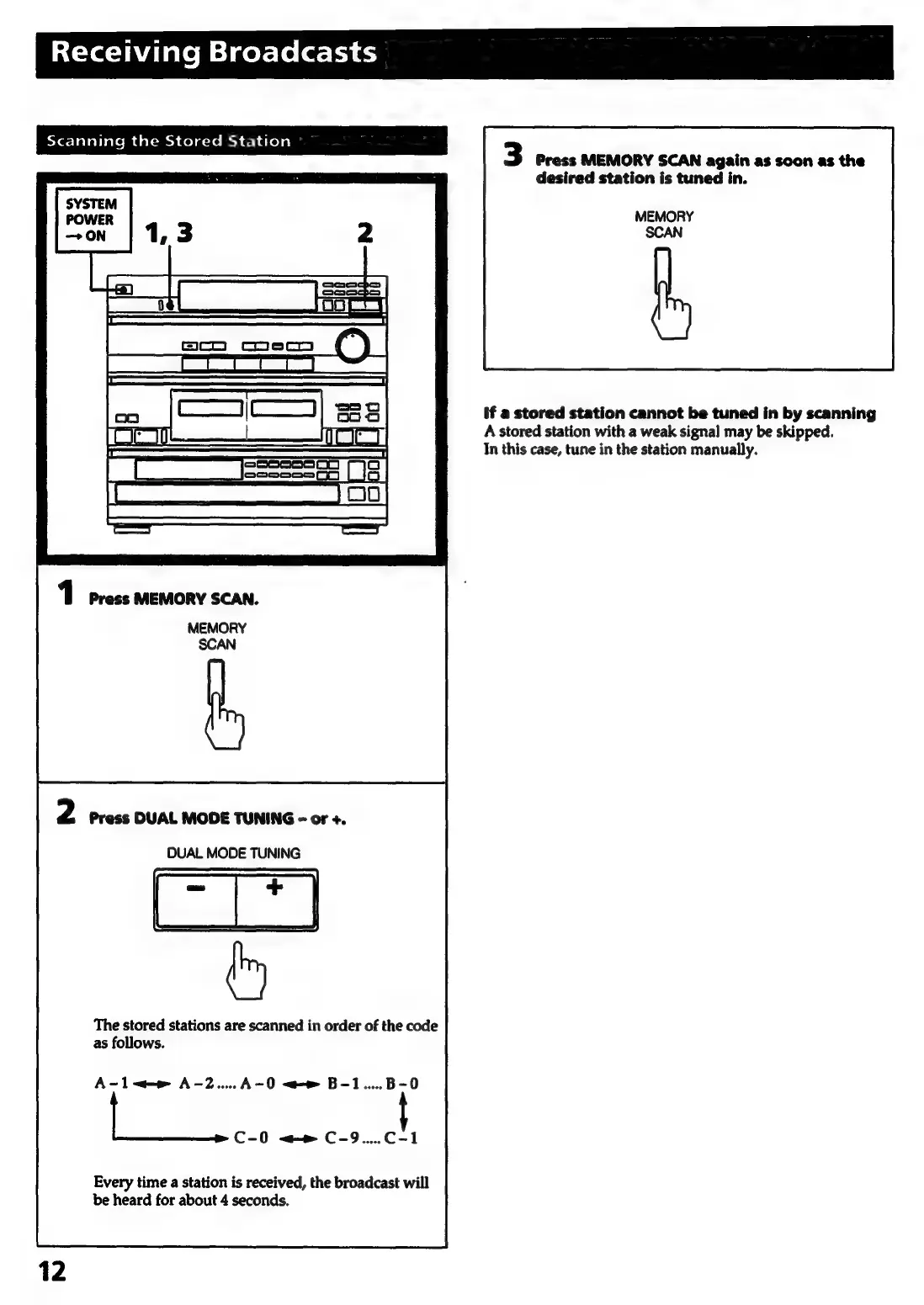
Sony HCD-441 - Scanning the Stored Station; Initiating Station Scan; Navigating Scan Results; Stopping the Scan

Sony HCD-441
27 pages
Print Icon
To Next Page IconTo Next Page
To Previous Page IconTo Previous Page
Loading...
Receiving
Broadcasts
eYez
Taleiials
mm
delcm)
colacre
md
ech
ales)
3
Press
MEMORY
SCAN
again
as
soon
as
the
desired
station
is
tuned
in.
MEMORY
SCAN
if
a
stored
station
cannot
be
tuned
in
by
scanning
A
stored
station
with
a
weak
signal
may
be
skipped.
In
this
case,
tune
in
the
station
manually.
1
Press
MEMORY
SCAN.
MEMORY
SCAN
2
Press
DUAL
MODE
TUNING
-
or
+.
DUAL
MODE
TUNING
The
stored
stations
are
scanned
in
order
of
the
code
as
follows.
A-1~<—»
A-2....A-0
<>
B-1.....B-0
C-0
<—»
C-9.....C-1
Every
time
a
station
is
received,
the
broadcast
will
be
heard
for
about
4
seconds.

Related product manuals