EasyManua.ls Logo

Sony HCD-441 - Selecting a Desired Disc; Locating a Particular Selection; Locating a Specific Point

Sony HCD-441
27 pages
Print Icon
To Next Page IconTo Next Page
To Previous Page IconTo Previous Page
Loading...
Playing
the
Discs
—-
Continuous
Play
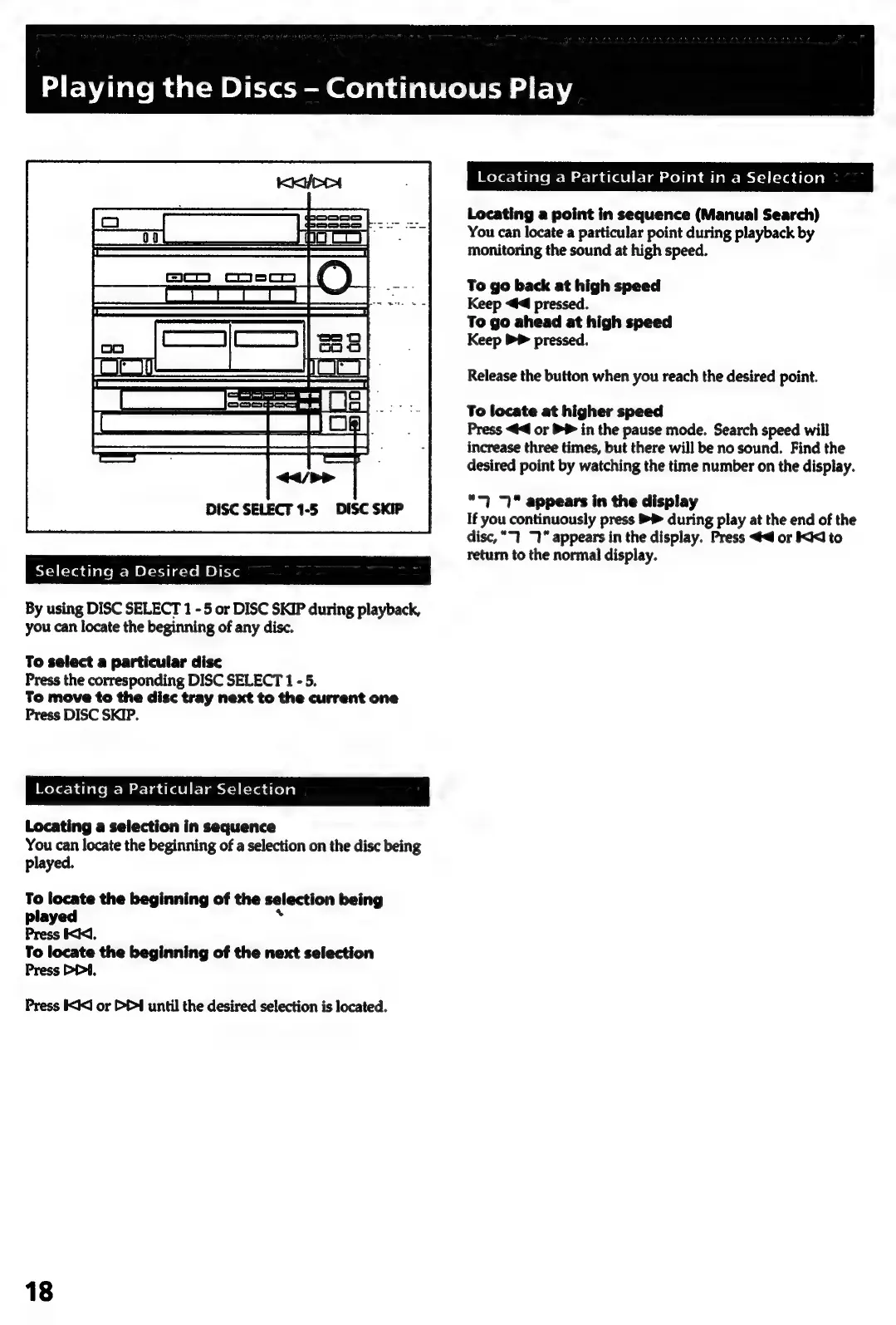
DISC
SELECT
1-5
DISC
SKIP
Selecting
a
Desired
Disc
By
using
DISC
SELECT
1
-
5
or
DISC
SKIP
during
playback,
you
can
locate
the
beginning
of
any
disc.
To
select
a
particular
disc
Press
the
corresponding
DISC
SELECT
1
-
5.
To
move
to
the
disc
tray
next
to
the
current
one
Press
DISC
SKIP.
Locating
a
Particular
Selection
Locating
a
selection
in
sequence
You
can
locate
the
beginning
of
a
selection
on
the
disc
being
played.
To
locate
the
beginning
of
the
selection
being
played
.
Press
<<],
To
locate
the
beginning
of
the
next
selection
Press
PD4,
Press
IX<J
or
D4
until
the
desired
selection
is
located.
18
Locating
a
Particular
Point
in
a
Selection
Locating
a
point
in
sequence
(Manual
Search)
You
can
locate
a
particular
point
during
playback
by
monitoring
the
sound
at
high
speed.
To
go
back
at
high
speed
Keep
<4
pressed.
To
go
ahead
at
high
speed
Keep
>
pressed.
Release
the
button
when
you
reach
the
desired
point.
To
locate
at
higher
speed
Press
<<
or
PP
in
the
pause
mode.
Search
speed
will
increase
three
times,
but
there
will
be
no
sound.
Find
the
desired
point
by
watching
the
time
number
on
the
display.
“7
appears
in
the
display
If
you
continuously
press
®P
during
play
at
the
end
of
the
disc,
"1
1"
appears
in
the
display.
Press
<4
or
I<
to
return
to
the
normal
display.

Related product manuals