EasyManua.ls Logo

Sony HCD-441 - Designating the Total Playing Time - Time Edit; Selecting Disc for Editing; Activating Edit Mode; Setting Tape Length

Sony HCD-441
27 pages
Print Icon
To Next Page IconTo Next Page
To Previous Page IconTo Previous Page
Loading...
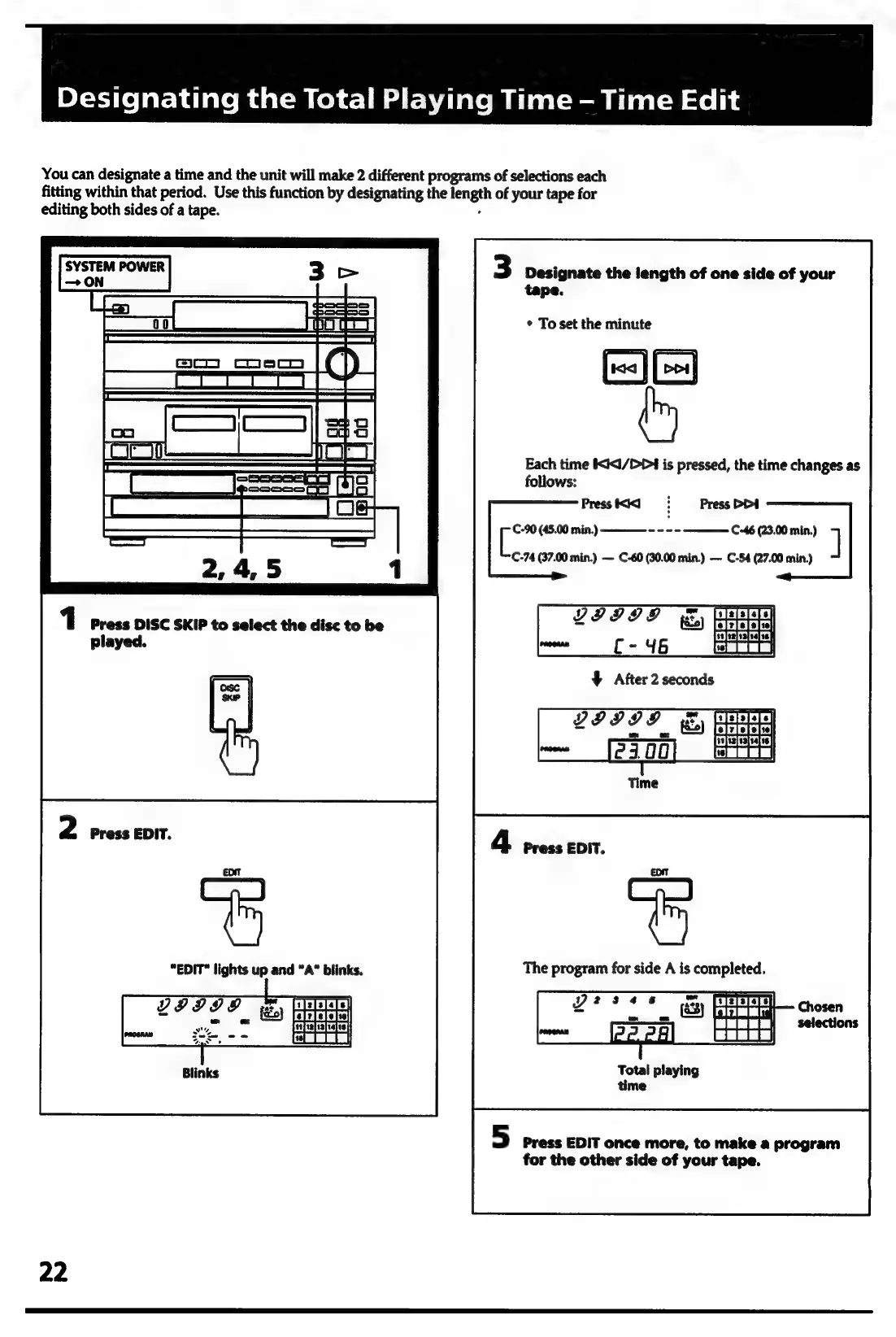
You
can
designate
a
time
and
the
unit
will
make
2
different
programs
of
selections
each
fitting
within
that
period.
Use
this
function
by
designating
the
hengih
of
your
tape
for
editing
both
sides
of
a
tape.
3
Designate
the
length
of
one
side
of
your
tape.
|
|
|
(ct
=e
*
To
set
the
minute
c
_—__.
ta
|
ES
Each
time
IXI<I/DP4
is
pressed,
the
time
changes
as
foliows:
Presst<il
=:
Press
DDA
ee
(45.00
min.)
C-46
(23.00
min.)
]
C-74
(37.00
min.)
C-60
(30.00
min.)
C-54
(27.00
min.)
The
program
for
side
A
is
completed.
Total
playing
time
5
Press
EDIT
once
more,
to
make
a
program
for
the
other
side
of
your
tape.
22

Related product manuals