EasyManua.ls Logo

Sony HCD-441 - Troubleshooting; Tuner Troubleshooting; Cassette Deck Troubleshooting; Compact Disc Troubleshooting

Sony HCD-441
27 pages
Print Icon
To Next Page IconTo Next Page
To Previous Page IconTo Previous Page
Loading...
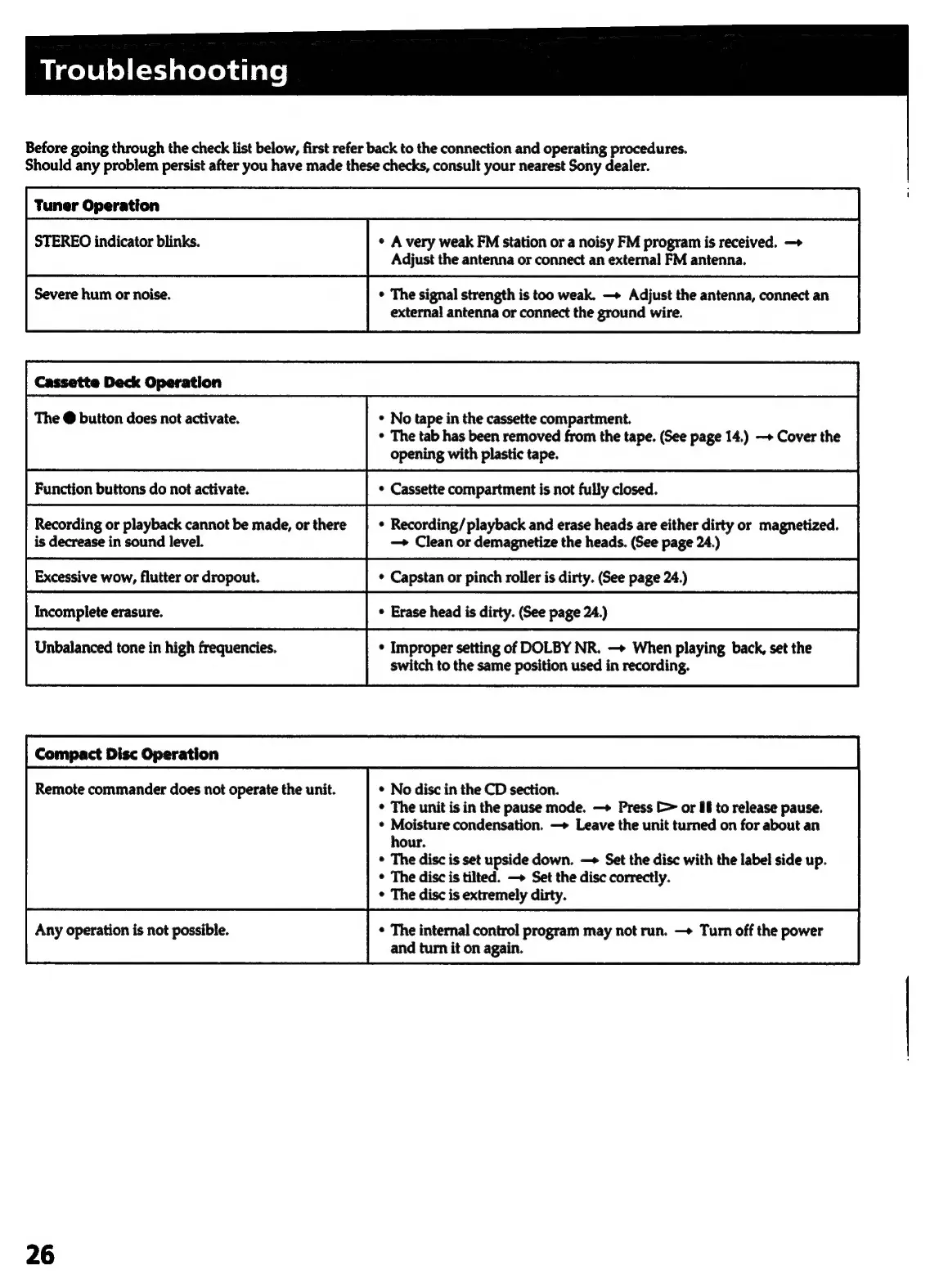
bigel¥le)(=tJaleleidiale|
Before
going
through
the
check
list
below,
first
refer
back
to
the
connection
and
operating
procedures.
Should
any
problem
persist
after
you
have
made
these
checks,
consult
your
nearest
Sony
dealer.
Tuner
Operation
STEREO
indicator
blinks.
«
A
very
weak
FM
station
or
a
noisy
FM
program
is
received.
—+
Adjust
the
antenna
or
connect
an
external
FM
antenna.
Severe
hum
or
noise.
¢
The
signal
strength
is
too
weak.
—+
Adjust
the
antenna,
connect
an
external
antenna
or
connect
the
ground
wire.
Cassette
Deck
Operation
The
@
button
does
not
activate.
¢
No
tape
in
the
cassette
compartment.
*
The
tab
has
been
removed
from
the
tape.
(See
page
14.)
—»
Cover
the
opening
with
plastic
tape.
Function
buttons
do
not
activate.
Recording
or
playback
cannot
be
made,
or
there
is
decrease
in
sound
level.
—+
Clean
or
demagnetize
the
heads.
(See
page
24.)
Excessive
wow,
flutter
or
dropout.
Unbalanced
tone
in
high
frequencies.
¢
Improper
setting
of
DOLBY
NR.
—>
When
playing
back,
set
the
switch
to
the
same
position
used
in
recording.
Compact
Disc
Operation
Remote
commander
does
not
operate
the
unit.
*
No
disc
in
the
CD
section.
¢
The
unit
is
in
the
pause
mode.
—>+
Press
[=
or
6
to
release
pause.
*
Moisture
condensation.
—>
Leave
the
unit
turned
on
for
about
an
hour.
*
The
disc
is
set
upside
down.
—+
Set
the
disc
with
the
label
side
up.
*
The
disc
is
tilted.
—»
Set
the
disc
correctly.
The
disc
is
extremely
dirty.
Any
operation
is
not
possible.
¢
The
internal
control
program
may
not
run.
—>
Turn
off
the
power
and
turn
it
on
again.
26

Related product manuals